


Overview of Common Stains
Full overview of the most common stains, including how to identify them and treat them
Every day, 347 billion emails are sent, and over half are flagged as spam. While email providers like Gmail block 99.9% of these, legitimate business emails often get caught in the crossfire, costing U.S. companies $59.5 billion annually in undelivered messages. If your emails land in spam, it can hurt your revenue, trust, and marketing efforts.
Here’s the bottom line: spam filters use AI-driven algorithms to evaluate sender reputation, engagement signals, and content. Even with perfect setups, 15–17% of emails still miss inboxes. To ensure your emails reach their destination, focus on these key areas:
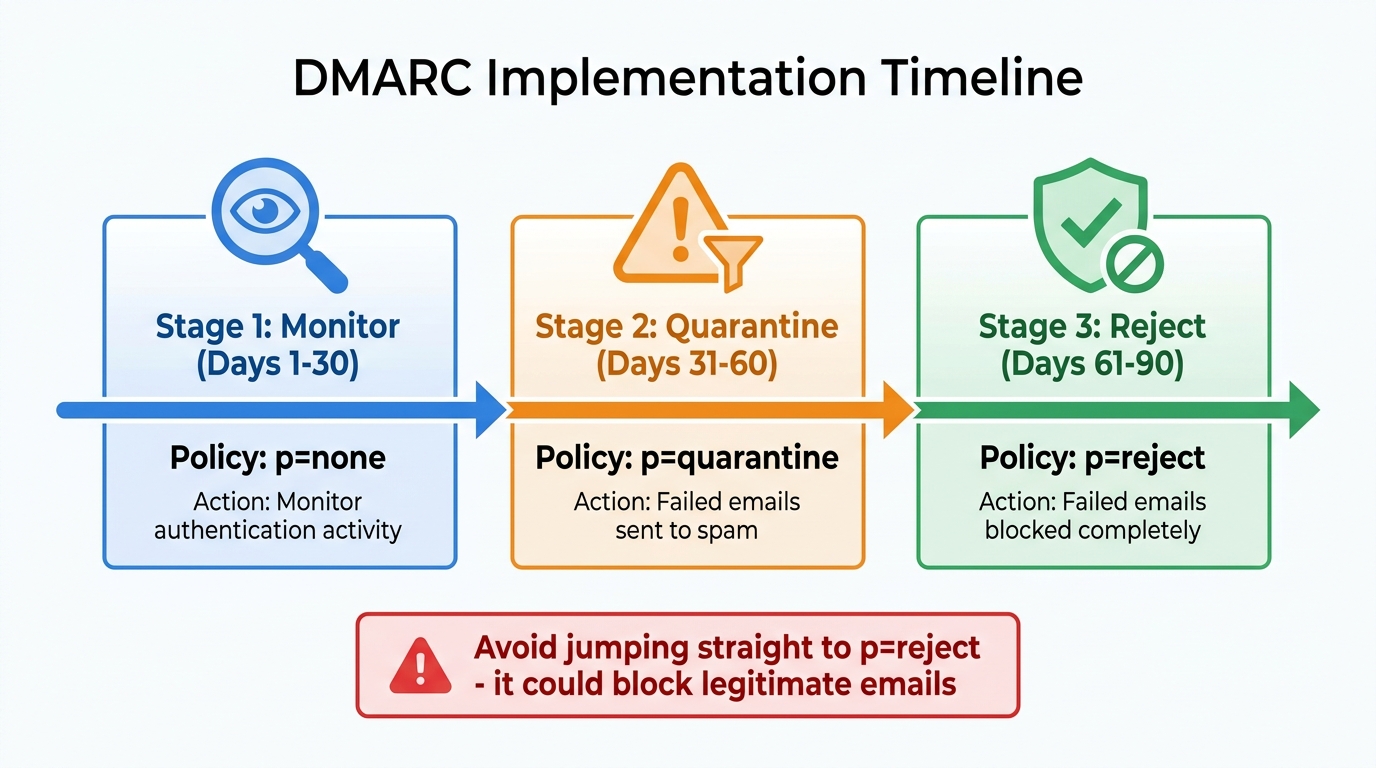
DMARC Implementation Timeline: 3-Step Rollout Process
Your sender reputation plays a crucial role in determining whether your emails land in the inbox or get flagged as spam. Mailbox providers evaluate it every time you send an email. A low score can result in your messages being filtered out, regardless of how engaging or relevant your content might be. To establish and maintain a strong reputation, focus on proper authentication, regular monitoring, and consistent sending habits.
Authentication is the backbone of email deliverability. Without it, providers like Gmail or Yahoo can't confirm that you're a legitimate sender. As of 2026, using SPF, DKIM, and DMARC is mandatory for all commercial email campaigns.
p=none to monitor activity, shift to p=quarantine after 30 days, and move to p=reject within 60–90 days. Avoid jumping straight to p=reject, as it could block legitimate emails."The baseline for your deliverability is your authentication. It's the first thing I would check if you're troubleshooting deliverability issues." – Jaina Mistry, Director of Brand and Content Marketing, Litmus
Another critical step is setting up reverse DNS (PTR) records, which link your sending IP to your domain. Many experts consider this a top priority for improving deliverability. Additionally, ensure all links in your emails use HTTPS to avoid being flagged as a security risk.
Once you've enforced DMARC (p=quarantine or p=reject), you can implement BIMI (Brand Indicators for Message Identification) to display your logo in recipients' inboxes. This not only improves brand recall by 44% but can also increase open rates by 4–6%. By 2025, a Common Mark Certificate (CMC) will provide a cost-effective alternative to the more expensive Verified Mark Certificate, making BIMI more accessible for businesses.
With your domain secured, the next step is monitoring your IP reputation.
After authenticating your domain, it's essential to keep an eye on your IP reputation. Factors like sending history, bounce rates, and spam complaints all influence how mailbox providers perceive your IP. If your IP gets listed on blacklists like Spamhaus or Barracuda, your emails might be blocked or sent straight to spam.
Use tools like MxToolbox to check your IP against common blacklists regularly. For Gmail-specific insights, Google Postmaster Tools can help you track your domain and IP reputation. To protect your reputation:
Avoid hitting spam traps, as recovery can take 6–12 months. When using a new IP, warm it up gradually over 4–8 weeks. Start with 1,000–2,000 emails per day, increasing the volume by 15–20% weekly.
"A single spam trap hit can take 6-12 months to fully recover from. So you can't wait for a problem to fix it; you have to avoid them from the start." – WordStream
For activities like cold outreach, consider using a secondary domain (e.g., getcompany.com) to protect your primary domain's reputation. If you're sending over 50,000 emails monthly, switching to a dedicated IP ensures that other senders' actions won't affect your deliverability.
Mailbox providers expect predictable sending patterns. Erratic spikes in email volume can raise red flags, suggesting potential spam or a compromised account.
Avoid sudden increases in volume. For instance, if you typically send 1,000 emails weekly, don't jump to 15,000 in one go. Instead, increase your volume gradually - by about 15–20% weekly, especially when warming up a new domain or IP.
"A sharp increase in volume, where you usually send 1,000 emails in a single week, and then one week you send 15,000 is going to make a lot of ISPs look twice." – Jaina Mistry, Director of Brand and Content Marketing, Litmus
Plan your campaigns to distribute emails evenly, helping recipients recall their signup and reducing spam complaints. If your reputation takes a hit, recovery typically requires 2–8 weeks of consistent, clean sending behavior.
Building a high-quality email list is crucial for ensuring your emails reach the inbox instead of the spam folder. Mailbox providers rely on engagement signals - like replies, opens, and clicks - to determine the placement of your emails. Sending to inactive or unsolicited addresses can harm your sender reputation just as much as any technical issues.
When it comes to list building, double opt-in is a reliable method. It requires subscribers to confirm their email address by clicking a link sent to their inbox. This step ensures that the person genuinely wants your content and helps weed out spam traps that could damage your reputation. While single opt-in may seem faster, it comes with risks like typos, bots, and fake addresses. If you choose single opt-in, adding CAPTCHA can help block automated sign-ups.
Keep your sign-up forms simple by asking for minimal information. Be transparent about what subscribers will get and how often. For instance, saying, "Get weekly marketing tips every Tuesday", is far more effective than a vague "Subscribe to our newsletter."
Lead magnets are another great way to attract the right audience. Offer something valuable - like an ebook, checklist, template, or webinar - in exchange for an email address. E-commerce businesses and home service providers can include an opt-in checkbox during checkout to capture customers when they're most engaged. For B2B companies, gated content such as premium articles or industry reports ensures that subscribers are genuinely interested in your field.
"Access to someone's inbox is sacred, and for a person to welcome you in, there's already a certain level of trust that you just can't achieve with other platforms." – Rob Litterst, Head of Strategy and Operations for HubSpot's Newsletter Network
Email lists naturally degrade over time. Roughly 2%–3% of addresses become invalid each month. This happens as people change jobs, abandon inboxes, or let domains expire. Over the course of a year, 22%–30% of email addresses can become invalid. Neglecting to clean your list means you're likely sending emails to dead addresses, which can trigger spam filters.
Start by removing hard bounces (permanent delivery failures) right away. For soft bounces, monitor them and remove addresses after 3–5 consecutive failures. Keep in mind that if more than 5% of your emails bounce, ISPs may throttle your sends.
It's also important to manage unengaged subscribers. For those who haven't opened or clicked an email in 90–180 days, try a re-engagement campaign or remove them entirely. Re-engagement campaigns typically recover only 5%–15% of inactive subscribers, so the majority should be cut. Additionally, avoid sending to role-based addresses like info@ or support@, as well as disposable email addresses, since they carry a higher risk of complaints.
| Sending Volume | Cleaning Frequency | Verification Frequency |
|---|---|---|
| Under 10,000/month | Every 6 months | Annually |
| 10,000–50,000/month | Quarterly | Quarterly |
| 50,000–250,000/month | Monthly | Quarterly |
| 250,000+/month | Monthly | Monthly |
Before launching major campaigns - like product launches or Black Friday sales - always verify your email list. Using a suppression list can prevent invalid addresses from being re-added through CRM syncs or imports. Real-time validation during sign-up is another effective way to block typos and fake addresses before they enter your list.
"The best list hygiene is preventive. Real-time verification at signup eliminates 80% of future cleaning work." – Braedon, Mailflow Authority
Using purchased email lists is a risky move that can severely harm your deliverability. These lists are often riddled with spam traps - email addresses set up by providers to catch senders with poor practices. Sending to these addresses can trigger spam filters and even get your IP or domain blocklisted. Moreover, because recipients didn’t opt in, they’re unlikely to engage with your emails, resulting in low open rates and a poor return on investment.
Purchased lists can also put you on the wrong side of the law. In Europe, GDPR requires "freely given, specific, informed, and unambiguous" consent. In the U.S., the CAN-SPAM Act imposes penalties of up to $42,530 per email for violations. Most reputable Email Service Providers - like Klaviyo, EmailOctopus, and My Emma - explicitly ban purchased or rented lists in their terms of service. Violating these terms could lead to your account being suspended or permanently banned.
Recipients who don’t recognize your sender name are far more likely to mark your email as spam. With major inbox providers, the spam complaint threshold is just 0.1% - that’s one complaint per 1,000 emails sent. A single campaign to a purchased list can ruin your sender reputation for months.
"If you send an email to someone who did not subscribe, it's unsolicited - and that's the very definition of spam." – Klaviyo
Instead of buying lists, focus on organic growth using lead magnets, content upgrades, and double opt-in forms. While it may take longer, the subscribers you gain will engage with your content, protect your sender reputation, and deliver better results over time.
With a clean list of active subscribers, the next step is to refine your content strategies to avoid spam triggers.
Modern spam filters rely on AI and machine learning to evaluate emails based on subject lines, body content, and linked landing pages. Along with maintaining a strong sender reputation, creating content that complies with these standards is critical to bypassing spam filters. With approximately 70% of analyzed emails containing at least one spam-related issue, paying attention to these elements can determine whether your email reaches the inbox or ends up in the junk folder. The following strategies help address common content issues that trigger spam filters.
Subject lines should be straightforward, honest, and free from deceptive tactics like fake prefixes, excessive punctuation, or ALL CAPS. For instance, using fake prefixes such as "Re:" or "Fwd:" in cold emails not only violates the CAN-SPAM Act but also attracts penalties from spam filters. Similarly, stacking high-pressure phrases like "Act Now" or "Limited Time" raises red flags with modern filters.
Aim for subject lines that are 40–60 characters long, written in normal sentence case, and focused on a clear value or request. For example, instead of "URGENT: Account suspended!!!", opt for something like "Action needed: Please update your payment method".
"The subject should preview the body, not bait the open." – MailReach
While personalization can boost engagement, it needs to feel genuine. Go beyond simple first-name tags and incorporate details like the recipient's industry, role, or company. Ensure the subject line matches the preheader and opening lines of the email to avoid creating a "trust gap" that could lead to spam complaints.
| Subject Line Element | High-Risk (Spam Trigger) | Low-Risk (Best Practice) |
|---|---|---|
| Punctuation | Excessive (!!!, ???) | Minimal or none |
| Capitalization | ALL CAPS | Sentence case or Title case |
| Prefixes | Fake "Re:" or "Fwd:" | No deceptive prefixes |
| Urgency | "ACT NOW!!! LAST CHANCE" | "2 hours left in the sale" |
| Personalization | "John - quick question" | "Outbound hiring for [Company]" |
| Intent | "Your account is suspended" (Bait) | "Receipt for your order" (Honest) |
The body of your email plays a key role in avoiding spam filters. For instance, image-only emails are often flagged because filters can't "read" images, which makes them suspicious. To avoid this, maintain a text-to-image ratio of at least 60:40 and include descriptive alt text so your message is clear even if images fail to load.
Avoid using URL shorteners like bit.ly, as they obscure the destination link and can appear untrustworthy. Instead, use full, branded URLs with anchor text that clearly indicates the link's purpose. Including a plain-text version of your HTML email not only improves compatibility but also reinforces your intent. For B2B outreach, a reply-based call-to-action, such as "Reply with your thoughts", can send a positive signal to spam filters.
"Today it's less about specific words you use and more about what looks spammy to the recipient." – Jaina Mistry, Director of Brand and Content Marketing, Litmus
Compliance with anti-spam laws is non-negotiable. The CAN-SPAM Act requires every commercial email to include:
Opt-out requests must be processed within 10 business days. Many major email providers now support RFC 8058 one-click unsubscribe headers, which make it easier for recipients to opt out and reduce spam complaints. Complicating the unsubscribe process can lead to more spam complaints and harm your sender reputation.
Your subject line must align with the email's content. Violating the CAN-SPAM Act can result in fines of up to $53,088 per email. For emails sent to recipients in Canada, ensure compliance with CASL, and for the EU, adhere to GDPR requirements for transparency and data handling.
"Your message must include your valid physical postal address. This can be your current street address, a post office box you've registered with the U.S. Postal Service, or a private mailbox." – Federal Trade Commission
Regularly testing and monitoring your email deliverability can help maintain strong inbox placement.
Did you know that about 16.9% of emails never make it to the intended inbox? Of these, 10.5% end up in spam, while 6.4% vanish entirely. This is why testing and monitoring email deliverability are essential - they help catch issues before they harm your sender reputation or inbox placement.
Deliverability monitoring involves two key stages: pre-send testing and post-send monitoring. Pre-send testing helps identify potential risks, like blocklist flags or authentication errors, before you hit send. Post-send monitoring, on the other hand, tracks where your emails actually land - whether in the inbox, spam folder, or nowhere at all - across various email providers. Together, these steps can help you avoid common pitfalls and maintain strong deliverability.
Before sending emails to your entire list, it's smart to use tools that scan for spam triggers and technical problems. Platforms like Mail Tester (free version available) and Mailtrap (free tier for testing workflows) can help you spot issues. They check your SPF, DKIM, and DMARC authentication, verify your content for spam flags, and ensure your email formatting works across different clients.
For more detailed insights, you can use seed lists - test addresses added to your subscriber list to monitor inbox placement. Tools such as GlockApps and Litmus Spam Testing specialize in tracking where your emails land (inbox vs. spam) across major providers like Gmail, Outlook, and Yahoo. Additionally, platforms like Google Postmaster Tools and Microsoft SNDS offer visibility into your domain's reputation and spam complaint rates.
When setting up DMARC, start with p=none to monitor authentication failures without blocking emails. Once everything runs smoothly, move to stricter policies like p=quarantine or p=reject. Regularly check your domain against major blocklists such as Spamhaus, Barracuda, and Proofpoint using tools like MxToolbox, which provides free DNS and blacklist lookups.
Once you've ensured your emails are reaching inboxes, it's time to focus on engagement. Metrics like opens, clicks, replies, and forwards are key indicators mailbox providers use to decide whether your emails belong in the inbox or spam folder. Tracking these metrics by provider (e.g., Gmail vs. Outlook) can help you identify reputation issues. For instance, a drop in Gmail open rates while Outlook remains steady could signal a problem with Google's filters.
However, Apple's Mail Privacy Protection (MPP) has made open rates less reliable by preloading tracking pixels. This means marketers now prioritize metrics like clicks, replies, and website visits for a clearer picture of engagement. Among these, replies are the most powerful signal to spam filters, showing that recipients value your emails.
"It's engagement, more than the content itself, that really matters when it comes to deliverability." – Litmus
Keep a close eye on your spam complaint rate, as Google and Yahoo enforce a strict 0.1% threshold. Exceeding this limit can quickly harm your inbox placement. Similarly, a bounce rate above 2% signals poor list hygiene and may trigger ISP penalties. Monitoring "TINS" (This Is Not Spam) rates - when users manually move your email from spam to their inbox - can also help boost your reputation.
Low engagement leads to a "slow reputation drag", where ignored emails gradually train filters to treat future messages as unwanted. To counter this, run re-engagement campaigns for subscribers who haven't interacted in 60 days. If they remain inactive, it's better to suppress them to protect your sender reputation.
Once your technical setup and engagement metrics are in good shape, it's time to fine-tune your targeting. Sending emails to segmented lists improves engagement and reduces spam complaints. In fact, segmented emails have been shown to increase open rates by 30% and click-through rates by 50%. Start by targeting highly engaged users, as their positive interactions (opens, clicks, replies) can improve inbox placement for the rest of your list.
Use preference centers to let subscribers choose the topics they want to hear about. This ensures your content stays relevant and reduces frustration-driven spam complaints. Behavioral and demographic segmentation - such as targeting by role, industry, or time zone - helps align your message with the recipient's daily routine, making it feel more like a tailored business communication than generic spam.
"It's much better to have a smaller, highly engaged email list than a larger one full of random email addresses for deliverability." – Carin Slater, Manager of Lifecycle Email Marketing, Litmus
Another smart move is to separate different types of email traffic (e.g., cold outbound, marketing, transactional) into distinct subdomains or sending pools. This prevents a reputation issue in one area from affecting critical messages like password resets. For inactive subscribers (60–90 days), send a re-engagement campaign. If they still don't respond, suppress them permanently to safeguard your reputation.
When using a new IP or domain, start small - send only 10–20 emails per day and gradually increase volume over two to four weeks. New domains (under 30 days old) require extra care and slow scaling to avoid spam flags.
Reliable email deliverability comes down to a mix of trust, technical setup, and smart practices. Avoiding spam filters isn’t just about what you say in your emails - it’s about proving your legitimacy to both subscribers and mailbox providers. This starts with proper technical authentication like SPF, DKIM, and DMARC, which help ISPs confirm your identity and block spoofing attempts.
Strong deliverability depends on three key elements: authentication, reputation monitoring, and list maintenance. Your sender reputation is built on the quality of your campaigns. Keeping spam complaints below 0.1%, bounce rates under 2%, and encouraging positive engagement (like opens, clicks, and replies) are all crucial for staying in the inbox.
"Landing in the inbox isn't just about writing great content; it's about building trust with both your subscriber audience and inbox providers." – Emailable
Maintaining a clean email list is just as important. Subscribers who opt in and actively engage with your emails send clear signals to filters that your content is worth delivering. Removing inactive contacts, steering clear of purchased lists, and using double opt-in processes can protect your reputation and keep your metrics on track. It’s always easier to prevent issues than to fix them later.
Finally, don’t overlook content quality and compliance. Providers like Gmail and Yahoo enforce standards to ensure emails are both valuable and safe. Clear subject lines, a 60:40 text-to-image ratio, and easy-to-find unsubscribe links are non-negotiables. Regular testing and segmentation can help you fine-tune your strategy, ensuring your emails consistently land in the inbox and drive meaningful results.
Legitimate emails sometimes end up in spam folders for a variety of reasons. Common culprits include the absence of proper email authentication, such as SPF, DKIM, or DMARC. Other factors might be the use of spam trigger words, or the presence of suspicious links or attachments.
Sender reputation also plays a big role. If you're using unverified email lists or your emails have low engagement rates, it can hurt your reputation and increase the chances of your messages being flagged as spam.
To improve deliverability, stick to best practices:
These steps can help ensure your emails land in the inbox where they belong.
To ensure your domain's email authentication is functioning correctly, it's important to verify that your SPF, DKIM, and DMARC records are properly set up and aligned. You can use diagnostic tools or directly check your DNS records to confirm everything is implemented correctly.
For DMARC, setting the policy to p=reject is a strong step to help prevent email spoofing. This policy instructs mail servers to reject any unauthorized messages that fail DMARC checks. Properly configured records not only enhance your domain's authentication but also play a key role in maintaining your sender reputation.
If your sender reputation takes a hit, it's crucial to address it promptly. Start by authenticating your emails - verify DNS records such as SPF, DKIM, and DMARC to ensure your messages are legitimate. To minimize spam complaints, clean up your contact list by removing invalid or unengaged addresses, keep an eye on bounce rates, and maintain a steady sending volume. Regularly monitor your reputation score and stick to email best practices to rebuild trust and gradually improve your deliverability.
Sign up for the newsletter and be the first to read our articles.


Every single person on our agency team has spent a lot of time in the field either running their own business or working for larger marketing agencies. We have all put in the time responding to leads, helping customers, scheduling and doing services. This gives us a massive advantage when making decisions.
One thing that has always been very special to us, is the fact that (excluding spam / people that never used our services) we do not have any bad reviews. This absolutely does not mean we have never had unhappy clients, but if it happens, we make it right, and stand behind our promises.
We have seen, time and time again, other agencies using strategies and structuring campaigns the way that they are technically supposed to. Most of these "best practices" that are taught in our industry, simply do not transfer into local lead gen. This is partially because we do have a much different target audience, and are typically spending less, however optimizing for website traffic does not work here.
We have been there, jumping into starting a home service business, struggling, and doing everything wrong. It's humbling. Our team has all felt the highs and lows, which is why we get so excited for our clients to win, we know how good it feels.

Estatehub is not a normal agency, we know "clicks" don't get you sales. Let us show you how lead gen experts do it.

