Running a home service business can be hectic, but CRM triggers simplify operations by automating repetitive tasks like follow-ups, appointment reminders, and review requests. These triggers save time, improve customer engagement, and help capture more leads with targeted marketing. Here’s a quick breakdown of the 10 most effective CRM triggers for home service providers:
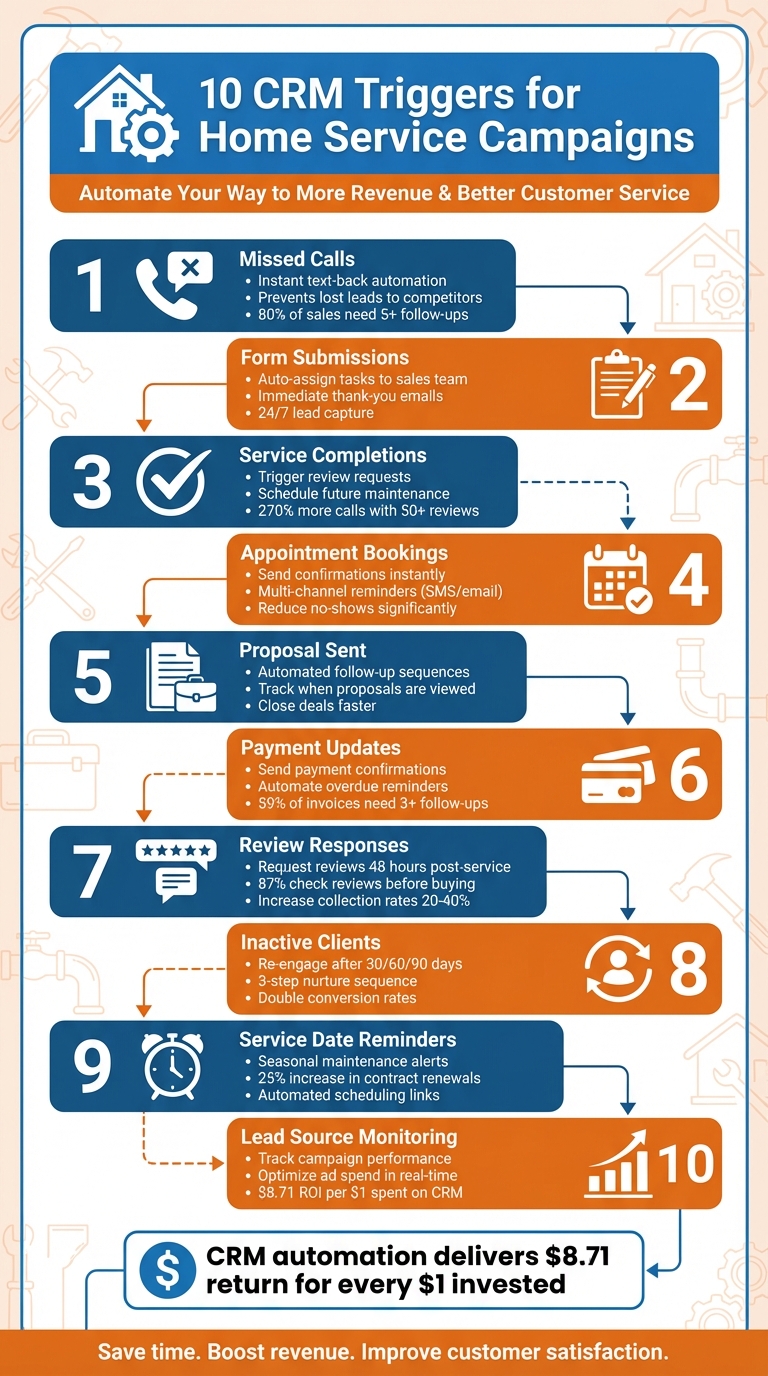
- Missed Calls: Automate instant text responses to lost calls, keeping leads engaged.
- Form Submissions: Send follow-ups and assign tasks automatically when forms are completed.
- Service Completions: Trigger review requests or schedule future service reminders.
- Appointment Bookings: Confirm bookings and send reminders to reduce no-shows.
- Proposal Sent: Automate follow-ups to close deals faster.
- Payment Updates: Send payment confirmations and overdue reminders automatically.
- Review Responses: Request and manage reviews to build credibility.
- Inactive Clients: Re-engage customers who haven’t interacted in a while.
- Service Date Reminders: Notify clients about upcoming or recurring services.
- Lead Source Monitoring: Track which campaigns generate the best leads and revenue.
CRM automation tools like Estatehub streamline these processes, helping businesses save time and boost revenue while improving customer satisfaction. With the right triggers in place, home service providers can focus on delivering quality work while their CRM handles the rest.
10 Essential CRM Triggers for Home Service Businesses
1. Missed Calls
Automation Potential
When you're busy on a repair job and can't answer the phone, a missed call could mean lost business. But missed-call text-back automation solves this by instantly sending a text to the caller. For instance, the message might say: "Hey! Sorry we missed you - this is Joe's Plumbing. Can we help you via text?".
This feature doesn't stop at a simple text. With CRM systems, you can set up multi-step workflows. These might include adding the caller to your lead pipeline, assigning a follow-up task to a team member, or even sharing a link to your online booking calendar. Plus, all missed calls are logged in a central inbox alongside messages from SMS, email, and social media, making it easy to manage responses on the go through a mobile app.
Impact on Customer Engagement
Did you know that 80% of sales require at least five follow-ups, but nearly half of sales reps give up after just one? Automating your missed calls can make a big difference. For example, one behavioral healthcare network cut its missed calls in half by using lead automation and tracking tools.
"Your business misses a call while you're under a sink or fixing a boiler. With GHL's missed-call text back, that caller gets an instant message... It keeps your lead from calling the next name on Google." – GoHighLevel Expert Team
This type of automation is especially valuable in emergencies - like burst pipes, broken heaters, or electrical issues - when customers want immediate reassurance, even if you can't answer right away.
Relevance to Home Service Providers
For professionals like plumbers, HVAC technicians, and electricians, answering the phone isn't always possible. That's why missed-call automation is so important - it helps ensure you don't lose potential customers to competitors. Quick responses matter, and businesses with 50 or more reviews generated through automated follow-ups can see up to 270% more calls than those with fewer than 10 reviews.
Ease of Integration with CRM Tools
Setting up missed-call automation is simple. Modern CRM platforms let you customize texts, send mobile notifications, and include scheduling links so customers can book services instantly. It's a cost-effective alternative to hiring extra staff, and the return on investment speaks for itself. This smooth integration keeps your business running efficiently while you focus on other key tasks, like handling form submissions to further optimize your workflow.
sbb-itb-2aa0348
2. Form Submissions
Automation Potential
When someone submits a form, it can kick off a series of automated actions - everything from sending a thank-you email to assigning a task to your sales team or adding the lead to your pipeline. You can even set up re-enrollment triggers, meaning automation can fire every time a returning customer submits a new form. Most CRMs come with built-in tools for immediate follow-ups, and AI-powered assistants can take it a step further by creating advanced workflows with simple prompts like, "When a form is submitted, send a follow-up email".
Impact on Customer Engagement
These automated workflows don’t just save time - they also keep your leads engaged when their interest is at its peak. For example, in early 2024, home service provider Zach Rollins used Estatehub’s CRM and backend team to launch automated lead campaigns. The result? He booked nearly $3,000 in service revenue within his first week.
Relevance to Home Service Providers
While missed calls are great for capturing immediate interest, form submissions play a key role in nurturing long-term engagement. They act as a gateway for leads to enter your pipeline, moving through stages like "New Lead", "Estimate Sent", and "Job Booked". Whether it’s a request for an instant quote on a burst pipe or a seasonal promotion for furnace tune-ups, forms attract high-intent customers who are ready to book. One roofing company, for instance, generated 220 leads in just 60 days by optimizing its funnels and form submissions. And since many home service providers are either out in the field or working late hours, tools like AI chatbots and web widgets ensure 24/7 lead capture, so no opportunity slips through the cracks.
Ease of Integration with CRM Tools
Integrating form submissions with your CRM tools is a straightforward way to strengthen your marketing strategy across multiple channels. Estatehub, for example, provides pre-built accounts with pipelines and automations designed specifically for home service providers, making setup a breeze. With a centralized inbox that combines SMS, email, Facebook, and Google Business Chat, you can manage every customer interaction in one place. To date, Estatehub has helped home service providers generate over 350,000 leads and optimize more than $7 million in ad spend using these integrated CRM strategies.
3. Service Completions
Automation Potential
When a technician marks a job as "completed" in your CRM, it can set off a series of automated actions designed to keep your business running smoothly. For instance, you can send out personalized review requests or satisfaction surveys via SMS or email. Many modern CRMs also automatically remove these customers from general nurture campaigns, so they don’t receive irrelevant sign-up messages. For seasonal businesses like HVAC or landscaping, this automation can go a step further by scheduling reminders for six or twelve months down the line. Whether it’s a filter change or a spring cleanup, these alerts help ensure your business stays top-of-mind. By automating follow-ups, every completed job becomes a chance to gather feedback and foster ongoing customer engagement.
Impact on Customer Engagement
Reaching out to customers right after a service builds trust and encourages them to share their experiences. Did you know that businesses with 50 or more reviews can see 270% more calls compared to those with fewer than 10 reviews? Take ABC HVAC as an example: after implementing automated review requests and seasonal tune-up reminders, they saw impressive results in just 90 days. These included a 180% increase in bookings, a 42% improvement in quote-to-close rates, a 70% reduction in admin time, and an additional $19,000 in monthly revenue. Another success story comes from a cleaning company that tied service completions to calendar automation. Within 30 days, they reduced missed appointments by 58%.
Relevance to Home Service Providers
Tracking service completions doesn’t just close the loop on a job - it enriches your customer data. Your CRM can record valuable details like parts used, recurring issues, and property-specific information. This data allows you to create tailored upsells and maintenance schedules based on each customer’s history. For industries like plumbing, electrical work, or pest control, where repeat business is essential, this strategy can boost contract renewals by 25%. It’s a practical way to stay connected with customers, even during the long intervals between service calls.
Ease of Integration with CRM Tools
Most contractor-focused CRMs feature visual pipelines where "Completed" is a standard stage, making it easy to kick off automated follow-ups as soon as a job is finished. This integration simplifies the process of sending personalized communications. By mapping custom fields - like technician notes or specific services performed - to your automation platform, you can ensure follow-up emails feel genuine and not like a generic template.
4. Appointment Bookings
Automation Potential
After missed calls and form submissions, appointment bookings are another key area where automation can simplify customer interactions. When customers book appointments online, your CRM can instantly send a confirmation via email or text, along with real-time links for rescheduling or cancellations. You can also set up multi-channel reminders through SMS, email, or even social media platforms like Facebook and Instagram. A well-timed text reminder, such as one sent an hour before the appointment, can help cut down on no-shows.
Impact on Customer Engagement
Automated booking confirmations remove the hassle of back-and-forth scheduling, making the process seamless for customers. For example, one home service provider saw a massive jump in bookings - from just one or two jobs per month to almost 20 jobs monthly - after implementing a CRM with automation.
"I went from booking one or two jobs a month to booking closer to 20 and my income has skyrocketed!" – Korbin Reitz
These automated reminders not only reduce missed appointments but also keep your business at the forefront of customers' minds. By linking appointment automations with other triggers, you create a smooth and consistent customer experience.
Relevance to Home Service Providers
For home service technicians, automated confirmations do more than just save time - they build trust with clients and optimize scheduling. These systems can align booking data with technician routes, allowing you to complete more jobs in a day while minimizing travel time. Self-service portals, which let customers book appointments 24/7, meet the demand for instant scheduling. This is especially critical for businesses that aim to respond to inquiries within 30 minutes - a speed often achievable only through automation.
Ease of Integration with CRM Tools
As with missed calls and form submissions, integrating appointment bookings into your CRM creates a streamlined workflow. Many home service CRMs sync with tools like Google and Outlook calendars, ensuring schedules stay up-to-date across devices. These systems often come with pre-designed templates geared toward common appointment workflows. Including links for rescheduling or cancellations in your confirmations can reduce the need for manual calendar adjustments. Personalization is also easy - dynamic fields in templates can add details like the customer's name, service type, or location, making messages feel tailored rather than generic. Start small by automating one channel, such as appointment reminders, before expanding to more complex workflows. This gradual approach helps your team adapt without feeling overwhelmed.
5. Proposal Sent
Automation Potential
Sending a proposal or estimate to a customer can trigger a series of automated follow-ups through email, SMS, or even WhatsApp, all thanks to CRM tools. Real-time tracking lets you see exactly when a prospect views or interacts with your proposal. Using this data, you can set up conditional actions - like sending a follow-up message if the proposal isn’t signed within 48 hours. These follow-ups might include helpful content like case studies or testimonials to address concerns and keep the conversation going. Once the proposal is signed or payment is received, the system halts further messages, avoiding any awkward overlaps. This kind of automation keeps the process efficient and focused on moving prospects closer to a decision.
Impact on Customer Engagement
Automated follow-ups are key to staying on a prospect’s radar during their decision-making process. Take filmmaker Adam Gorham, for example. In the summer of 2023, he noticed that 19 prospective couples had clicked on his follow-up emails multiple times but hadn’t booked. After switching to a CRM-native system, his booking rates jumped from 18% to 31%, and his response times dropped to under three hours. Similarly, Baris Zeren, CEO of Bookyourdata, cut his sales cycle by 28 days by eliminating delays between his email service and CRM. This allowed his team to reach out to leads at the peak of their interest.
"Our external email service took 4 to 6 hours to update engagement data. Prospects who demonstrated buying intent received a generic follow-up rather than a customized conversation." – Baris Zeren, CEO of Bookyourdata
Relevance to Home Service Providers
For home service providers like contractors, plumbers, and HVAC technicians, proposals are a critical step in turning interest into action. Automated follow-ups ensure no opportunity slips through the cracks. Just as automated responses to missed calls and form submissions simplify lead management, automating proposal follow-ups helps maintain timely engagement and increase conversions. Since many home service professionals are constantly on the move, manually tracking every quote is nearly impossible. A "Proposal Sent" trigger in your CRM offers clear pipeline visibility. You’ll know which proposals remain unopened, which have been viewed multiple times, and which require a personalized follow-up. For instance, if a high-value proposal sits in the "Sent" stage for more than 48 hours without being signed, the system can notify a manager or assign a follow-up task to a sales rep. This is especially helpful for jobs with longer decision cycles, where consistent but non-intrusive nurturing is essential.
Ease of Integration with CRM Tools
Modern CRM platforms make it easy to integrate with tools like e-signature software and mobile payment processors, creating a seamless process from proposal to payment. Pre-built templates for estimates not only save time but also help maintain a polished, professional look. Many CRMs also provide instant alerts - via SMS or internal notifications - when a prospect opens a digital estimate, giving your team the chance to respond while the lead is still warm. Start with a simple two-message sequence: one confirmation when the proposal is sent and a reminder after 48 hours. From there, you can expand your strategy as needed.
6. Payment Updates
Automation Potential
Automating payment updates can save time and reduce stress. For instance, when a deal is marked as "Closed Won" or an invoice hits a key milestone, your CRM can automatically send reminders to customers. Considering that 59% of overdue invoices require at least three follow-ups to get paid, setting up a workflow trigger - like one 27 days after closing - can prompt action before an invoice becomes overdue. Once payment is made, the system sends a confirmation, updates the customer's status, and even kicks off post-purchase activities, such as sharing care tips or requesting reviews.
Payment reconciliation workflows are another game-changer. By cross-checking data across payment gateways, these workflows match payments to invoices and flag discrepancies early on, preventing them from spiraling into bigger issues.
This kind of automation doesn’t just simplify invoicing - it also strengthens customer relationships.
Impact on Customer Engagement
Automated payment confirmations go beyond just acknowledging transactions - they help build trust. For home service providers who often work directly in customers’ homes, an immediate receipt shows professionalism and reassures clients that their payment was processed correctly. These confirmations also open the door for continued engagement. For example, once a payment clears, you can automatically send a request for a review or share maintenance tips.
This approach aligns with consumer preferences - 91% of people say they favor brands that offer relevant recommendations and offers. Using payment data to personalize follow-ups makes your communication feel thoughtful rather than purely transactional.
In addition to fostering trust, payment automation boosts efficiency, which is critical for home service businesses.
Relevance to Home Service Providers
Cash flow is the lifeblood of any business, especially for contractors, plumbers, and HVAC technicians. Spending time manually chasing payments can be a huge drain on resources. With 39% of consumers preferring automatic payment options for recurring bills, setting up triggers for subscription billing or service agreements can ensure a steady revenue stream with minimal effort.
Payment triggers also free up your team to focus on what they do best - whether it’s repairing an HVAC system or installing a new appliance - while the CRM handles invoicing and reminders. This kind of efficiency is especially valuable in an industry expected to exceed $1 trillion by 2025. Streamlining operations like payment updates can be the difference between a thriving business and one that struggles to grow.
Ease of Integration with CRM Tools
Modern CRM platforms make integrating payment automation a breeze. Many come with built-in connections to popular payment gateways like Stripe, PayPal, and Authorize.net, allowing real-time syncing of payment data. Drag-and-drop tools mean you don’t need to be a tech whiz to set things up. Mobile payment terminals and quick-pay links can also sync directly with your CRM, instantly updating customer profiles.
Start small by automating tasks like payment confirmations and overdue reminders. As your business grows, you can expand into more advanced workflows like reconciliation and recurring billing.
"Manually sending these invoices would be exhausting. Therefore, setting up payment workflows to deliver these virtual bills is more convenient." – Satyam, Content Professional, MakeWebBetter
7. Review Responses
Automation Potential
Automating review requests makes gathering feedback much easier. For example, when a job is marked as "complete", you can set up an automatic review request to be sent 48 hours later. This timing ensures the experience is still fresh in the customer’s mind, but they’ve had enough time to reflect. This simple strategy can increase review collection rates by 20% to 40% while cutting down on the time spent on manual follow-ups by as much as 80%.
Modern CRM tools make this process even more efficient by personalizing the request with details like the technician’s name and the type of service provided. These systems can also notify your team as soon as a review is submitted, allowing you to respond quickly and maintain strong customer engagement.
Impact on Customer Engagement
Automating review requests doesn’t just save time - it also strengthens your connection with customers. Reviews are a big deal. Around 87% of people check reviews before making a purchase decision, and 79% trust online reviews as much as recommendations from friends or family. For home service providers, these reviews become the social proof that builds trust - a key factor when someone is deciding whether to let a technician into their home.
The timing of reviews matters too. About 90% of consumers pay attention to how recent reviews are when evaluating a business. Including a direct link to your Google Business Profile in your message makes it quick and easy for customers to leave a review. This is especially important since 83% of consumers rely on Google reviews when researching businesses.
Relevance to Home Service Providers
For professionals like plumbers, HVAC technicians, and contractors, reviews are the modern version of word-of-mouth. A steady flow of recent, glowing reviews on Google not only attracts new customers but also boosts your visibility in local search results and on Google Maps. Google tends to rank businesses higher when they have verified listings with current, positive reviews.
Automation ensures that every customer gets a reminder to leave feedback, eliminating the gaps that often occur with manual processes. Adding a small touch, like asking customers to mention a specific technician by name, can lead to more detailed and genuine reviews. This approach integrates seamlessly into your CRM, helping you manage customer interactions efficiently.
Ease of Integration with CRM Tools
Modern CRMs make review automation straightforward by syncing customer details automatically when a job is marked as complete. This triggers a personalized workflow without requiring any manual input. Many platforms also provide centralized dashboards where you can manage and respond to reviews from SMS, email, and Google My Business - all in one place.
To get started, claim and verify your Google Business Profile. Then, set up a trigger so that when a job status changes to "complete", a review request is sent 48 hours later. Experiment with A/B testing different timings - like 2 days versus 5 days - to see which gets the best response rate. Just be careful not to overdo it; limit review requests to 1–2 per customer per month to avoid overwhelming them.
8. Inactive Clients
Automation Potential
After gathering and using client feedback, it's just as important to reconnect with clients who’ve gone quiet. Set up triggers to identify contacts who haven’t engaged in 30, 60, or 90 days. Once flagged, initiate a three-step re-engagement process: start with an SMS, follow up five days later with an email offering something valuable - like photos of recent projects or details on new financing options - and if there’s still no response, mark them as "Unqualified".
Impact on Customer Engagement
Reaching out to inactive clients can make a big difference. Research shows that 80% of sales require at least five follow-ups, but 44% of sales reps stop after just one. Automated workflows ensure no potential client is overlooked, letting your team focus on the most promising leads. Personalize these messages with real contact details from your team. To make the system seamless, include a "pause automation" trigger so the sequence halts as soon as someone replies, giving your team the chance to step in and have a real conversation or book a call to discuss strategy.
Relevance to Home Service Providers
In industries like home services, long decision cycles and hesitation can cause leads to go cold. For instance, a homeowner might request quotes for a kitchen remodel in March but not be ready to move forward until September. Without automation, these leads might slip through the cracks. By implementing these systems, businesses often see conversion rates double. Plus, it’s far more cost-effective to re-engage a past client than to find a new one. Former clients already know your work and are more likely to trust you again.
Ease of Integration with CRM Tools
Modern CRM platforms simplify tracking client interactions, making it easy to spot when someone has gone inactive. You can also set filters to ensure messages go out only during business hours, like Monday–Friday from 9:00 AM to 6:00 PM. Many CRMs come with drag-and-drop editors, so you can design workflows without needing technical skills. To get started, create a segment for contacts who haven’t made an inbound call, sent an SMS, or replied to an email in 90 days. Then, build a straightforward three-step sequence: send a check-in SMS, wait five days, and follow up with a value-packed email.
9. Service Date Reminders
Automation Potential
Setting up service date reminders in your CRM can save time and keep your operations running smoothly. Once configured, these reminders work automatically, often using triggers like completed activities or specific dates - think six-month HVAC filter replacements or annual water heater check-ups. For instance, when a technician marks a job as finished, the system can start counting down to the next service. You can also use key dates, like contract expirations or the last service appointment, to schedule reminders. These notifications are typically sent via email for formal updates and SMS for quick alerts, making them both practical and customer-friendly. By automating these processes, you not only streamline scheduling but also maintain stronger connections with your customers.
Impact on Customer Engagement
Timely reminders keep your business on your customers' radar, encouraging regular maintenance and building trust. In fact, 47% of CRM users noted that automated reminders significantly improved both customer satisfaction and retention. Features like "on-my-way" alerts sent 30 minutes before a technician arrives add a layer of transparency, easing concerns about service timing. These thoughtful touches show respect for your customers' time and help foster loyalty. According to research, 91% of consumers are more inclined to stick with brands that offer personalized recommendations and timely updates. A seasonal maintenance reminder, for example, aligns perfectly with this expectation and can make a big difference in customer satisfaction.
Relevance to Home Service Providers
For businesses that rely on recurring services - like HVAC maintenance, pest control, or lawn care - automated service reminders are a game changer. Consider an HVAC company that introduced email and SMS reminders for seasonal tune-ups; they saw a 25% increase in contract renewals. Without these reminders, customers might forget routine maintenance or even turn to a competitor when an issue arises. A friendly nudge in early spring about AC maintenance, for example, can prompt homeowners to book a service before problems occur, ensuring customer loyalty and preventing costly breakdowns.
Ease of Integration with CRM Tools
Most field service management platforms already include tools for scheduling and automated communications, making integration straightforward. It’s as simple as adding a "service date" field to your CRM and creating corresponding email or SMS templates. Start small - perhaps with appointment confirmations - and gradually expand to include other reminders. Adding a "book now" link to your messages can simplify the scheduling process, while personalizing reminders (e.g., "Time to replace your Carrier furnace filter") makes them feel more relevant and engaging. Mobile CRM access allows technicians to update service dates from the field, boosting efficiency by over 25%.
Platforms like Estatehub make these integrations seamless, enabling home service providers to stay ahead with proactive customer care.
10. Lead Source Monitoring
Automation Potential
Modern CRMs make tracking lead origins a breeze by using unique identifiers for each source - whether it’s Google Ads, Facebook campaigns, website forms, or phone calls. Tools like Dynamic Number Insertion (DNI) assign specific phone numbers to individual campaigns, ensuring each call is tied back to its ad. This eliminates the need for manual tracking and provides instant performance insights. You can even set up workflows to automate follow-ups based on the lead source. For instance, if someone submits a form after clicking on your "new HVAC installation" ad, the CRM can send out a personalized email tailored to their interest. This kind of automation works hand-in-hand with other CRM triggers, ensuring every detail about a lead informs how you follow up.
Relevance to Home Service Providers
For home service businesses, understanding which marketing efforts actually bring in paying customers is essential. After all, clicks don’t pay the bills - booked jobs do. Lead source monitoring allows you to test 10–20 different ad combinations, targeting strategies, and offers to see what resonates most with your local audience in just a few days. Some campaigns might generate 50–60 leads in the first month, but without proper tracking, you won’t know which ones brought in serious customers versus those just shopping around. In industries like plumbing or HVAC, where customers often hire the first business that answers the phone, tracking lead sources and responding quickly can make all the difference. Just as timely follow-ups and reminders keep operations running smoothly, lead source tracking ensures your marketing dollars turn into real results.
"We know clicks don't turn into sales. As we launch your campaigns, we are always making optimizations towards what's bringing you in quality leads, and what's generating you the most revenue." – Estatehub
Impact on Customer Engagement
Knowing exactly where a lead came from allows you to tailor your interactions. For instance, a homeowner who clicked on your "emergency water heater repair" ad will need a different approach than someone exploring seasonal maintenance options. Plus, data shows that 60% of customer service agents believe a lack of customer information leads to poor service. By automatically capturing lead source data, your team can respond with relevant context, building trust and rapport from the very first interaction.
Ease of Integration with CRM Tools
Like other CRM automations, lead source tracking integrates seamlessly with most platforms, providing real-time insights and enabling quick responses. CRMs designed for home services often sync effortlessly with tools like Google Ads, Facebook, and QuickBooks, automatically centralizing lead data. You can set up call tracking and form integrations in just a few hours and review lead sources every two weeks to ensure your cost-per-lead matches your revenue. Platforms like Estatehub simplify this process with pre-built integrations and dashboards, allowing you to refine campaigns 2–3 times a week based on actual performance data.
This One Tool Transformed My Home Service Business
Conclusion
CRM triggers simplify workflows and ensure every customer interaction is accounted for. By consolidating SMS, email, and social media messages into one platform, your team can respond quicker and deliver a seamless experience - whether a customer just filled out a form or completed a service request.
The numbers speak for themselves: for every dollar spent on a CRM, businesses see an average return of $8.71. CRMs can also drive a 29% increase in sales and improve sales productivity by 34%. The key lies in consistent follow-ups. With 80% of sales requiring at least five follow-up attempts - but only 8% of salespeople reaching that mark - automated triggers become essential to capturing every opportunity. Additionally, technicians benefit from having full access to customer histories on-site, while mobile tools allow them to adjust estimates and move deals forward directly from their phones.
"A CRM is designed to improve your overall operations, and much of it comes from making multiple aspects of your business more efficient." – Housecall Pro
These operational benefits pave the way for specialized CRM solutions tailored to specific industries. For example, Estatehub offers a customized version of the HighLevel CRM, complete with pre-configured pipelines, automations, and templates specifically designed for home service providers. Their expertise is backed by results: managing over $7 million in ad spend and generating more than 350,000 leads, with campaigns typically delivering 50–60 leads per month. Unlike agencies that focus solely on clicks, Estatehub optimizes campaigns 2–3 times a week based on actual revenue performance.
FAQs
How do CRM triggers help home service businesses enhance customer engagement?
CRM triggers play a key role in helping home service businesses enhance customer connections by automating tailored communication based on specific actions or events. For instance, they can automatically send reminders for scheduled appointments, follow-up thank-you messages after a service visit, or special offers during seasonal promotions. These automated touchpoints make customers feel appreciated and maintain engagement - without adding extra work for your team.
Additionally, CRM triggers enable businesses to respond promptly to actions like form submissions or missed calls, making it easier to nurture potential leads. This quick, targeted communication not only boosts the likelihood of converting inquiries into loyal customers but also fosters trust, encourages repeat business, and delivers a smoother, more engaging customer experience.
How does automating follow-ups for missed calls benefit home service providers?
Automating follow-ups for missed calls helps ensure timely and consistent communication with potential clients, so you don’t let opportunities slip through the cracks. With automated responses, you can quickly engage leads, respond to their needs, and keep your business front and center.
This approach not only saves valuable time but also boosts your chances of turning missed calls into paying customers - without the hassle of manual follow-ups.
How can tracking lead sources improve marketing for home service providers?
Tracking where leads come from is a game-changer for home service providers looking to fine-tune their marketing efforts. Whether a lead originates from paid ads, website forms, or referrals, knowing this allows businesses to craft messages that align with the lead’s interests and behavior. This personalized approach makes it much easier to turn leads into paying customers.
It also helps businesses figure out which marketing channels are actually working. By analyzing performance, providers can focus their budget on campaigns that deliver results. For instance, if a lead comes through a specific ad, businesses can set up automated follow-ups - like tailored emails or appointment reminders - based on that insight. The result? Better engagement, higher ROI, and more qualified leads that translate into increased revenue.
Related Blog Posts

Sign up for the newsletter and be the first to read our articles.