

Overview of Common Stains
Full overview of the most common stains, including how to identify them and treat them
Retaining customers is far less expensive than acquiring new ones, yet many home service businesses struggle with common issues like missed follow-ups and one-time customers. CRM automation offers practical solutions to improve retention, reduce churn, and create loyal customers. Here are 10 strategies:
Each strategy leverages CRM automation to save time, improve customer satisfaction, and boost revenue. These approaches are particularly effective for home service businesses like HVAC, plumbing, and pest control. Start with simple tools like automated reminders and feedback surveys, then scale up to advanced features like predictive analytics and AI-driven insights.
Lead scoring assigns points to customers based on their actions and characteristics, while smart routing ensures they’re directed to the right team member. For home service businesses, this means identifying customers who might be at risk and connecting them with a dedicated retention team. This targeted approach lays the groundwork for the retention strategies that follow.
The system evaluates three key signals: intent (how specific the service request is), engagement (response rates to emails or texts), and fit (factors like budget and location). If a customer’s engagement score drops below a defined threshold, the CRM flags them as at-risk and triggers an automated response. This might include assigning them to a senior account manager or enrolling them in a win-back campaign.
"High-performing real estate lead qualification automation systems are clear, fast, and measurable."
- Viorel Zoran BOGDAN, Founder, 2B Consulting Services
The results speak for themselves: 47% of businesses using CRM systems report better customer retention. Additionally, companies leveraging CRM predictive analytics have seen revenue jumps of up to 15%. For home service providers, this means pinpointing high-value customers who may be ready for upselling opportunities.
Moderate. Setting up lead scoring involves creating workflows triggered by specific actions, using conditional logic, and calculating scores. A good starting point is to use three categories (Hot, Warm, Long-Term) and track 8–12 key signals.
Faster response times and better conversion rates. Automated routing ensures that skilled team members handle high-value and at-risk accounts effectively.
About 30 days:
This approach works best for high-volume home service businesses, like HVAC companies managing both residential and commercial accounts or plumbing services handling emergency and scheduled calls. It’s particularly useful once you’re managing more than 50–100 customer interactions per month.
CRM automation takes customer service to the next level by creating tailored experiences that strengthen relationships and build loyalty.
With CRM automation, outreach becomes more personal by consolidating service history, preferences, and past interactions into one platform. For home service providers, this means technicians can show up already familiar with a customer’s equipment, past repairs, and even their preferred appointment times. In fact, 74% of CRM users report better access to customer data, which translates to more informed and efficient service.
Behavior-driven triggers further enhance personalization by delivering targeted offers based on customer actions. For instance, after completing an AC repair, a customer might receive a customized offer for a seasonal maintenance plan. If someone hasn’t scheduled a service in 12 months, an automated email with a "we miss you" discount could re-engage them. These communications aren’t generic - they reference the customer’s actual service history and specific property needs.
"A CRM system stores service history and past interactions, enabling seamless experiences." - Power Digital
Businesses that use CRM tools to manage customer lifecycle stages often see retention rates rise by 27%. Even better, for every dollar spent on CRM retention tools, businesses see an average return of $8.71. This kind of personalization doesn’t just boost immediate engagement - it lays the groundwork for long-term loyalty, which is critical for sustainable growth.
Simple personalization, like using a customer’s name or referencing their service history, is relatively easy to implement. But more advanced features, such as AI-powered sentiment analysis to detect negative emotions in emails and automatically escalate issues, require deeper integration and clean, well-organized data.
Personalized interactions lead to higher Customer Lifetime Value (CLV) by encouraging repeat bookings and creating opportunities for upselling. This approach turns one-time service calls into ongoing maintenance contracts, which are more profitable in the long run.
Getting started with basics like automated emails and service reminders typically takes 2–4 weeks. However, building a robust 12-month retention plan with milestone tracking and dynamic customer segmentation is a long-term effort that evolves over time.
This strategy is ideal for HVAC companies, plumbing services, pest control providers, and other home service businesses. In industries where strong client relationships and detailed service records are crucial, CRM automation can transform occasional service calls into scheduled, recurring maintenance plans.
Real-time dashboards take scattered customer data and turn it into a single, actionable view. This helps home service providers spot potential issues before they grow into bigger problems. Instead of wasting time manually piecing together service histories, support tickets, and customer feedback, CRM automation pulls all this data into one centralized dashboard that updates instantly as new information comes in. This streamlined approach aligns perfectly with the broader goal of CRM automation: delivering personalized and efficient customer experiences.
One of the standout benefits of these dashboards is their ability to pinpoint customers at risk of leaving. By monitoring key indicators - like reduced engagement, missed appointments, or repeated negative feedback - businesses can step in early to re-engage customers. While 76% of companies acknowledge the importance of customer lifetime value (CLV), only 42% measure it accurately. Dashboards help close this gap by highlighting at-risk customers and offering actionable insights.
"A bad customer service experience sticks with you. In fact, 58 percent of consumers will switch companies solely because of poor customer service." - Patti M. Wilson, Senior Account Strategist, SmartBug Media
To make the most of these insights, it’s crucial to design dashboards that focus on actionable metrics. This includes tracking churn dates, reasons for customer loss (whether preventable or not), interaction history, and customer health scores. When a customer’s engagement drops below a set threshold, automated alerts notify account managers, allowing them to step in with precision and timeliness.
Advanced CRM platforms, like those offered by Estatehub, integrate real-time dashboards that help providers monitor key metrics and respond quickly. This isn’t just about convenience - it’s about results. Research shows that improving customer retention by just 5% can increase revenue by 25% to 95%. With dashboards, decisions are grounded in data, helping businesses protect revenue and build stronger customer loyalty.
Setting up these dashboards requires a moderate level of technical work. You’ll need to establish custom property mapping, integrate feedback tools like NPS surveys, and implement strong data hygiene practices to keep the dashboards accurate. Additionally, this involves connecting various communication channels and defining the metrics that are most relevant to your business.
The primary goal of these dashboards is to enhance customer lifetime value (CLV) and reduce avoidable churn. By identifying friction points in the customer journey early, businesses can prevent minor issues from escalating into major problems, ultimately fostering long-term loyalty.
Getting these dashboards up and running typically takes 2 to 4 weeks. The first two weeks are usually spent cleaning and importing data, followed by segmentation and defining key metrics in week three. The final week focuses on configuring the dashboards and testing the automation workflows.
These dashboards are ideal for mid-size to enterprise-level home service businesses that handle a high volume of customer interactions and find it challenging to track customer health manually. They are particularly effective for industries like HVAC, plumbing, and pest control, where repeat customers and referrals are essential for sustained growth.
Automated customer segmentation takes personalization to the next level by grouping customers into specific categories, ensuring that your outreach aligns with their unique needs. While personalized experiences focus on tailoring interactions for individuals, segmentation ensures that targeted messages reach the right audience. For instance, instead of blasting the same email to everyone, CRM automation categorizes customers based on factors like service history, property type, or the time elapsed since their last appointment. This means a homeowner who recently had an HVAC repair will receive messages relevant to their situation, while someone overdue for maintenance gets a nudge to schedule a service.
This targeted approach isn’t just theoretical - it works. CRM-driven email campaigns see 14% higher click-through rates compared to generic ones. Plus, segmentation avoids irrelevant messages that can alienate customers and hurt engagement. It’s a practical way to enhance every stage of the customer lifecycle.
Modern CRM platforms allow for micro-segmentation, breaking down customer groups into even finer categories. For example, a plumbing business could pinpoint customers who last serviced their water heaters three years ago and send them reminders before a typical replacement cycle. These systems also use predictive triggers, like seasonal changes or property anniversaries, to initiate outreach before customers even realize they need help. And it pays off - 79% of consumers say they’re more loyal to brands that use personalized strategies.
Setting up automated segmentation isn’t overly technical but does require some effort. You’ll need to create decision trees to determine how customers move between segments and maintain clean, accurate data. Thankfully, many modern CRM tools now feature user-friendly, no-code interfaces, making this process accessible even if you don’t have programming skills.
The main goal? Boosting Customer Lifetime Value (CLV) through stronger engagement and retention. Businesses that adopt formal retention systems see an average retention rate of 84%, and top CRM implementations deliver an impressive $8.71 return for every dollar spent on retention tools.
Getting started with basic CRM setup and initial segmentation typically takes 2 to 4 weeks. Begin by focusing on your most valuable customer segments, such as high-frequency or high-margin clients. Expanding gradually ensures your system isn’t overwhelmed.
This strategy is ideal for businesses managing a wide range of services or large customer bases where manual follow-ups are no longer practical. It’s particularly effective for industries like HVAC, plumbing, and pest control, where repeat business and customer retention are key.
Predictive analytics takes the guesswork out of upselling by identifying the right customers at the right time. By analyzing patterns in purchase history, service usage, and engagement behavior, these tools can pinpoint customers who are likely ready for an upgrade. For example, home service providers might use predictive analytics to flag a customer whose HVAC system is nearing the end of its typical lifecycle or someone frequently asking about services beyond their current plan. This approach transforms your CRM into a powerful revenue generator.
The numbers speak for themselves: upselling to existing customers has a success rate of 60–70%, compared to just 5–20% for new prospects. Companies leveraging AI-powered Customer Lifetime Value (CLV) models have reported revenue increases ranging from 20–35%. Take American Express, for instance - they used Salesforce Einstein Analytics to deliver personalized recommendations, resulting in a 25% boost in customer retention and a 15% rise in revenue.
Predictive analytics relies on tracking specific triggers. For instance, when a customer nears their service limits, requests additional services, or shows a sharp drop in engagement - say, a 40% decline over 30 days - the CRM flags them for outreach. These timely interventions significantly increase the likelihood of conversion.
This strategy is considered high in complexity, often requiring advanced AI-powered CRM platforms like Salesforce Einstein or HubSpot AI, or even data science expertise. However, businesses can start small with simpler statistical models based on transaction history. These basic models can often be deployed in under a day and deliver up to 80% of the results provided by more advanced machine learning models. On the other hand, custom machine learning models demand at least 12 months of historical data and can take weeks or even months to implement fully.
The main goal here is to increase Customer Lifetime Value (CLV) by timing upsell offers to align with customer engagement peaks. A targeted approach like this can boost conversion rates by 40% to 60%, outperforming traditional calendar-based upselling methods.
"A mediocre model that triggers timely interventions outperforms a brilliant model that sits in a data warehouse unconnected to customer-facing workflows." - DigitalApplied
For businesses with over 10,000 customers and at least a year of historical data, custom machine learning models are a strong option. Smaller businesses with 1,000 or more customers can start with simpler statistical models, which require minimal setup. A basic implementation involves consolidating CRM and behavioral data through a HighLevel setup, creating features that reflect engagement trends, selecting a model, integrating prediction scores into your CRM, and setting up automated triggers for your sales team.
This approach works best for businesses with large customer bases and recurring service relationships, such as HVAC companies, plumbing services, pest control providers, and landscaping businesses. The key is having enough historical data to identify meaningful trends and a customer volume that justifies the investment.
Retention starts the moment a sale is finalized, and automated post-sale workflows ensure customers feel supported from day one. These workflows are triggered by specific events - like completing a purchase, hitting a 30-day milestone, or experiencing a period of inactivity. They deliver timely follow-ups, onboarding resources, and feedback requests, replacing manual tracking with a seamless process. This proactive approach helps improve customer satisfaction and retention rates.
The results speak for themselves. CRM users have seen a 47% increase in customer satisfaction by automating consistent communication. For example, in 2025, Michal Kierul, CEO of InTechHouse, introduced a structured renewal workflow with 120-, 60-, and 30-day reminders that incorporated product usage metrics and NPS scores. Over two quarters, this approach boosted on-time renewals by 17% and cut last-minute discounts by 25%. Similarly, Natalie Nicole, Head of Customer Success at SurveyStance, reduced customer churn by over 15% using automated renewal processes.
This strategy falls into the moderate complexity range. Most modern CRMs include drag-and-drop workflow builders, making it easy to set up basic post-sale sequences. You’ll need to define triggers like “deal closed” or “30 days after purchase,” create pre-written templates, and schedule your touchpoints. For more advanced workflows - such as those using health scores or product usage data - you’ll need collaboration between sales and customer success teams, as well as integration with product analytics tools.
The main goal is to increase Customer Lifetime Value (CLV) while reducing churn. Consistent, value-driven communication after the sale ensures customers feel supported and engaged. Retaining current customers is far more cost-effective than acquiring new ones - six to seven times less expensive, in fact. Even a 5% boost in customer retention can lead to a revenue increase of 25% to 95%.
Setting up basic post-sale workflows - like thank-you emails, onboarding sequences, and milestone check-ins - can take 1–2 weeks. More advanced workflows that include health scoring or usage alerts will require 2–4 weeks. Start with simple date-based triggers (e.g., 30, 60, 90 days post-sale) and gradually incorporate behavioral triggers as your system evolves.
This strategy works well for businesses with recurring revenue models, such as subscription-based services, e-commerce platforms, and B2B companies with long-term client relationships. Home service providers - like HVAC technicians, plumbers, and landscapers - can also benefit by sending maintenance reminders, seasonal tips, and service anniversary messages. These touchpoints keep your business top-of-mind when customers need assistance again. For home service providers, CRM automation offers a powerful advantage. At Estatehub, for instance, we craft tailored digital marketing campaigns that integrate post-sale workflows to help businesses retain their customers effectively.
Churn doesn’t happen overnight - it’s a gradual process that starts with subtle behavioral shifts. A good CRM system can spot these early warning signs before cancellations become inevitable. Modern automation tools monitor key indicators like fewer logins, abandoned features, or a rise in support tickets. These signals help pinpoint accounts at risk. As KISSmetrics aptly explains: "Your customer did not churn yesterday. They started churning three months ago - you just were not watching the right signals".
To tackle this, businesses often use composite health scoring. For example, a typical model might weigh product engagement at 30%, relationship signals at 25%, billing data at 25%, and support satisfaction at 20%. If a customer’s score dips below a set threshold, automated workflows kick in. These workflows could include sending re-engagement emails, notifying customer success managers, or offering personalized incentives. The results speak for themselves - proactive outreach has a conversion rate of 60–80%, compared to just 15–20% for reactive efforts.
This strategy isn’t simple - it requires pulling data from multiple sources like usage analytics, support tickets, billing systems, and engagement metrics. These inputs are used to create custom scoring models and set up workflows with conditional logic. Many companies use a tiered approach to escalation:
This layered system ensures the right level of attention is given to each account.
The main goal here is to protect recurring revenue by reducing churn. Catching at-risk accounts early means that new sales contribute to growth rather than just replacing lost customers. Even a small improvement - like a 5% increase in retention - can drive profitability up by 25–95%. Additionally, companies that excel at customer experience enjoy 51% better retention rates and see profit growth nearly 50% faster.
Building a system like this takes time. Designing health scores and integrating data sources typically takes 30–90 days. However, you might see quick results within 2–4 weeks by starting with basic triggers - such as flagging accounts with 14 days of login inactivity or three support tickets in 30 days. Over time, you can add more advanced, AI-driven analytics to refine the system. Full optimization usually happens within 9–12 weeks.
This approach is ideal for subscription-based businesses. SaaS companies, membership programs, and B2B organizations with high-value accounts benefit the most, especially when recurring revenue is a priority. It’s also a great fit for industries with high customer acquisition costs, where maximizing lifetime value is critical. For instance, home service providers with seasonal contracts or maintenance agreements can use churn detection to identify customers who haven’t scheduled their annual service or responded to reminders. Platforms like Estatehub even offer CRM automation solutions tailored to these specific needs.
When a customer clicks "cancel", it doesn’t have to be the end of the story. Personalized cancellation recovery uses CRM automation to turn that moment into an opportunity for re-engagement. Modern CRM systems can kick off recovery workflows as soon as a cancellation is initiated or when at-risk behaviors, like 30 days of inactivity or a lapsed subscription, are detected. The key is responding quickly and with a personal touch. Automated exit surveys collect the reason for canceling - whether it's pricing, technical challenges, or a lack of perceived value - and then guide the customer into a recovery process tailored to their specific concerns.
Branching logic takes this a step further. For instance, if a customer mentions pricing as the issue, the system might suggest a discount or a more affordable plan. If technical problems are cited, it could schedule a call with a support specialist. High-value clients might even get a personalized outreach from a Customer Success Manager. A real-world example? Adobe Creative Cloud offers canceling users two free months of service mid-contract.
Andrew Romanyuk highlights the impact of proactive engagement:
"If there is no meaningful touch for 30 days, the client is marked as 'at risk.' Since we started using this rule two years ago, the number of refusals has gone down by around 15 percent."
There’s also strong evidence supporting the effectiveness of recovery efforts. Research shows that 96% of customers are willing to stay with a company if it apologizes and fixes a mistake. Plus, even a small 5% increase in customer retention can boost profits by 25% to 95%.
Setting up this type of automation requires a moderate to high level of sophistication. It involves integrating your billing system with your CRM, implementing custom health-scoring properties, and creating branching logic based on exit survey feedback. To keep the outreach personal, the system should include relevant customer details - like contract end dates, original pricing, and risk levels - so responses feel informed rather than generic.
The main goal here is to reduce churn and recover lost revenue. At the same time, you'll gather valuable feedback to improve retention strategies moving forward. Businesses that have implemented these workflows have reported a 17% increase in on-time renewals.
Expect to spend 2-4 weeks setting this up. This includes cleaning your data, configuring triggers, and running tests. A good starting point is to flag accounts after 14 days of inactivity, then expand the system as you go.
This approach works best for subscription-based businesses, like SaaS companies or B2B service providers, where recurring revenue is critical. It’s also a great fit for home service providers with seasonal contracts or maintenance agreements. For example, they can use these workflows to identify customers who haven’t scheduled annual services or responded to reminders. Platforms like Estatehub offer CRM automation tools specifically designed for these kinds of retention challenges.
Missing a renewal date can directly impact your revenue. Automated renewal management tackles this issue by using date-based triggers that activate months before a contract expires. Instead of relying on spreadsheets or memory, your CRM takes charge, tracking every contract’s end date and initiating a structured sequence at intervals like 120, 90, 60, and 30 days before expiration. Each interaction serves as a reminder of the value you’ve provided - whether it’s seasonal maintenance advice for HVAC customers or ROI reports for B2B clients - making renewal discussions feel natural rather than forced.
This approach builds on post-sale automation to lock in recurring revenue by staying ahead of contract deadlines. The results are impressive. Savage Growth Partners, for instance, implemented a sequenced workflow where marketing sent value-driven reminders, and account managers received preloaded context at renewal triggers. This alignment across teams cut churn by 22% in just one quarter.
Automation also helps reduce involuntary churn caused by expired credit cards or failed payments, which can account for 20-40% of cancellations. Dunning workflows handle these situations by retrying failed transactions, sending reminders for payment updates, and assigning follow-up tasks to your team. This process can save thousands of dollars in lost revenue - all without requiring manual intervention.
This setup requires a moderate effort. You’ll need to configure date-based triggers, establish health scoring logic that integrates usage data or NPS scores, and create branching workflows. These workflows can route high-value accounts to a manager while automating email follow-ups for smaller contracts. To ensure accuracy, make fields like "contract end date" and "notice period" mandatory.
The main objective is to boost Net Revenue Retention (NRR) while reducing churn. Companies that use CRM tools for renewals report an 8.5% higher NRR compared to those that don’t. Additionally, automated renewal management enhances operational efficiency by eliminating manual tracking and reducing missed deadlines. Proactive retention efforts have a success rate of 60-80%, compared to just 15-20% for reactive approaches.
You can launch basic workflows in 2-4 weeks, though more complex setups involving health-score integrations may take additional time. Start with a test group of 10-20 accounts to troubleshoot issues like bounced emails or stalled renewals before rolling out on a larger scale.
This strategy is ideal for service providers with recurring contracts - like HVAC maintenance, landscaping, pest control, or B2B subscriptions - where missing a renewal date results in immediate revenue loss. Home service providers can also use property timelines to identify when a home is approaching the average ownership window (typically 5-7 years) and suggest system upgrades. Platforms like Estatehub offer CRM tools tailored to manage these workflows for home service businesses.
Today’s customers expect quick answers, especially when it comes to things like service appointments or rescheduling. By integrating chatbots with your CRM, you can instantly handle routine tasks like order tracking, address updates, or answering FAQs. The integration even allows the system to recognize returning customers, using their service history to provide personalized responses without making them repeat themselves.
This approach works particularly well for home service businesses - think HVAC, plumbing, or pest control - where immediate responses are critical. Chatbots can handle appointment bookings, share service updates, and even detect frustration through sentiment analysis. When needed, they can escalate an issue to a senior technician. As Drake Q., Co-founder & CPO of Chatty, puts it:
"Automation handles the repetitive work, so your team can focus on what actually needs a human touch: solving complex problems, building relationships, and making strategic decisions".
Proactive chatbot support can also improve customer retention. For example, if a customer submits three or more support tickets in 30 days, a chatbot can reach out proactively - achieving a save rate of 60–80%, compared to just 15–20% for reactive support. Additionally, features like contextual silencing can pause promotional emails for customers with unresolved issues, avoiding poorly timed marketing messages. When seamlessly integrated with your CRM, chatbots become a key part of optimizing customer support.
To get started, you’ll need to sync your CRM data - like customer profiles, service history, and open tickets - with your chatbot’s logic. This ensures that interactions feel personal and relevant. Begin with a single workflow, such as handling FAQs or scheduling appointments, and track its performance over 30 days. Adding simple self-service options like "Track Service Appointment" or "Request Callback" buttons can also deliver instant solutions.
The ultimate goal here is to reduce churn while improving efficiency. Automated communication can lead to a 47% increase in customer satisfaction, and for every dollar invested in CRM software, businesses see an average return of $8.71. Chatbots also help re-engage "silent customers" - those who might otherwise leave without saying a word - by triggering timely follow-ups.
Setting up basic CRM and chatbot integration usually takes about 2–4 weeks. Start by mapping your customer journey to identify common pain points, create automated workflows, and test them with a small group before rolling them out fully.
This strategy works best for high-volume businesses with repetitive support needs. Home service providers, e-commerce companies, and SaaS platforms are great examples, as their customers frequently ask about service status, billing, or account details. Even small teams can benefit - chatbots allow you to scale support without hiring extra staff. Platforms like Estatehub offer CRM tools specifically designed for home service businesses, making it easy to integrate automated workflows into your operations.
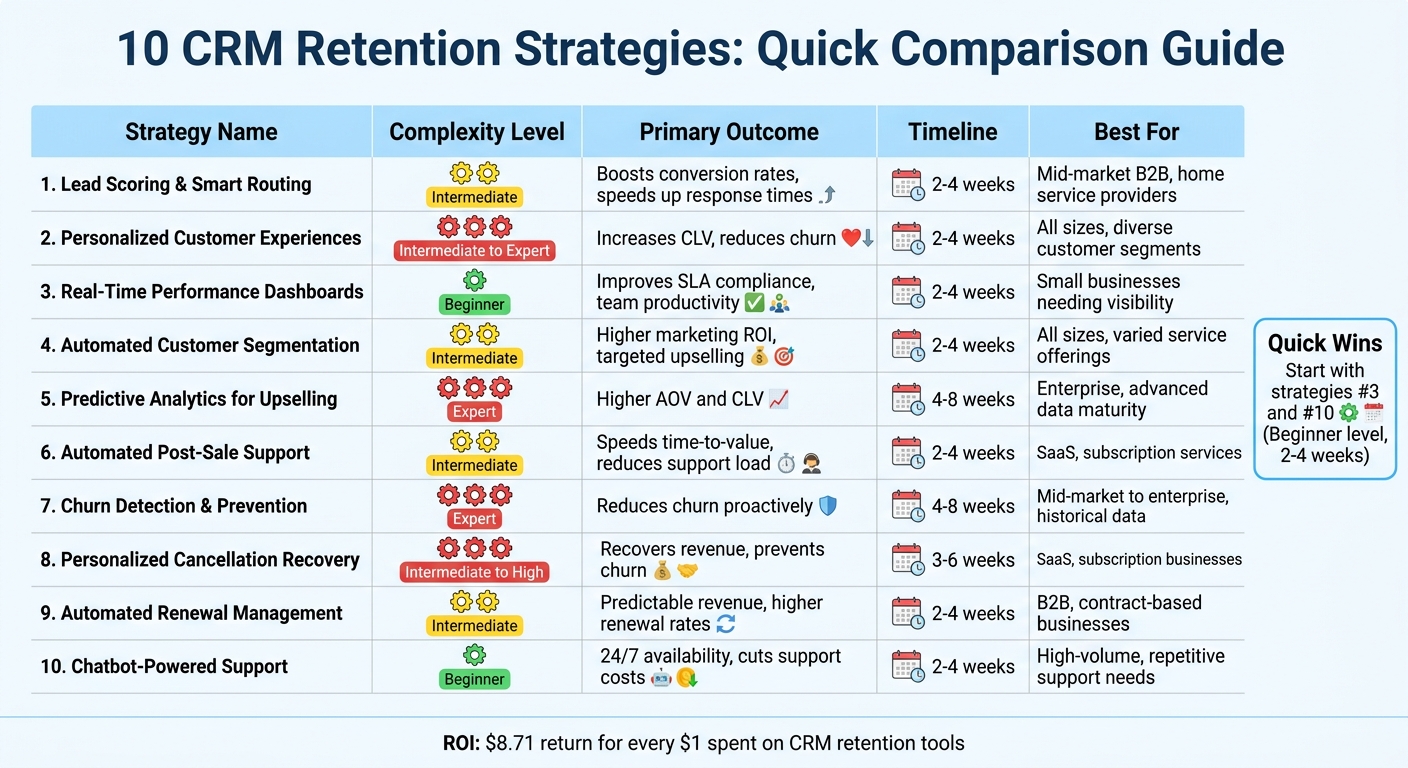
CRM Automation Strategies Comparison: Complexity, Outcomes, and Implementation Timeline
The table below provides a quick overview of 10 strategies, helping you decide based on your goals and available resources.
| Strategy | Automation Complexity | Primary Business Outcome | Implementation Timeline | Best Suited For |
|---|---|---|---|---|
| Lead Scoring & Smart Routing | Intermediate | Boosts conversion rates, speeds up response times | 2–4 weeks | Mid-market B2B, home service providers with multiple service lines |
| Personalized Customer Experiences | Intermediate to Expert | Increases customer lifetime value, reduces churn | 2–4 weeks | Businesses of all sizes, especially those with diverse customer segments |
| Real-Time Performance Dashboards | Beginner | Improves SLA compliance and team productivity | 2–4 weeks | Small businesses needing visibility into response times and account health |
| Automated Customer Segmentation | Intermediate | Delivers higher marketing ROI, enables targeted upselling | 2–4 weeks | Suitable for all sizes, especially businesses with varied service offerings |
| Predictive Analytics for Upselling | Expert | Drives higher average order value and customer lifetime value | 4–8 weeks | Enterprise and mid-market businesses with advanced data maturity |
| Automated Post-Sale Support Workflows | Intermediate | Speeds up time-to-value, reduces support workload | 2–4 weeks | Ideal for onboarding-heavy businesses like SaaS or subscription services |
| Churn Detection & Prevention | Expert | Helps reduce churn proactively, improves retention rates | 4–8 weeks | Mid-market to enterprise businesses with ample historical customer data |
| Personalized Cancellation Recovery | Intermediate to High | Recovers revenue, prevents immediate churn | 3–6 weeks | SaaS, subscription-based, and recurring service businesses |
| Automated Renewal Management | Intermediate | Ensures predictable revenue and higher renewal rates | 2–4 weeks | B2B service providers, contract-based businesses, annual maintenance plans |
| Chatbot-Powered Customer Support | Beginner | Offers 24/7 availability, cuts support costs | 2–4 weeks | High-volume businesses with repetitive support needs, like home service providers |
Use this comparison to pinpoint the best starting point for your CRM automation journey. You can scale your efforts as your capabilities grow.
If you're a small business or just stepping into CRM automation, tools like timetoreply ($36/mailbox/month), Pipedrive ($14/seat/month), Brevo ($9/month), and Tidio (free plan) are excellent for fast deployment. For mid-sized teams, strategies like lead scoring, automated segmentation, post-sale workflows, and renewal management require more time for planning and data mapping but are still manageable. Advanced strategies such as predictive analytics and churn detection, however, demand significant setup time (4–8 weeks or more) and a high level of data maturity.
Retention offers a strong return on investment: acquiring a new customer can cost 5 to 25 times more than keeping an existing one. Despite this, only 18% of companies focus primarily on retention, while 44% prioritize acquisition. For home service businesses, platforms like Estatehub offer CRM tools tailored to the industry, simplifying the adoption of these strategies.
Begin by tracking email response times to meet SLAs and reduce churn. Map out activation milestones before automating onboarding, and set up feedback surveys at key moments - like 90 days before a renewal - to spot at-risk accounts early. As Vaishnavi Manjarekar from Netcore puts it:
"Retention isn't just about keeping people around - it's about continuously nurturing the relationship".
CRM automation reshapes how home service businesses maintain and strengthen customer relationships, creating a growth system that builds momentum over time. Companies that focus on retention can handle a larger client base while cutting marketing costs compared to those chasing constant acquisition.
For home service providers like HVAC, plumbing, and pest control companies, CRM systems address common churn issues - missed appointments, lack of follow-up, and inconsistent communication. As Power Digital explains:
"A CRM system is much more than a database for storing customer information. When used effectively, it becomes the central hub for managing relationships, automating communication, and personalizing customer interactions".
To get started, map out your customer journey - from booking to post-service follow-up. Pinpoint areas where automation, such as appointment reminders, seasonal maintenance prompts, or tailored offers, can make the biggest impact. Make sure your CRM integrates with your booking platforms and marketing tools to create a unified system. This not only enhances your customer experience but also aligns with the retention strategies discussed earlier. For businesses ready to dive in, tools like Estatehub offer industry-specific CRM solutions to streamline the process.
Focus on quick wins by automating service reminders, sending feedback surveys, and segmenting personalized offers to improve retention. Track key metrics like retention rates (aim for 75% or higher) and referrals (15% or more) every quarter to gauge success. Personalization is key - it builds loyalty and helps prevent customers from turning to competitors.
To kick off lead scoring and churn detection, start by collecting behavioral signals, transactional data, and relationship indicators. Examples of these include how customers use your product, their payment history, interactions with support, and feedback from NPS surveys. By combining these data points, you can build a health score that helps predict churn and spot high-value leads.
To determine whether your CRM automation is making a difference in retention and revenue, focus on tracking a few key metrics. Start with redemption rates for automated offers, which can show how well your campaigns are connecting with customers. Then, monitor customer retention rates, such as the frequency of repeat purchases, to gauge loyalty. Don’t overlook satisfaction scores from automated surveys - these provide direct feedback on how customers feel about their interactions.
Over time, dig into trends in customer lifetime value and revenue from repeat customers. These figures can give you a clear picture of how effective your CRM automation strategies are in building long-term engagement and driving consistent revenue.
Sign up for the newsletter and be the first to read our articles.


Every single person on our agency team has spent a lot of time in the field either running their own business or working for larger marketing agencies. We have all put in the time responding to leads, helping customers, scheduling and doing services. This gives us a massive advantage when making decisions.
One thing that has always been very special to us, is the fact that (excluding spam / people that never used our services) we do not have any bad reviews. This absolutely does not mean we have never had unhappy clients, but if it happens, we make it right, and stand behind our promises.
We have seen, time and time again, other agencies using strategies and structuring campaigns the way that they are technically supposed to. Most of these "best practices" that are taught in our industry, simply do not transfer into local lead gen. This is partially because we do have a much different target audience, and are typically spending less, however optimizing for website traffic does not work here.
We have been there, jumping into starting a home service business, struggling, and doing everything wrong. It's humbling. Our team has all felt the highs and lows, which is why we get so excited for our clients to win, we know how good it feels.

Estatehub is not a normal agency, we know "clicks" don't get you sales. Let us show you how lead gen experts do it.

