


Overview of Common Stains
Full overview of the most common stains, including how to identify them and treat them
If you want the short answer: BrightLocal is a strong pick for simple local tracking, Local Falcon is best for map-grid rank checks, Local Viking fits teams that live in Google Business Profile, Semrush fits contractors who want rank data tied to SEO work, and Nightwatch works for plain daily tracking.
Your rankings can change by city, ZIP code, and even by neighborhood. That matters because the Google Map Pack gets about 33%–44% of clicks on home-service searches. So if your business shows up in one area but not another, your calls and quote requests can change fast. Watching that variation closely is part of why local rank tracking sits inside ongoing local SEO work rather than a one-time check.
This guide compares BrightLocal, Whitespark, Local Falcon, Local Viking, Semrush Local / Position Tracking, and Nightwatch based on the things contractors usually care about most:
It also points out where Google Search Console and Google Business Profile Insights fit in. Those free tools give you a starting point, but they do not replace a local rank tracker.
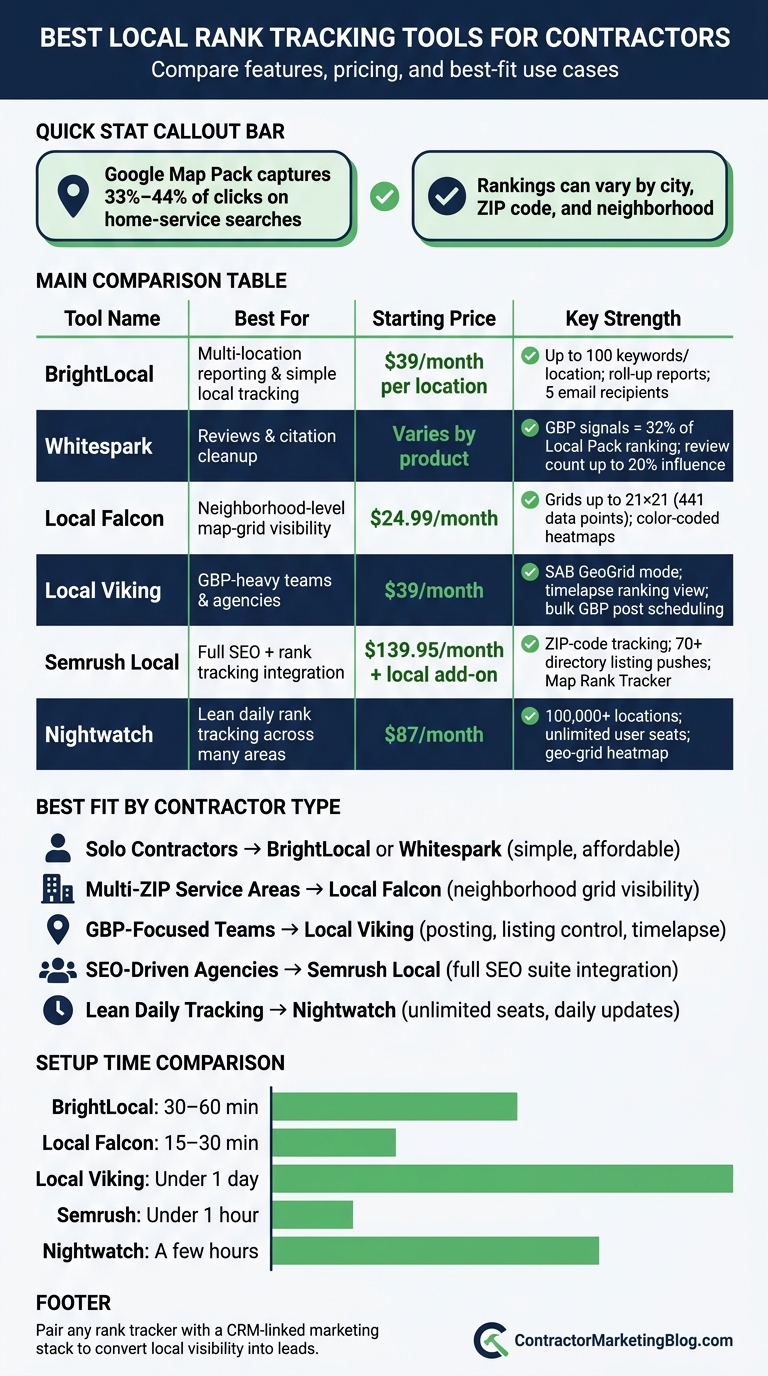
Best Local Rank Tracking Tools for Contractors: Side-by-Side Comparison
| Tool | Best For | Main Focus | Starting Price |
|---|---|---|---|
| BrightLocal | Simple local tracking for single or multi-location contractors | Search, Maps, grids, scheduled reports | $39/month per location |
| Whitespark | Reviews and citation cleanup | Reviews, citations, local visibility | Varies by product |
| Local Falcon | ZIP code and neighborhood map-grid checks | Geo-grid heatmaps and area scans | $24.99/month |
| Local Viking | GBP-heavy teams and agencies | GeoGrid tracking, GBP posts, listing control | $39/month |
| Semrush Local / Position Tracking | Contractors tying rankings to SEO work | Local tracking plus SEO reporting | $139.95/month + local add-on |
| Nightwatch | Lean daily rank tracking across many areas | Daily rank tracking and reports | $87/month |
If you want a tool that matches your service area, reporting needs, and team setup, the breakdown below makes the tradeoffs easy to see.
BrightLocal centers on two main tools: Local Rank Tracker and Local Search Grid. Together, they show where you rank in Google Search, Google Maps, and Bing.
Most contractors can get BrightLocal up and running the same day, often in 30 to 60 minutes per location. The setup is pretty simple. Add your business location, pick a report frequency and time zone, enter local keywords like roof repair Dallas or HVAC installation Phoenix, and, if you want, add up to four competitors for comparison.
Local Rank Tracker supports up to 100 keywords per location and tracks desktop and mobile Google Search, Google Maps, Local Pack, Local Finder, and Bing. Local Search Grid adds another layer by showing rankings across a service area instead of giving you just one averaged position.
That matters for contractors. One single ranking can hide a lot. You might rank well on one side of town and slip on the other, and the grid makes that easier to spot.
BrightLocal works well for service-area contractors that don't have a storefront. Each report can be tied to a city or ZIP code search location. You can set the grid size and distance in miles or meters, then move the grid to different parts of your territory.
So instead of guessing where your visibility drops, you can see it on the map. That makes it easier to spot strong areas, weak spots, and where to put your next push.
Scheduled reports can run weekly or monthly and be emailed to up to five recipients. That's a good fit for owners, office managers, marketers, and consultants who all need the same numbers without chasing updates.
Multi-location contractors can also use Roll-Up reports to combine rankings from several branches into one view. And if you're sending reports to clients under your own brand, white-label reporting is available.
Pricing starts at $39/month per location, or $29/month billed annually, on the Track plan.
BrightLocal stands out for contractors who want broad local visibility, simple reporting, and multi-location tracking. If your next focus is citation work and local visibility beyond rank grids, Whitespark is the next tool to look at.
Whitespark is a strong pick for contractors that need citation tracking, review monitoring, and a clear view of local search performance. Where BrightLocal leans more toward broad rank tracking, Whitespark puts more weight on reviews and citations.
Its Local Search Ranking Factors Survey spells out what has the biggest impact on Local Pack visibility. In the 2026 survey, Google Business Profile signals account for about 32% of Local Pack ranking influence. Reviews make up 16%–20%, and review count alone can reach up to 20%.
That has a direct business impact. 31% of consumers only hire contractors with a 4.5-star rating or higher. So review monitoring isn't just about rankings. It also shapes whether a lead turns into a phone call, estimate request, or signed job.
For contractors, Whitespark is often used for:
It works best when rankings, reviews, and citations all need attention at the same time. For contractors trying to connect search visibility with stronger review growth, Whitespark makes a lot of sense.
Local Falcon maps rankings across your service area with a color-coded heatmap: green means strong visibility, red means little or none. For contractors, that makes the picture easy to read. You can spot which ZIP codes are bringing in calls and which areas need work. It’s at its best when neighborhood-level visibility matters more than one citywide ranking.
Most contractors and agencies can go from signup to a first useful scan in 15–30 minutes. Setup usually means connecting your Google Business Profile, picking a local keyword like "HVAC repair near me," choosing a grid size and radius, and running the first scan. Multi-location setups take more time, but the process stays simple.
Grid sizes range from 3×3 to 21×21, and you can adjust the radius from about 0.5 miles to 50+ miles. At the top end, a 21×21 grid gives you 441 data points across your service area. Each point acts like a real search from that spot, so you can see where you show up strong and where you don’t.
Local Falcon also shows how often you appear in the local 3-pack and how your average visibility shifts across the grid. That’s a lot easier to walk through with a contractor owner than handing over a pile of raw ranking data.
Local Falcon works for service-area businesses, even when the Google Business Profile address is hidden. You can set the scan center to a point that fits your service area, like a key neighborhood or high-value ZIP code, instead of being tied to a public business pin. That gives you room to track visibility across cities, neighborhoods, suburbs, or even entire states.
Reports export as PDF or CSV, and public links let clients view scans without a login. White-label reporting is on Premium plans, so agencies can brand heatmaps for contractor clients.
Falcon AI turns scan results into prioritized fixes, such as Google Business Profile issues or citation problems that may hurt visibility. It also connects with Looker Studio, Zapier, and n8n, which makes it simple to send ranking data into dashboards or CRMs next to lead volume and job revenue. If you want more scheduling and multi-location management, compare Local Viking next.
Pricing is credit-based:
| Plan | Monthly Price | Credits/Month | Key Features |
|---|---|---|---|
| Starter | $24.99 | ~7,500 | Falcon AI, Looker Studio, Zapier |
| Basic | $49.99 | ~15,150 | Falcon AI, Looker Studio, Zapier |
| Pro | $99.99 | ~31,250 | API access, multi-location tracking |
| Premium | $199.99 | ~63,150 | High-volume scanning, white-label |
Local Viking is built for Google Business Profile (GBP) management and GeoGrid rank tracking. That makes it a strong pick for contractors who depend on GBP for calls and leads. Local Falcon leans more into scan detail. Local Viking adds GBP management and posting tools on top of that.
For 1–3 locations, setup usually takes less than a day, and first scans are often ready within hours. The process is simple: connect your GBP listings, pick a grid size, and turn on service-area business (SAB) mode if you need it.
Local Viking runs searches from many GPS points across a chosen area. You set up a grid - usually 5×5 or 7×7 - around a main address or service-area centroid, choose a radius, and run scans for each keyword. For most U.S. contractors, that radius is usually 5 to 10 miles.
One of the handiest parts is the timelapse view. It shows ranking movement over time, so you can see what happened after a review campaign, a citation push, or a content update. ATGR, AGR, and SoLV turn all that grid data into trend lines that are much easier to read.
Local Viking also tracks organic SERP positions alongside Maps rankings. So if your team is working on on-page SEO and GBP at the same time, you can watch both from one dashboard. That’s useful when rankings shift and you need posting, listing edits, and SEO work lined up in one place.
Local Viking’s SAB mode works for service-area businesses with hidden GBP addresses. SAB GeoGrid scans don’t use separate credits, which helps keep frequent scans across big territories from getting too expensive. If you manage a mix of public-address offices and hidden-address locations, you can handle them from one dashboard.
White-label reporting and embeddable GeoGrid widgets are included on Pro plans and above. That lets agencies brand heatmaps and share them with contractor clients directly. Teams also get bulk GBP post scheduling with spintax and chained post scheduling, so they can push different content versions across many locations without repeating the same post word for word.
Attribute Sentry automatically reverts unauthorized edits to GBP listings. In plain English, it helps teams keep tighter control as they add more locations and more people touch the account.
Pricing is based on the number of listings:
| Plan | Monthly Price | Listings | White-Label |
|---|---|---|---|
| Single | $39 | 1 | No |
| Starter | $59 | 10 | No |
| Pro | $99 | 20 | Yes |
| Agency | $149 | 40 | Yes |
| Enterprise | $200 | 70 | Yes |
If you need rank tracking tied more closely to SEO reporting and keyword research, Semrush Local / Position Tracking comes next.
Semrush adds local rank tracking to a broader SEO suite, which is a big deal for contractors that want to tie visibility back to keywords, content, ads, and analytics. If local rankings affect SEO plans, paid campaigns, and client reports, that connection helps a lot. In plain English: it works well when rank tracking needs to support bigger marketing calls.
Setup is pretty fast. Most contractors can get a tracking campaign live in under an hour.
The process is straightforward:
Position Tracking monitors rankings down to the ZIP code level, which matters when lead flow changes from one part of town to the next. You can set up separate campaigns for different ZIP codes or cities and filter reports for queries that trigger local pack results.
Semrush Local’s Map Rank Tracker adds a geo-grid heatmap, so you can see how your Google Business Profile ranks across streets and blocks inside your service area. Put those pieces together, and you get a clear view of where you show up well and where rankings start to slip.
Semrush Local supports service-area businesses through its Listing Management tool, which can push NAP, hours, and categories to 70+ U.S. directories. You enter your business details once, then the platform pushes updates across those directories.
ZIP-code and neighborhood-level tracking also fits contractors that work by service radius or postal code instead of relying on a storefront address. That setup makes branch-by-branch or territory-by-territory reporting easier too.
Reports cover keyword rankings, local pack presence, map heatmaps, citation status, and review analytics, with filters for location, keyword group, and SERP feature. Teams can watch daily ranking shifts, catch drops early, and use that data to find lead gaps or decide which service areas need attention first.
For contractors using Estatehub, Semrush data can feed SEO and CRM workflows.
Pricing follows two tracks: the core SEO toolkit, which includes Position Tracking, and a separate per-location Local Toolkit add-on.
| Plan | Monthly Price | Tracked Keywords/Day | Projects | Notes |
|---|---|---|---|---|
| Pro | $139.95 | 500 | 5 | Core SEO toolkit |
| Guru | $249.95 | 1,500 | 15 | Core SEO toolkit |
| Business | $499.95 | 5,000 | 40 | Core SEO toolkit |
| Local Base | about $30/location | - | - | AI-assisted GBP management, review auto-replies, about 375 Map Rank Tracker credits/month |
| Local Pro | about $60/location | - | - | Listing management, review generation, advanced GBP tools, about 1,225 Map Rank Tracker credits/month |
If you need simpler rank tracking without the broader SEO suite, Nightwatch is next.
Nightwatch is a lighter option for contractors who want rank tracking only, not a full SEO platform. It fits teams that need to watch rankings across multiple ZIP codes or service areas. The platform tracks daily across Google, Google Maps Pack, and Bing, and it saves ranking snapshots so you can look back at trends over time.
Most contractors can get set up in a couple of hours. The process is pretty simple: create a project, add your website and Google Business Profile, then assign keywords to each city or ZIP code. After that, daily updates keep your visibility data current for every location you track.
Once tracking starts, Nightwatch shows how your visibility shifts across your service area. It tracks rankings in more than 100,000 locations worldwide, down to ZIP codes and GPS coordinates. You can track organic rankings and Local Pack positions separately, which makes it easier to tell whether a drop comes from your site or from your Google Business Profile.
Its geo-grid feature adds another layer. You can map up to about 100 GPS points across a service area and see the results in a color-coded heatmap - green for stronger visibility, red for weaker visibility. That makes it much easier to spot dead zones instead of guessing from one city-level ranking.
Nightwatch also works well for service-area contractors that don't have a storefront. It simulates searches from a chosen city, ZIP code, or GPS coordinate, so you can see how you appear across your territory even when your address is hidden in Google Business Profile. That ZIP-level view can help contractors decide where to put more effort into SEO, GBP work, and review building.
For agencies and in-house teams, a big draw is shared access and automated reporting. Nightwatch includes unlimited user seats on paid plans, so owners, office managers, and outside agencies can all log in to the same account without extra seat fees. Automated reports can be scheduled and emailed, with ranking changes summarized for each tracked location.
White-label reports and Looker Studio integration are included on Professional plans and above, which is useful for marketing partners handling contractor accounts.
Pricing starts at about $87/month for the Starter plan. That includes around 500 keywords, about 5 websites, and tracking for Google, Bing, YouTube, and Maps. Professional is about $175/month for around 2,500 keywords and 25 websites, plus white-label reports and Looker Studio integration. Agency is about $439/month for around 7,500 keywords and 100 websites, with higher AI prompt allowances and a dedicated manager. Enterprise pricing is custom, with 20,000+ keywords and unlimited websites.
| Plan | Approx. Monthly Price | Keywords | Websites | Notable Features |
|---|---|---|---|---|
| Starter | ~$87/month | ~500 | ~5 | Google/Bing/YouTube/Maps tracking, unlimited user seats |
| Professional | ~$175/month | ~2,500 | ~25 | White-label reports, Looker Studio integration |
| Agency | ~$439/month | ~7,500 | ~100 | Dedicated manager, higher AI prompt allowance |
| Enterprise | Custom | 20,000+ | Unlimited | 20,000+ keywords, unlimited websites |
These tools tackle different contractor needs, so the right pick comes down to what matters most in your day-to-day work. The main things to weigh are service-area coverage, GBP visibility, reporting, and review monitoring. Put simply: choose the tool based on the job you need it to handle.
| Priority | Best Fit | Main Tradeoff |
|---|---|---|
| Multi-location reporting | BrightLocal | Less geo-grid depth than Local Falcon |
| Reviews and citation cleanup | Whitespark | Lighter rank tracking than other tools |
| Neighborhood-level grid visibility | Local Falcon | Fewer GBP management features |
| GBP workflows and posting | Local Viking | More operational complexity |
| Full SEO and rank tie-in | Semrush Local | Higher cost and steeper learning curve |
| Lean daily rank tracking | Nightwatch | Fewer local SEO extras |
Here’s the quick read:
Next, the conclusion narrows these tradeoffs to the best fit by contractor type.
Pick the tool that fits your company size and reporting needs.
Solo contractors do best with BrightLocal or Whitespark. Both keep local rank tracking simple.
As route density grows and service areas spread, map-based tracking matters more. Companies covering many ZIP codes get the clearest picture from Local Falcon, since its map-grid view shows where rankings drop across a service area.
Multi-location contractors and agencies scale better with Local Viking, Semrush Local / Position Tracking, or Nightwatch. Owners, investors, franchise partners, and outside marketing teams that need white-label reporting should look at BrightLocal, Whitespark, and Local Viking. Teams that want CRM-linked workflows get more mileage from Semrush Local / Position Tracking and Nightwatch.
Pair any rank tracker with Estatehub to turn local visibility into leads: SEO to close ranking gaps, Google Ads to fill in where organic can't reach, website improvements to convert the traffic that arrives, and CRM-driven follow-up to turn that traffic into booked jobs.
One assumption: the source text just said "paid ads," so I linked Google Ads rather than Facebook Ads since rank tracking and search intent pair more naturally with search ads. Swap it for Facebook Ads, or link both, if that's not the read you want.
Contractors should check local rankings on a regular basis - ideally every day, or at least a few times per week. That way, they can spot changes fast and keep an eye on their visibility in local search results, including the map pack.
City rankings show how visible you are across a larger area, like a city, state, neighborhood, or ZIP code.
Map-grid tracking goes a level deeper. It splits map-pack results into smaller points on a map, so you can see how rankings shift block by block or by exact location.
Yes. Service-area businesses can still track local rankings without a public street address.
They do it with location-based rank tracking that simulates searches from specific cities, ZIP codes, or neighborhoods. So even if the business hides its street address, it can still see how it shows up in local results across the area it serves.
Some tools use proxies or browser cookies to detect search location. And grid or heatmap views make this easier to read by showing map-pack visibility across an area.
Sign up for the newsletter and be the first to read our articles.


Every single person on our agency team has spent a lot of time in the field either running their own business or working for larger marketing agencies. We have all put in the time responding to leads, helping customers, scheduling and doing services. This gives us a massive advantage when making decisions.
One thing that has always been very special to us, is the fact that (excluding spam / people that never used our services) we do not have any bad reviews. This absolutely does not mean we have never had unhappy clients, but if it happens, we make it right, and stand behind our promises.
We have seen, time and time again, other agencies using strategies and structuring campaigns the way that they are technically supposed to. Most of these "best practices" that are taught in our industry, simply do not transfer into local lead gen. This is partially because we do have a much different target audience, and are typically spending less, however optimizing for website traffic does not work here.
We have been there, jumping into starting a home service business, struggling, and doing everything wrong. It's humbling. Our team has all felt the highs and lows, which is why we get so excited for our clients to win, we know how good it feels.

Estatehub is not a normal agency, we know "clicks" don't get you sales. Let us show you how lead gen experts do it.

