
The best multi-city SEO setup depends on how your business serves each market, not how many city pages you can publish.
If you serve customers across several cities, you usually have five main options: a revenue-tracked program, office-based city pages, service-area city pages, a hub-and-spoke setup, or template-based geo pages. The right choice depends on your service radius, local proof, site control, and whether you can track calls, forms, booked jobs, and revenue by city.
This article covers each approach by looking at:
- Local ranking potential
- Scale across multiple cities
- How much city-level copy each page needs
- How to track leads and ROI
It also points out a few hard numbers that matter. In one 2025 case study, organic search produced a 50% consultation-to-job close rate, compared with 11% from Meta ads. Another program drove $244,000 in organic revenue on an $18,000 annual spend, or 13.6x ROAS.
The Multi Location SEO Mistake Costing Contractors Calls
Quick Comparison
| Approach | Best Fit | Ranking Focus | Scale | Content Need | Tracking Focus |
|---|---|---|---|---|---|
| Estatehub-supported program | Companies that want SEO tied to revenue | Organic + local intent | Medium | High | Calls, forms, jobs, revenue by city |
| City-specific location pages | Businesses with actual offices in each city | Strong city-level organic results | Low | Very high | Page-by-page attribution |
| Service-area city pages | Contractors serving nearby cities without offices there | Organic, not map pack | High | Medium | Lead and revenue by city |
| Hub-and-spoke architecture | Regional brands with many city pages | Regional hub + city spokes | High | High | Hub traffic plus spoke conversions |
| Template-driven geo pages | Franchises or CMS-limited sites | Depends on local detail added | Very high | Low at first, then more support content | Call tracking and CRM matching |
The main takeaway is simple: only target cities you can actually serve and prove. That keeps your pages from turning into thin local copy and helps your leads turn into jobs instead of wasted spend.
1. Estatehub-Supported Multi-City SEO Programs

Estatehub treats multi-city SEO like a revenue system, not a traffic game. The focus is on local demand, conversion paths, and revenue tracking. That matters when success comes from booked jobs, not pageviews. From there, the next step is simple: decide how city-level content should be set up.
Local Ranking Potential
A city page should only go live when there’s measured local search demand and the business can actually serve that market. Estatehub lines up geographic signals, on-page elements, and internal linking with local intent, so each page goes after coverage areas the business can win in, not areas it merely wants.
Scalability
To grow across many service areas, Estatehub uses structured internal linking and a steady content cadence. That helps build authority across locations without leaning on repetitive copy.
Content Uniqueness
Each city page needs to match local intent. It can’t just swap one city name for another. Estatehub's Tailored Local SEO approach handles local listings and on-page elements for each community, so the page reflects service areas, local proof, and market-specific details. Once a city has enough demand to earn its own page, the next call is where that page fits in the site structure.
Lead Tracking and ROI
Estatehub connects HighLevel CRM to city-page leads, including calls, forms, booked estimates, and closed jobs, so each lead ties back to the market that produced it. That lets businesses track:
- Cost per lead
- Booked jobs
- Close rate
- Revenue by city
With that data, it’s much easier to see which markets deserve more budget and attention. If a market has earned its own page, the next model to look at is the direct city-page structure.
2. City-Specific Location Pages
When a business has an actual office in a market, city pages get a lot more punch. This setup works best for home service companies with real branch locations in each city they serve.
Local Ranking Potential
These pages do best when they show proof that the business is part of the area. Simply dropping the city name into the title tag isn't enough. A solid city page should mention local neighborhoods and issues people in that area deal with, like galvanized pipes or hard water. At a minimum, put the city name in both the title tag and the H1.
Scalability
Scale is the big constraint here. Each page needs its own local angle, or the whole thing starts to feel copied and thin. A hub-and-spoke setup can help connect these pages without repeating the same long explanation on every one. And when a company needs to tie a lot of city pages together, site structure becomes the next big piece.
Content Uniqueness
The best city pages include local reviews and a map for the branch or service area. That kind of proof matters. Businesses with 50+ reviews convert 3x more leads than those with fewer reviews. Trust badges and licensing certifications can also increase conversions by 18%.
Lead Tracking and ROI
Every city page should have a sticky click-to-call button. That's not a nice-to-have. It's basic conversion design. With 64% of plumbing and home service leads coming through mobile devices, a phone number hidden halfway down the page can cost you calls.
Speed matters too. A slow page leaks leads. And a lot of sites have this problem: 68% of plumbing websites fail to load in under 3 seconds, which can cost up to 40% of potential leads. This approach makes the most sense when the business has a physical local presence. Service-area businesses usually need a different page structure.
3. Service-Area City Pages
When a contractor works in several cities but doesn't have an office in each one, service-area city pages make sense. These are landing pages for nearby cities you serve, even without a street address there. And that changes how they work.
Unlike branch pages, these pages don't lean on a local office. They lean on proof that you serve the area.
Local Ranking Potential
A well-built service-area city page can still do a lot of work in search. In many cases, it can land on page one for long-tail local terms, especially in suburbs, smaller cities, and niches that aren't packed with competitors.
That includes searches like "AC repair in Frisco, TX" or "roof replacement near Naperville, IL."
The catch is the local pack. If you don't have a physical address in that city, these pages usually won't move the needle much in map results. Service-area listings also tend to perform best closest to the main office.
So the best way to think about these pages is simple: they're an organic search play, not a map-pack play.
Scalability
Most single-location home service contractors can keep 10–50 service-area city pages in good shape, based on team size, service area, and demand.
Go much past that, and things can get messy. Pages often get thin. Updates slip. Quality drops.
It's smarter to focus on cities where you already have:
- past jobs
- search demand
- local proof
As the page count grows, site structure starts to matter more than just publishing more pages.
Content Uniqueness
This is where a lot of contractors phone it in - and it shows.
A good target is 30–50% unique copy on each city page. That means the page should speak to that city in a way that feels grounded, not swapped in with a find-and-replace job.
Use details like local neighborhoods and ZIP codes. Mention city-specific issues, like clay soil in Dallas or freeze-related pipe bursts in Minneapolis. Add one short project example with real specifics.
That's the kind of detail that helps a page feel tied to a place instead of floating in space.
Lead Tracking and ROI
Each service-area city page should have its own call tracking number and a conversion goal set up in Google Analytics.
For paid traffic, tag visits with UTMs. Then track leads by city and report on:
- close rate
- average job size
- revenue by market
That city-level view shows which places are worth more site depth and stronger internal linking.
sbb-itb-2aa0348
4. Hub-and-Spoke Regional Architecture
When service-area pages start to pile up, a hub-and-spoke setup helps keep the site clean without watering down local signals. The idea is simple: build one regional hub page, then connect it to spoke pages for each city or neighborhood.
Local Ranking Potential
The hub can rank for regional searches. The spokes go after city-level terms. When you link them together well, they can support one another instead of acting like separate pages fighting for attention.
Scalability
You can add new cities as spokes without wrecking the site structure. That’s a big step up from a flat list of service-area pages, where each page can end up sitting on its own with little connection to anything else. For this setup to work, the hub and every spoke need clear roles.
Content Uniqueness
The hub should handle shared service details and regional trust signals. The spokes should focus on city-level proof, such as:
- local neighborhoods
- service examples tied to that city
- location-specific photo file names
That split helps keep the hub from becoming too packed and the spokes from feeling too thin.
Lead Tracking and ROI
Track the hub page for regional search performance and the spokes for city-level conversions. Then look at consult-to-job close rates by market so you can see which cities and service lines are bringing in revenue.
In a 2025 case study, The FS Agency tracked an organic content program for a South Florida luxury home services franchisee built around locally-researched blog posts, YouTube videos, and Google Business Profile content; it generated $244,000 in organic revenue on an $18,000 annual spend, producing a 13.6x ROAS and a 50% consultation-to-job close rate. That sits above the typical 5x to 12x ROAS benchmark for home services SEO.
"Organic search captures buyers who are already in a decision-making mindset - they searched for a solution and found the business." - Amber S. Hoffman, Founder & CEO, The FS Agency
For teams that need faster page production, template-driven geo landing pages take a different route.
5. Template-Driven Geo Landing Pages
This is the speed-first play in multi-city SEO. Template-driven geo landing pages use one shared page layout, then repeat it across cities with local details swapped in.
You’ll see this a lot in franchise systems and locked CMS setups, where design and technical settings are hard to change. The catch is simple: a plain template with only light city swaps usually won’t earn much organic visibility on its own.
Local Ranking Potential
A template page can rank, but only if you add enough local detail on top of the base layout.
That usually includes:
- FAQ-style sections
- Schema markup
- Locally researched titles
- Neighborhood references
- Location-named image files
- Supporting local content
Without that extra layer, the page tends to look thin.
Scalability and Content Uniqueness
Template pages scale fast because the framework is already there. Adding a new city often means plugging in local variables instead of building a page from zero.
But that doesn’t mean the work is done. The heavy lift moves to the content layer. Each city needs its own blog posts, Google Business Profile signals, and location-specific media to avoid thin content problems.
Once the template is live, the main job is making each page feel local without drifting into duplicate territory. A good way to handle that is to treat each city’s support content - blogs, videos, and Google Business Profile posts - as the main point of separation. Neighborhood references and location-named image files also help search engines tell one city page from another.
Lead Tracking and ROI
Each template page should have its own call tracking number and city-level conversion goals.
Basic analytics often miss phone leads, so ROI reports are often conservative. Track leads by city, then look at close rate, average job size, and revenue by market. That makes it easier to see which locations deserve deeper content investment.
That speed comes with a heavier content load, which the comparison below breaks down.
Side-by-Side Comparison: Ranking, Scale, Content, and ROI
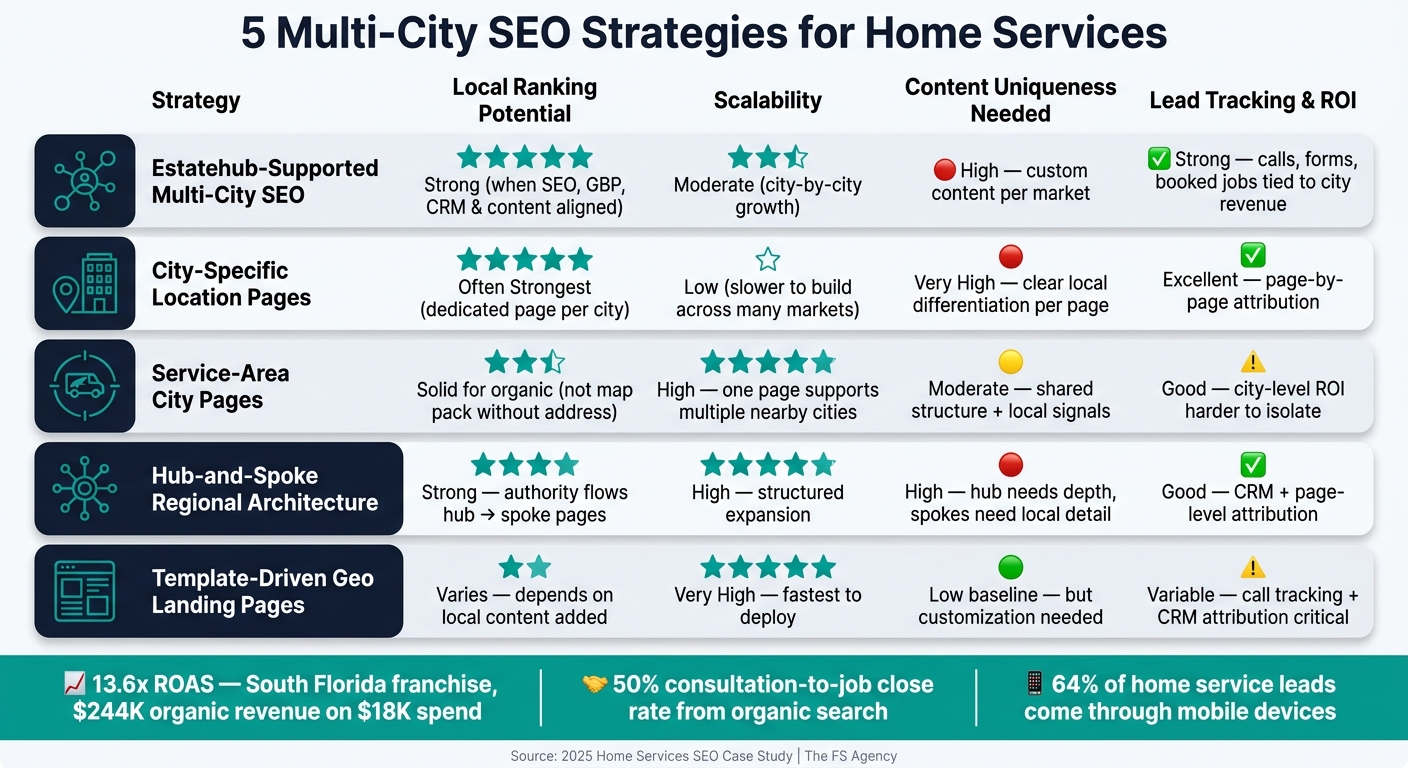
5 Multi-City SEO Strategies for Home Services: Side-by-Side Comparison
These five approaches all juggle the same four things: local fit, scale, content workload, and measurement. Some give you stronger city-level ranking signals. Others are much easier to roll out across a big service area. And some look good on paper until you try to track what each page actually brings in.
Here’s the side-by-side view:
| Approach | Local Ranking Potential | Scalability | Content Uniqueness Needed | Lead Tracking & ROI |
|---|---|---|---|---|
| Estatehub-Supported Multi-City SEO | Strong when SEO, content, Google Business Profile, and CRM data are aligned | Moderate - growth can be managed city by city | High - each market benefits from custom content | Strong when calls, form fills, and booked jobs are tied back to city-level revenue |
| City-Specific Location Pages | Often strongest when each city gets a dedicated page | Low - slower to build across many markets | Very high - each page needs clear local differentiation | Excellent when attribution is mapped page by page |
| Service-Area City Pages | Solid for broader local coverage | High - one page can support multiple nearby cities | Moderate - shared structure with local signals | Good, though city-level ROI can be harder to isolate |
| Hub-and-Spoke Regional Architecture | Strong because authority can flow from a central hub to supporting pages | High - easier to expand in a structured way | High - the hub needs depth and the spokes need local detail | Good with CRM and page-level attribution in place |
| Template-Driven Geo Landing Pages | Varies based on how much local content is added | Very high - quickest to deploy | Low baseline, but more customization is needed for stronger local relevance | Variable - call tracking and CRM attribution matter more here |
ROI is where the gap between these models starts to show. In home services, organic SEO often lands between 5x and 12x ROAS, and one South Florida franchise brought in $244,000 in organic revenue over 12 months on an $18,000 budget. That worked out to a 13.6x ROAS.
That kind of result didn’t happen by luck. The business tracked calls, form fills, booked consultations, and close rates by city, then matched those outcomes to specific landing pages inside the CRM. That matters because phone calls drive a lot of home service conversions, yet they’re often missed in reporting.
Close rate is the gut check. It tells you whether the leads are just coming in or turning into jobs. Premium organic leads can hit a 50% consultation-to-job close rate, and organic search leads can convert at up to 4.5x the rate of paid social leads.
For cost per lead, the math is simple:
CPL = total spend ÷ appointments generated.
That sets up the pros and cons below.
Pros and Cons of Each Approach
No single setup works for every home service business. The right pick comes down to a few practical things: your service radius, how many markets you serve, what your CMS lets you do, and how much content your team can keep producing.
The table below shows where each setup works best, where it can get tough, and which business type tends to get the most out of it.
| Approach | Best Advantages | Key Drawbacks | Best-Fit Business Type |
|---|---|---|---|
| Estatehub-Supported Multi-City SEO | Aligns SEO, GBP, CRM, and content around revenue | Requires ongoing content production and cross-channel coordination | Growing home service providers and franchises that want a managed growth strategy |
| City-Specific Location Pages | Strong local signals when each city gets unique content | Harder to maintain as market count grows | Businesses with a small set of target cities and enough content capacity |
| Service-Area City Pages | Covers a broad service radius efficiently | City-level performance can be harder to isolate | Providers serving a broad metro area or multiple nearby cities |
| Hub-and-Spoke Regional Architecture | Authority flows from a central hub to supporting city pages | Locked CMS access can rule out this option | Regional operators and franchises with flexible site access |
| Template-Driven Geo Landing Pages | Scales quickly across many markets | Thin content underperforms without meaningful local signals | Organizations that can maintain frequent content output |
This is where the tradeoffs start to matter. A business serving three nearby cities may do well with city-specific pages. But a company spread across dozens of markets might need a more scalable setup, even if each page gets a bit less local detail.
In plain English: the best structure is the one that matches your markets, your control over the site, and your team’s ability to keep the pages useful over time.
Conclusion
After looking at ranking potential, scale, content needs, and ROI, the answer comes down to fit. The best multi-city SEO setup depends on four practical things: where you actually serve, your true service radius, how much content your team can produce and keep up to date, and which cities are most likely to bring in profit.
Your page setup should match how your business runs. That could mean one service radius, one office, several branches, or a franchise network. The right setup is the one your market coverage, site control, and content capacity can support.
There’s one rule that applies across the board: only build a city page you can actually back up.
If your team can’t cover a city with local proof, recent jobs, and actual service coverage, a page aimed at that city may bring in leads that are tough to close and expensive to serve. And that’s where this stops being an SEO problem and starts becoming a business problem.
For teams that want a managed, revenue-focused approach, Estatehub is a fit for businesses that want SEO tied directly to revenue tracking.
FAQs
Which multi-city SEO setup fits my business?
The right multi-city SEO setup depends on your size, budget, and service area. For a lot of businesses, a hub-and-spoke model is a smart place to start.
Here’s the basic idea: build one main service page, then link it to separate city or neighborhood pages built for each area you serve.
That said, don't crank out generic templates and call it a day. That's where things often go sideways. Each page should include local details that fit the area, so the content feels specific instead of copied and pasted.
If you don't have a storefront, define your service areas in your Google Business Profile. And if you're a smaller business, start small. Focus on a few high-potential regions first, then expand once those pages are in place and doing their job.
How many city pages should I create?
Create city pages only where you have real demand, documented job history, and enough local proof to make each page stand on its own.
Don’t build a page for every place you could serve. Build pages for the places where you can show clear value.
For some businesses, that may mean focusing on 2–3 core regions. For others, it may make sense to target up to 20 cities or ZIP codes within a two-hour drive.
The main idea is simple: keep your city pages tied to places where you have both market demand and enough local evidence to make each page different, useful, and worth publishing.
How do I track ROI by city?
Track ROI by city by tying leads straight to your geo-targeted campaigns, not just rankings or traffic. In Google Analytics, set up geo-specific views so you can compare performance by city or county side by side.
Then use Estatehub’s CRM and ad reports to track leads, return on ad spend, and cost per lead by city or ZIP code. That makes it much easier to move budget toward the areas that bring in the best results.
Related Blog Posts

Sign up for the newsletter and be the first to read our articles.