

Overview of Common Stains
Full overview of the most common stains, including how to identify them and treat them
If you judge marketing by leads alone, you can back the wrong channels. A home service business turns only 7.8% of leads into customers on average in 2026, so the channel with the lowest lead cost is not always the one that brings in the most booked revenue.
Here’s the short answer: you should track both first-touch and last-touch attribution at the booked-job level. First-touch shows which channels start demand. Last-touch shows which channels help close it. That side-by-side view makes it easier to judge spend by cost per booked job, not just cost per lead.
You can boil the article down to this:
| Model | What It Credits | Best For | Main Weak Spot |
|---|---|---|---|
| Lead attribution | Calls and form fills | Measuring inquiry volume | Ignores booked revenue |
| Revenue attribution | Booked jobs and job revenue | Judging spend by sales outcome | Needs CRM tracking to closed jobs |
| First-touch | First interaction | Finding channels that start interest | Misses later closing touches |
| Last-touch | Final interaction before booking | Finding channels that close jobs | Can over-credit bottom-funnel channels |
A simple example shows why this matters: a $45 lead that books at 15% costs $300 per booked job, while a $35 lead that books at 25% costs $140 per booked job. That is the difference between looking at lead volume and looking at revenue.
The rest of the article explains how to record both attribution models, how to read the gap between them, and how to use that data in your CRM to spend on channels that bring in booked work.
With first-touch attribution, 100% of the credit for a booked job goes to the first interaction a homeowner had with your business. If someone clicked a Google Ad and later booked a job, that first interaction gets full credit for the revenue.
For digital traffic, first-touch UTMs record the original source. For offline calls, unique tracking numbers do the same job. In your CRM, keep the first lead-source tag in place all the way through booking and job completion.
First-touch works best for channels that introduce your business before a homeowner searches for you by name. That includes SEO, social media, direct mail, and top-of-funnel Google Ads.
This matters a lot for contractors in local markets, where homeowners often visit, leave, compare options, and come back later. In that kind of buying path, first-touch helps you see which channels spark interest early. But it doesn't tell you which channel got the job across the line.
The biggest gap in this model is simple: it ignores everything that happens after the first interaction. A homeowner might see a social ad first, then come back weeks later through branded search or retargeting before calling to book.
That means channels that help close the sale - like branded searches or review checks - can disappear from a first-touch report, even when they play a big part in driving revenue.
First-touch shows which channels start the journey; last-touch shows which ones finish it.
If first-touch tells you how a homeowner found you, last-touch tells you what pushed them to book.
Last-touch attribution gives 100% of the credit for a booked job to the final interaction before booking, and every earlier touch gets zero credit. That’s why this model can look clean on the surface but still miss part of the story. Many ad platforms and basic CRMs use last-touch by default, which can make booking channels look stronger than they are. And if your CRM doesn’t pull in call data along with click data, the view gets even thinner.
Last-touch works best when the time between first contact and booking is short.
That’s common with urgent service calls, like no-heat issues or burst pipes. In those cases, the homeowner often moves fast. They search, they call, they book. The final step may, in fact, be the step that matters most. The buying cycle can be just a few minutes, so the last search or phone call may tell the whole story.
That matters even more in home services, where phone leads convert at 46%, and 37% of those close on the very first call.
Things get messy when the homeowner takes days, weeks, or even months to decide.
Picture this: a homeowner sees a Meta ad in March, searches your brand on Google in April, and books a system replacement in July. Last-touch gives all the credit to branded search, even though earlier marketing may have done the heavy lifting by putting your name in their head in the first place.
This is where teams can get fooled. A contractor may look at the numbers and decide LSAs or branded search drive all the revenue, when those channels may just be closing demand that was built earlier. Put simply: use first-touch to spot demand creation, and last-touch to spot closers.
The danger is pretty simple. You cut spend on awareness because last-touch doesn’t show what that spend did. If Meta ads or SEO content never appear as the final touch, they can look like dead weight, even when they warmed up the lead and made the later branded search convert.
Next, compare both models at the job level to see where credit moves from one channel to another.
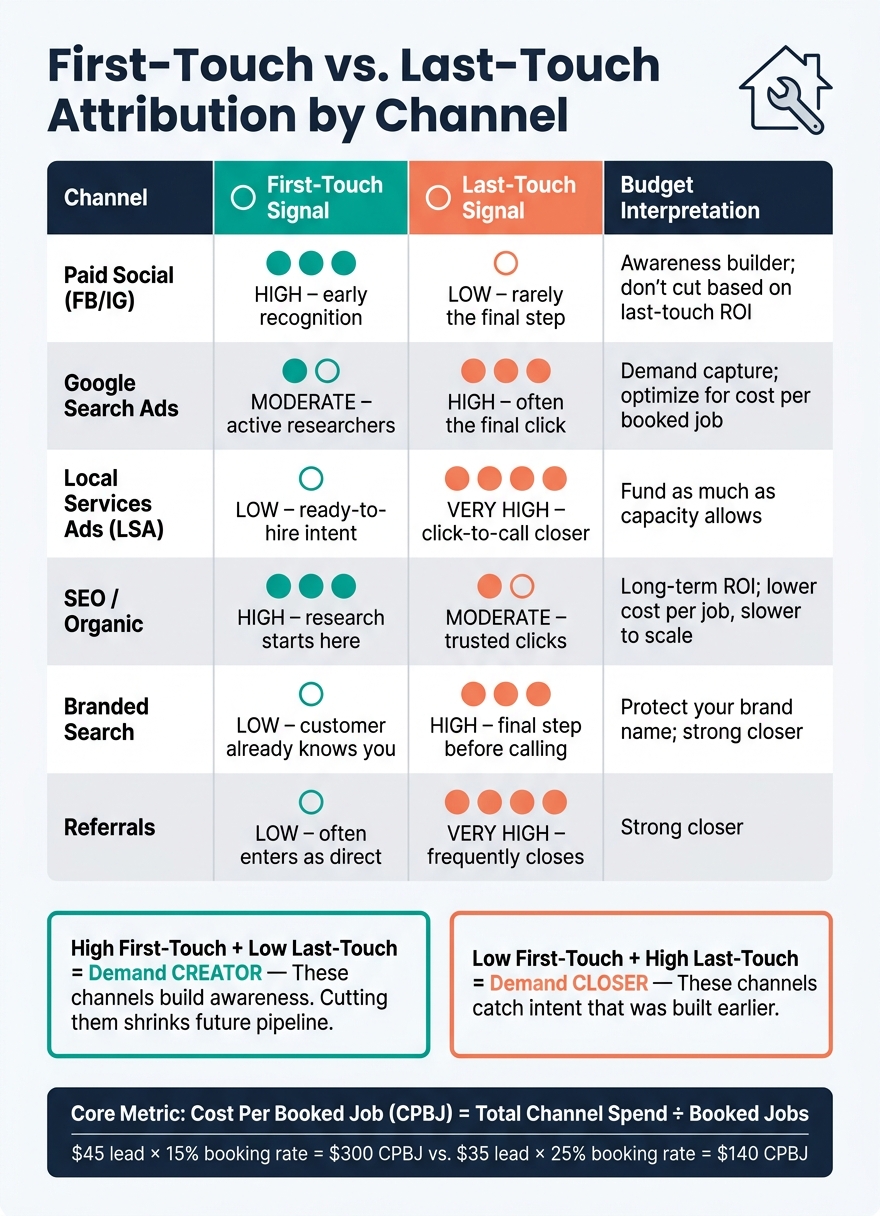
First-Touch vs Last-Touch Attribution: Channel Performance for Contractors
Running first-touch and last-touch side by side on booked jobs helps you see two different things at once: which channels start the path, and which ones finish it. That gap matters. If you look only at leads, it's easy to back the wrong channels. Booked revenue gives you a much better read on where your money is doing the job.
Tag every lead when it comes in. Use unique call tracking numbers, keep your UTMs consistent, and send source data into your CRM or FSM all the way through booking and job completion. At the record level, each lead should show:
That booked status is a big deal. Without it, you can't work out cost per booked job, which is simply total spend divided by booked jobs.
The gap between first-touch and last-touch helps you sort channels into three groups: starters, closers, or both.
| Channel | First-Touch Signal | Last-Touch Signal | Budget Interpretation |
|---|---|---|---|
| Paid Social (FB/IG) | High - early recognition | Low - rarely the final step | Awareness builder; don't cut based on last-touch ROI |
| Google Search Ads | Moderate - active researchers | High - often the final click | Demand capture; optimize for cost per booked job |
| Local Services Ads (LSA) | Low - ready-to-hire intent | Very high - click-to-call closer | Fund as much as capacity allows |
| SEO / Organic | High - research starts here | Moderate - trusted clicks | Long-term ROI; lower cost per job, slower to scale |
| Branded Search | Low - customer already knows you | High - final step before calling | Protect your brand name; strong closer |
| Referrals | Low - often enters as direct | Very high - frequently closes | Strong closer |
A channel with high first-touch and low last-touch is usually creating demand. A channel with low first-touch and high last-touch is usually catching demand that already exists.
This is where people get tripped up. A discovery channel can look weak in last-touch reporting, even when it's doing a lot of the heavy lifting. Social and non-branded search often show up early, not at the final booking step. So if you cut spend there just because last-touch gives them less credit, you can shrink the flow into branded search and direct traffic later.
For most small and mid-sized contractors, first-touch and last-touch side by side gives enough clarity to make better budget calls. But sometimes both the first and last touch matter a lot in the same sale. In that case, a simple position-based, or U-shaped, model can split credit between those two touches and give less weight to the middle interactions.
Think of that as a second step, not the place to begin. Start with the two single-touch models. Read the gaps. Then add a hybrid view only when the simpler side-by-side view stops giving you clear answers.
Once both models are in place, use them in your CRM to decide which channels should get more spend.
Once you’ve captured first-touch and last-touch at the job level, the next move is simple: don’t let that source data break as it moves through your stack.
If you want a clean comparison between first-touch and last-touch, the source needs to stay attached from the first call all the way to the closed job. If that link gets lost halfway through, your numbers stop telling the truth.
The minimum setup is pretty straightforward:
It also helps to pull calls and forms into one report. That way, you’re not looking at half the picture in one dashboard and the other half somewhere else. On top of that, your sales and dispatch teams need to label calls the same way every time so outcomes like booked, missed, and unqualified are tracked cleanly.
Assign separate tracking numbers to Google Ads, Local Services Ads (LSAs), your organic pages, and any other active channels. Then send those source tags straight into your CRM.
Once your source data is clean, judge spend by booked jobs, not leads.
CPL tells you what a lead costs. CPBJ tells you what a booked job costs. And for most contractors, that’s the number that matters more.
A sample monthly review might look like this:
| Channel | Monthly Spend | Booked Jobs | Cost Per Booked Job | Attributed Revenue | ROAS |
|---|---|---|---|---|---|
| Google Ads | $3,000 | 18 | $167 | $15,000 | 5.0x |
| Local Services Ads (LSA) | $1,800 | 24 | $75 | $12,000 | 6.6x |
| SEO / Organic | $1,500 | 10 | $150 | $9,000 | 6.0x |
| Yelp | $400 | 3 | $133 | $1,200 | 3.0x |
That kind of review should also include call outcomes like answered, missed, and unqualified, since missed calls still cost money and can push CPBJ higher.
First-touch shows which channels start demand. Last-touch shows which channels close it.
Track each lead all the way through to a closed job and recorded revenue in your CRM. That gives you the clearest view of attribution.
For home service businesses, sales cycles often stretch across weeks. So metrics like clicks or form submissions only tell part of the story. Closed-loop reporting ties that first ad click to the final payment, even when there’s a long gap in between.
Audit your tracking setup to find where marketing spend stops tying back to revenue. Start by standardizing your UTM parameters and giving each marketing channel its own phone number. That way, every lead gets tagged from the moment it comes in.
Next, connect your website analytics tool, such as GA4, to your CRM. Pass details like GCLID and UTM parameters through hidden form fields so those data points stay attached to each lead.
It also helps to do a monthly cleanup. Remove duplicates, fix broken tags, and update contact details so your reporting stays clean and usable.
First-touch tends to make top-of-funnel channels look stronger. Think social media ads or broad search campaigns. They introduce your brand and put you on someone’s radar.
Last-touch usually gives more credit to high-intent channels like branded search or direct website visits. Those channels often get the final conversion.
The catch is simple: if you use last-touch by itself, you can end up giving too little credit to the channels that kicked off the customer journey.
Sign up for the newsletter and be the first to read our articles.


Every single person on our agency team has spent a lot of time in the field either running their own business or working for larger marketing agencies. We have all put in the time responding to leads, helping customers, scheduling and doing services. This gives us a massive advantage when making decisions.
One thing that has always been very special to us, is the fact that (excluding spam / people that never used our services) we do not have any bad reviews. This absolutely does not mean we have never had unhappy clients, but if it happens, we make it right, and stand behind our promises.
We have seen, time and time again, other agencies using strategies and structuring campaigns the way that they are technically supposed to. Most of these "best practices" that are taught in our industry, simply do not transfer into local lead gen. This is partially because we do have a much different target audience, and are typically spending less, however optimizing for website traffic does not work here.
We have been there, jumping into starting a home service business, struggling, and doing everything wrong. It's humbling. Our team has all felt the highs and lows, which is why we get so excited for our clients to win, we know how good it feels.

Estatehub is not a normal agency, we know "clicks" don't get you sales. Let us show you how lead gen experts do it.

