

Overview of Common Stains
Full overview of the most common stains, including how to identify them and treat them
One bad site change can cost you calls the same day. If a top service page gets a noindex tag, a quote form breaks, or a city page drops out of Google, traffic and leads can fall before you spot the problem in a monthly report.
I’d sum this guide up like this: watch your money pages, track indexing and page changes, set alerts by risk, and review issues on a fixed schedule. For home service companies, the pages to watch first are service pages, location pages, contact pages, financing pages, and quote forms. The alerts that matter most are noindex tags, canonical changes, robots.txt edits, downtime, 404/500 errors, ranking drops, and Search Console coverage issues.
Here’s the short version:
robots.txt, sitemap changes, uptime, and Core Web VitalsA few numbers stand out. The article notes that teams using alert-based workflows respond 10x faster than teams using monthly reports. It also points out that the #1 result in Google gets about 27.4% CTR, while #2 gets 15.8%. That gap can mean lost revenue for a local service business.
If I were setting this up today, I’d keep it simple: start with high-value pages, build five core alerts, send notices to Slack or email, and make sure someone owns the response when a top page breaks.
Not all monitoring tools protect pages the same way. Some catch the stuff that matters right away. Others drown your team in alerts you’ll ignore by day three. The goal is simple: watch the signals that matter and turn them into alerts people can actually use.
A good tool should track title tags, meta descriptions, headings, canonical URLs, schema markup, robots directives, and hreflang tags. Those signals help protect service pages, city pages, and quote pages from small mistakes that can change how search engines read, index, and show a page.
It should also watch 404 and 500 errors, Core Web Vitals, robots.txt changes, and XML sitemap updates. For high-value pages, checks every 2 to 5 minutes can help you catch trouble before search engines come back to crawl the page.
That matters more than it may seem at first glance.
A single accidental noindex tag can remove entire site sections from search within one crawl cycle.
One bad tag. One crawl. Big problem.
Fast detection only matters if the right person sees the alert in time. Strong tools use severity labels like Low, Medium, High, and Critical so teams can tell the difference between a minor edit and a full-on fire drill.
High-risk changes, like a noindex tag or a robots.txt edit, should trigger instant alerts. Lower-priority updates can be bundled into a daily or weekly digest. That keeps the signal clear and cuts down on alert fatigue.
Catching a noindex bug within hours is far cheaper than finding it weeks later.
Change logs also do a lot of heavy lifting here. They should show what changed, when it changed, and what the page looked like before the update. Side-by-side HTML diffs are especially helpful because they let non-technical site owners spot the issue without digging through code.
| Feature Area | What It Detects | Why It Matters for SEO Protection |
|---|---|---|
| On-Page Elements | Titles, meta descriptions, headings, schema | Catches accidental changes that can affect rankings and click-through rates |
| Indexability Signals | Noindex tags, canonicals, robots.txt | Helps prevent pages from being removed from search results |
| Technical Health | 404/500 errors, Core Web Vitals drops | Keeps the site accessible and performing well |
| Content Integrity | Body copy, internal links, schema | Flags updates that removed high-value keywords or broke links |
| Sitemap Tracking | URL additions or removals | Helps catch indexing failures or unexpected page removals |
Once those alerts are easy to see, the next job is making sure they show up inside the tools your team already uses.
Alerts need to reach people where they already work. The best setups send notifications through Slack, email, Microsoft Teams, or webhooks. That cuts the time between detection and response without forcing anyone to check one more dashboard.
For business owners who don’t live in technical details every day, simple summary reports are often more useful than raw logs. A report should quickly show which revenue pages changed and whether someone needs to take action. When alerts and reports are clear, it’s much easier to move into setup, thresholds, and response workflows.
Real-Time SEO Monitoring Setup: Alerts, Tiers & Response Workflow
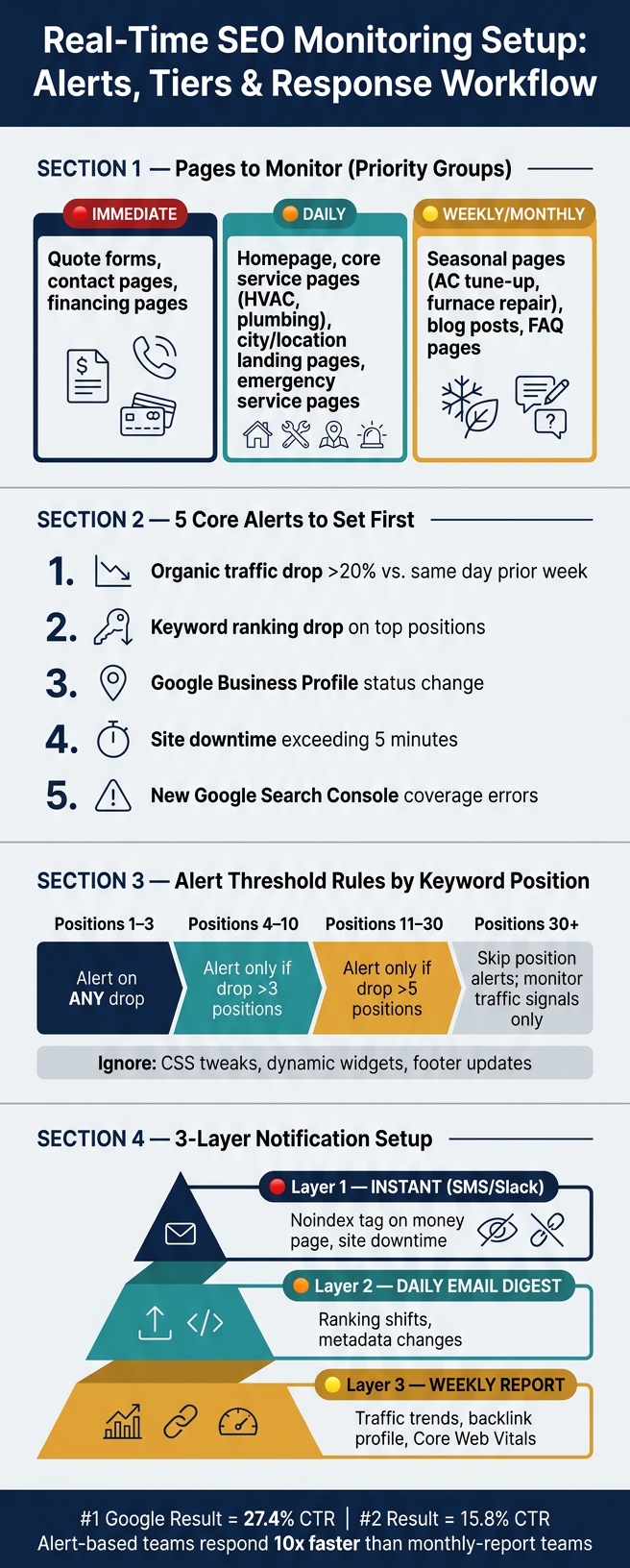
Start by watching the pages that protect revenue. For a home service business, that usually means the homepage, core service pages like HVAC and plumbing, city or location landing pages, quote request forms, contact pages, financing pages, and emergency service pages. These are the URLs most likely to affect leads and revenue.
It also helps to group pages by how fast a problem would hit calls or form fills. Say an HVAC company serves three cities. In that case, each city page should sit in its own group. If one page slips, the team can see right away which market took the hit and move faster.
| Page Group | Examples | Monitoring Priority |
|---|---|---|
| High Business Value | Emergency services, HVAC replacement, water heater installs | Daily |
| Location-Based | City landing pages, neighborhood pages | Daily |
| Lead Generation | Quote forms, contact pages, financing pages | Immediate |
| Seasonal | AC tune-up specials, furnace repair pages | Weekly in season |
| Informational | Blog posts, FAQ pages | Monthly |
Before turning on alerts, capture a known-good snapshot of your top pages. That means rankings, traffic levels, and technical health. Then wait two weeks before making site changes so your baseline reflects normal behavior.
After that, keep the first alert setup tight. A solid starting point is five core alerts:
For notifications, use a 3-layer setup. Send immediate SMS or Slack alerts for critical failures like a noindex tag on a money page or site downtime. Use a daily email digest for ranking shifts. Then send a weekly report for traffic trends. That way, the right person gets the right alert without getting buried in noise.
If every small footer edit or widget refresh sets off an alert, people stop paying attention. And that’s when the alerts that matter get missed.
The fix is simple: get more specific. Set keyword alerts by position tier. Trigger an alert on any drop for keywords in the top 3. For rankings 4–10, alert only when a keyword drops by more than 3 positions. For rankings 11–30, alert only on drops of more than 5 positions.
For keywords below position 30, skip position alerts altogether and watch traffic-level signals instead. On the technical side, ignore cosmetic changes like CSS tweaks, dynamic widgets, and footer updates. Focus your rules on headings, body copy, and indexability signals.
Monitor the signals that can affect calls and form fills.
Once alerts are live, the next step is triage: figure out what's urgent and what's just part of normal site churn.
Not every alert needs the same response. Some need action right away. Others can wait until the same day or your weekly review. The job is simple: know which is which.
The table below shows the most common alert types, what usually sets them off, and where to look first:
| Alert Type | Likely Cause | Business Risk | First Item to Inspect |
|---|---|---|---|
| Indexing Change | Accidental "noindex" tag or robots.txt block | High: Total loss of organic visibility for affected pages | Page source <meta name="robots"> and robots.txt file |
| Canonical Shift | Broken deployment or plugin update | High: Duplicate content issues; wrong page ranking | Canonical tag URL vs. actual URL |
| Metadata Change | CMS edit or plugin update | Medium: Drop in CTR and keyword relevance | Title tag and meta description diff in CMS |
| Content Deletion | Copy edit or template error | Medium: Loss of rankings for specific long-tail keywords | H1–H3 headers and body text snapshots |
| Uptime/Server Error | Server downtime or JS rendering failure | Critical: Site inaccessible to users and bots | Server logs and 5xx error reports |
| Ranking Drop | Competitor move or algorithm update | Variable: Depends on page value and keyword intent | SERP features and competitor content changes |
For home service sites, start with service pages, city pages, and quote forms when a high-risk alert comes in. Those pages tend to hit revenue first.
Indexing changes and server errors belong at the top of the urgency ladder. If a "noindex" tag shows up on a money page or your quote form stops working, organic traffic to that page can dry up fast. Metadata changes matter too. A changed title tag or meta description can hurt CTR and keyword relevance in a hurry.
At the same time, not every ranking move is a fire. A 1–2 position drop on lower-priority keywords is often normal fluctuation unless it keeps happening.
When an alert fires, don't start with what happened. Start with when did it happen, and what changed right before it. That's where timestamps help. They turn alert history into an audit trail.
Match the alert timestamp against CMS edits, plugin updates, and deployment records from the same time window. If a ranking drop on a service page lines up with a template push from your developer, that's the first place to look. Don't jump straight to a Google algorithm update.
Annotating your dashboards makes this much easier over time. Each time your team pushes a content update, installs a plugin, or refreshes a page template, log the date in your analytics view. Then, when you're looking at a traffic dip in Google Analytics 4 or Search Console weeks later, you can tell right away whether it lines up with an internal change or something outside your control.
The shape of the ranking drop matters too. A sudden drop - a sharp loss over one to two weeks - usually points to a technical error or an algorithm update. A gradual decline, where a page slips 1–2 positions per month, usually points to content freshness decay.
Use those patterns to decide what belongs in the weekly review and what needs immediate action.
Once your alerts are set up, move into a simple review rhythm. You do not need to stare at dashboards all day. You just need a routine that spots problems before they snowball.
Daily, check high-priority alerts for your top revenue pages and make sure lead forms still work. Weekly, set aside about 45 minutes to review alerts, indexation errors, and traffic swings. If traffic drops 15%–20% below your 90-day rolling average, that’s a strong sign something needs attention. Monthly, review your backlink profile for lost or toxic links and check Core Web Vitals.
| Monitoring Focus Area | What It Protects | Key Metric to Watch |
|---|---|---|
| Keyword Rankings | Search Visibility & Traffic | Position shifts in top 20 terms |
| Local pack and map rankings | Local Lead Flow | Rankings at city/ZIP code level |
| Technical Health | Indexability & Rankings | 404 errors, noindex tags, crawl blocks |
| Site Uptime | Lead Conversion Paths | Server response and downtime alerts |
| AI Visibility | Brand visibility | Brand citations in ChatGPT/Gemini |
This routine works best when it stays tied to service pages and lead forms. That’s where small issues turn into missed calls.
For home service businesses, put your attention on the pages that drive calls and form submissions. Start with city pages, service area pages, and lead forms. If one of those pages gets an accidental noindex tag, or its search visibility slips, traffic can dry up fast.
Think of it like checking the front door before bed. You don’t inspect every window, pipe, and wire in the house each night. You make sure the main entry points are secure first. SEO monitoring works the same way.
Real-time SEO monitoring comes down to a few basics: watch the right pages, set the right alerts, and review changes on a steady schedule.
The #1 ranking position in search results averages a 27.4% click-through rate. Dropping to #2 cuts that to 15.8%. For a home service business that depends on local organic traffic, that drop can mean fewer calls and less revenue. A focused page set, clear thresholds, and a weekly review habit help protect the pages that bring in business.
Start with your most important commercial pages - especially the landing pages that bring in the most traffic and revenue.
Focus first on pages that get strong impressions but weak engagement or conversions. That gap can point to visibility or distribution problems.
It also helps to keep an eye on a small group of high-sensitivity URLs. Think of them as early warning signs. If something goes wrong there, you’ll spot it sooner.
On those core pages, monitor:
Check SEO alerts based on the severity and impact of the change, not on a fixed schedule.
If an issue is critical, send an alert right away so your team can respond within 24 to 48 hours. For day-to-day monitoring, review core metrics daily to spot anomalies early. Then use weekly reviews to look at broader trends and add context to what you’re seeing.
The most urgent alerts are decision signals. They need action within 24 to 48 hours because they can hit revenue or search visibility fast.
That group includes:
These aren’t the kind of alerts you leave sitting in a dashboard. They point to problems that can cost traffic, leads, and sales if no one steps in soon.
Sign up for the newsletter and be the first to read our articles.


Every single person on our agency team has spent a lot of time in the field either running their own business or working for larger marketing agencies. We have all put in the time responding to leads, helping customers, scheduling and doing services. This gives us a massive advantage when making decisions.
One thing that has always been very special to us, is the fact that (excluding spam / people that never used our services) we do not have any bad reviews. This absolutely does not mean we have never had unhappy clients, but if it happens, we make it right, and stand behind our promises.
We have seen, time and time again, other agencies using strategies and structuring campaigns the way that they are technically supposed to. Most of these "best practices" that are taught in our industry, simply do not transfer into local lead gen. This is partially because we do have a much different target audience, and are typically spending less, however optimizing for website traffic does not work here.
We have been there, jumping into starting a home service business, struggling, and doing everything wrong. It's humbling. Our team has all felt the highs and lows, which is why we get so excited for our clients to win, we know how good it feels.

Estatehub is not a normal agency, we know "clicks" don't get you sales. Let us show you how lead gen experts do it.

