If your landing page is not connected to your CRM, you are likely losing leads, slowing follow-up, and missing revenue data.
I’d sum it up like this: CRM integration sends every form fill straight into your pipeline, assigns it to the right person, starts follow-up fast, and tracks where the lead came from. That matters because teams that reply within 5 minutes have a far better shot than teams that wait 30 minutes or more, and businesses can lose around 30% of leads when website and CRM tracking breaks.
Here’s the short version:
- Leads stop getting lost in shared inboxes and spreadsheets
- Follow-up starts faster with alerts, SMS, and email
- Data stays cleaner with mapped fields and fewer manual mistakes
- Attribution gets clearer with UTM and GCLID tracking
- Booking rates can improve when reps contact leads while intent is still high
- Automation keeps leads warm with 5- to 7-touch follow-up over 14 to 21 days
A disconnected setup often leads to:
- slow replies
- unclear ownership
- duplicate or missing records
- weak ad tracking
- poor reporting from click to closed job
A connected setup fixes the handoff. That is the main point. Once the form submits, the CRM can route the lead, send the first message, and log the source without anyone copying data by hand.
| Setup | What usually happens | What you can track |
|---|---|---|
| No CRM integration | Leads sit in email or spreadsheets | Partial data, weak ROI tracking |
| CRM-integrated landing page | Leads go straight to pipeline and follow-up starts at once | Source, response time, bookings, and revenue |
Bottom line: I’d treat CRM integration as the step that turns landing page traffic into booked jobs, not just form submissions.
Common Problems With Standalone Landing Pages
Lost Leads, Delayed Responses, and No Clear Ownership
When a landing page doesn’t connect to a CRM, leads usually end up in a shared inbox or a spreadsheet. Then someone has to notice them, open them, and decide who owns them. That manual handoff slows follow-up right away.
It also creates a simple but costly problem: no one clearly owns the lead. One person thinks another person handled it. Another assumes it’s still waiting to be assigned. Meanwhile, the lead just sits there. Businesses often lose 30% of their leads because of tracking failures between the website and the CRM.
Messy Data and Weak Campaign Tracking
Manual entry causes mistakes that are easy to miss and hard to fix later. A wrong digit, a missing address, or an empty service field can leave reps with half the story before they even make the call. That makes qualification harder and wastes time on both sides.
Tracking gets messy too. If the form doesn’t use hidden fields to collect UTM parameters, there’s no solid way to connect the lead to a certain ad, keyword, or landing page. For home service contractors spending $5,000/month on ads, that’s a big blind spot. Many still can’t tell which keywords brought in revenue without closed-loop CRM integration. At that point, ROI tracking is mostly guesswork.
"A perfectly chosen CRM that does not talk to your website forms... is useless for measuring marketing ROI." - Charwin Vanryck deGroot
Non-Integrated vs. CRM-Integrated Landing Pages
The table below lays out where standalone pages tend to break down:
| Feature | Non-Integrated Landing Page | CRM-Integrated Landing Page |
|---|---|---|
| Lead Capture Reliability | High risk of leads lost in email inboxes | Instant, automatic entry into the sales pipeline |
| Data Quality | Prone to manual entry errors and missing fields | Clean, mapped fields with consistent formatting |
| Source Tracking | No reliable attribution to ad, keyword, or page | Full attribution via UTM parameters and ad keywords |
| Follow-Up Speed | Delayed by hours or days | Instant triggers for SMS, email, or rep notifications |
| Reporting Visibility | Fragmented; marketing and sales numbers don't align | Closed-loop reporting from ad click to closed job |
| Ownership | No clear assignment; leads may be ignored or double-called | Automatic routing to the correct rep or territory |
Each weak spot in the non-integrated setup adds one more way to lose a lead. Fix those handoff and tracking issues, and the payoff is simple: faster replies, cleaner data, and follow-up that doesn’t fall through the cracks. If you're ready to automate your lead flow, book a call with our team.
sbb-itb-2aa0348
Zoho Landing Pages Tutorial: Build Pages & Sync to Zoho CRM | Lesson 16 | Zoho One Marketing Course
How CRM Integration Improves Lead Management and Conversions
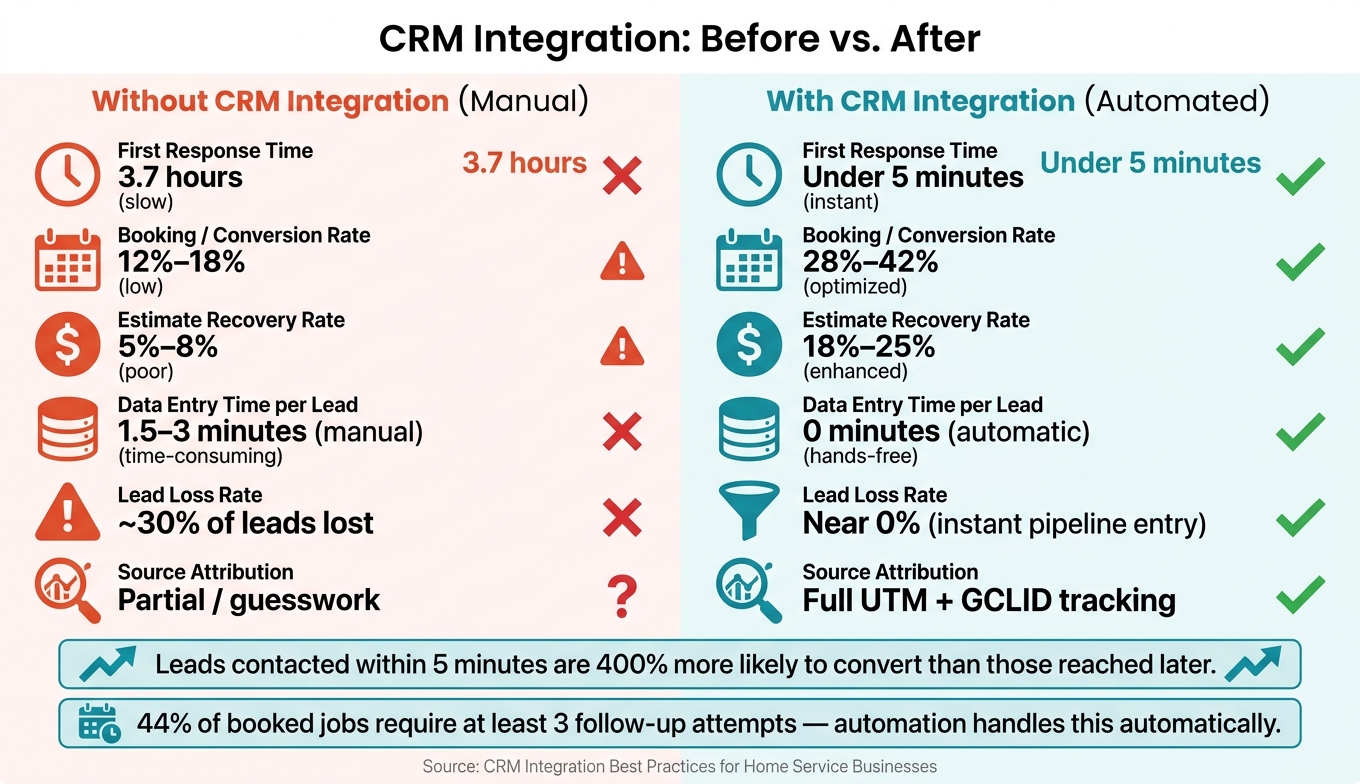
CRM-Integrated vs. Non-Integrated Landing Pages: Key Metrics Compared
Instant Lead Capture and Clean Field Mapping
Once the handoff is fixed, the next gains come from cleaner data and faster routing.
Connected forms send submissions into the CRM right away. Each field maps to the correct CRM record, which keeps contact details and job information in the right place. Automation can validate ZIP codes, standardize phone numbers, and cut down on duplicate records. The result is a clean, consistent database reps can trust before they make the call.
Faster Response Times and Better Booking Rates
Leads contacted within 1 hour of submitting a form are 7x more likely to qualify for a sale than those reached after 24 hours. Responding within an average of 5 minutes can increase that conversion lift to 400%.
As soon as a form comes in, the CRM can send an SMS or team alert to the assigned rep, with the lead's service type, ZIP code, and notes already attached, so the team can respond within minutes. Routing rules assign leads automatically based on geography or service type, without waiting for a manager to decide who takes what.
That matters because automation cuts out the lag that slows follow-up.
Speed helps more reps make contact. Then CRM data shows which leads turn into booked work and revenue.
Using CRM Data to Improve Conversion Quality
Submission counts matter less than booked jobs and closed revenue. CRM pipeline data makes that easy to see.
When hidden fields capture UTM parameters and Google Click IDs (GCLIDs) with each submission, teams can trace every lead back to the exact ad, keyword, or campaign that drove it, then tie that lead to actual revenue. That changes the conversation from "which page got the most submissions" to "which page brought in the most booked jobs."
Lead scoring also helps reps focus on the leads most likely to book, instead of treating every inquiry the same way.
How Automation Makes Follow-Up More Efficient
Once the CRM captures the lead, automation should kick off the first touch right away.
Immediate Confirmation and Next-Step Automation
Send an automated SMS within 1 minute to confirm the request and keep the lead engaged while the problem is still top of mind. If a call is missed, a missed-call text can help win that lead back before it goes cold.
Keep the sequence simple at first. Start with a short text, then layer in email and reminders. For example, a one-hour text can add social proof, a four-hour email can share a rough price range, and a 24-hour text can include a direct scheduling link.
Nurture and Reactivation for Leads That Do Not Book Right Away
If the lead doesn’t book on the first touch, the sequence should keep going. Many landing-page leads need more than one follow-up before they book. A CRM can handle that with a 5- to 7-touch sequence across SMS, email, and phone over 14 to 21 days. That matters because 44% of booked jobs require at least three outreach attempts.
For leads that got a quote but didn’t sign, automation can send reminders on days 2, 4, and 7 to recover 18% to 25% of estimates that would otherwise be lost. It can also re-engage past quotes and seasonal inquiries when the timing is better.
Follow-Up Performance: Before and After CRM Integration
The gap shows up fast in response time and booked-job rates.
| Metric | Before Integration (Manual) | After Integration (Automated) |
|---|---|---|
| First Response Time | 3.7 hours | Under 5 minutes |
| Booking/Conversion Rate | 12%–18% | 28%–42% |
| Estimate Recovery Rate | 5%–8% | 18%–25% |
| Data Entry Time | 1.5–3 minutes per lead | 0 minutes (automatic) |
Next, the setup needs to stay simple enough for the team to use every day.
Setup Steps and Final Takeaways
Basic Integration Setup for Home Service Businesses
Once you've nailed down the handoff, setup is pretty straightforward: connect the form to the CRM.
The easiest route is a native integration. That means form submissions go straight into the CRM without extra tools. If that option isn't there, use a connector like Zapier or Make. Zapier usually runs $20 to $50 per month.
| Integration Step | Objective | Key Checks |
|---|---|---|
| 1. Identify Method | Choose the simplest connection path. | Check for native plugins or built-in CRM form builders first. |
| 2. Set Up Trigger | Detect new form submissions instantly. | Make sure the webhook URL is pasted correctly or the API key is active. |
| 3. Map Form Fields | Make sure data lands in the right CRM properties. | Match each form field to the right CRM field, and set defaults for required fields that aren't on the form. |
| 4. Route Leads | Assign the lead to the right team member. | Use rotation or territory rules, and send rep alerts by SMS or Slack. |
| 5. Test & Monitor | Verify the end-to-end flow and data health. | Submit 5 live test leads, then check UTM capture and duplicate handling. |
One small detail can save a lot of cleanup later: test the live form, not test mode.
Also, lowercase emails before the CRM lookup. That way, "John@Doe.com" and "john@doe.com" don't end up as two contacts.
Where Estatehub Fits Into the Process

If your team wants to get this live faster, Estatehub offers a prebuilt path.
Estatehub provides pre-configured GoHighLevel workflows, landing page templates, and automations for home service businesses. So form submissions move into the right pipeline without manual work.
Conclusion: Better Lead Capture Means More Booked Jobs
When routing and follow-up are set up well, the payoff is simple: more booked jobs.
The speed of follow-up matters a lot. When a lead is contacted within 1 hour of submitting a web form, they're 7x more likely to qualify for a sale than leads contacted after 24 hours.
CRM integration helps you bring leads in cleanly, send them to the right person fast, and keep follow-up moving while interest is still high.
FAQs
How does CRM integration reduce lost leads?
CRM integration cuts down on lost leads by removing the gaps that come with manual data entry and messy handoffs. When landing pages connect straight to a CRM, lead details are captured and synced in real time. That means inquiries are far less likely to get buried in a shared inbox or slip through the cracks because of human error.
It also automates follow-up tasks, email sequences, and sales alerts, while keeping tracking in one place. The result is simple: businesses can respond faster and give every prospect timely, consistent attention.
What data should a landing page send to a CRM?
Your landing page should send key contact details like name and email, along with extra qualifiers that help your team decide who to contact first and how to tailor the follow-up.
For home service providers, those qualifiers can include:
- Service type
- Property size
- Preferred start date
- Lead source
- Key pain points
- Competitor mentions
Estatehub recommends tailoring these fields to fit your business so your team can improve forecasting and sales efficiency.
How long does CRM landing page integration take?
CRM landing page integration is usually a pretty simple, efficient process. For many businesses, native plugins for WordPress or embed codes for custom websites can speed things up.
The exact timeline depends on your website setup and whether you use a standard plugin or a custom configuration. Estatehub can make setup easier with pre-built accounts, pipelines, and automations for home service providers.
Related Blog Posts

Sign up for the newsletter and be the first to read our articles.