
If you want more booked jobs and fewer missed complaints, you need to know what people are saying right now. For a home service company, real-time social media monitoring means tracking public posts, reviews, and comments as they appear, then sending the right ones to the right person fast.
Here’s the short version:
- I use keywords, source filters, and location rules to narrow live mentions to my service area.
- I rely on spam filtering and deduplication to cut junk and repeated posts.
- I set real-time alerts for urgent issues like complaints, missed appointments, and service requests.
- I use dashboards and sentiment labels to sort what needs attention first.
- I route each alert to customer service, dispatch, sales, or marketing based on the type of mention.
- I review results each week to fix noisy alerts, find missed terms, and improve response time.
A few numbers show why this matters. 76% of customers who complain on social media expect a response within 1 hour, while the average brand response time is about 5 hours. That gap can mean lost jobs, public complaints that spread, or both.
In simple terms, real-time monitoring is a live triage system. It helps me spot leads faster, using an aggressive lead generation program, answer complaints sooner, and see local demand shifts as they happen.
| Area | What it does |
|---|---|
| Filtering | Finds posts that match my brand, services, and cities |
| Alerts | Flags urgent mentions in seconds or minutes |
| Dashboards | Shows volume, reach, source, and trend changes |
| Sentiment | Labels posts as positive, neutral, or negative for sorting |
| Workflow | Assigns follow-up and tracks what happens next |
If I set it up well, I’m not staring at a flood of random posts. I’m looking at a short list of mentions my team can act on right away.
Best Social Media Monitoring Tools For Brands And Agencies
sbb-itb-2aa0348
How Monitoring Tools Collect and Organize Live Data
A monitoring tool pulls public data, checks it against your rules, and sends matching results into a live feed. These tools connect to social platforms, review sites, and local forums through platform APIs or approved scraping methods. Each new public post, comment, or review gets turned into a standard record: text, author, timestamp, and source. Then the tool checks whether that record matches your filters.
This usually happens in seconds or minutes. So the stream moves fast. Once the data comes in, the next job is simple: trim it down to the mentions that matter.
Keyword Rules, Source Selection, and Location Filters
Filtering starts with the right keywords, sources, and location rules. For a U.S. home service business, a solid keyword list usually covers four buckets:
- Brand terms - your business name, common misspellings, abbreviations
- Service terms - "AC repair", "drain cleaning"
- Location terms - city names, neighborhood names, ZIP codes like 75201
- Request phrases - "roof leaking", "need plumber near me"
Most tools also support Boolean filters, which help tighten the results. For example, you might track "AC repair" AND "Dallas" but NOT "job opening." That way, your team sees local service requests instead of random posts that happen to use the same words.
Add an English (en-US) language filter and a geographic radius, like 25 miles around your service area, and you can cut irrelevant noise by 30–60%.
Spam Filtering, Deduplication, and Live Feeds
Raw keyword searches bring in junk. A lot of it. Monitoring platforms use automated scoring to screen out bot accounts, fake support messages, and generic promo posts. That can reduce dashboard clutter by 40–70%.
Duplicate removal solves a different headache. Say a local news story gets reposted across several Facebook groups. Instead of stuffing your feed with the same item again and again, the tool groups those reposts into one mention and shows total reach.
What’s left is a cleaner, time-sorted live feed that updates all the time. The newest relevant mentions in your service area stay at the top, which makes it much easier for your team to spot what needs attention next. After that, alerts and dashboards turn that cleaned-up feed into something you can act on.
The Main Features: Alerts, Dashboards, Analytics, and Sentiment
After filtering, the tool has one clear job: separate urgent mentions from background noise. That comes down to four features: alerts, dashboards, analytics, and sentiment tracking.
Alerts That Flag Urgent Mentions
Alerts tell you when a mention hits a high-priority rule. That could mean a negative comment, a sudden jump in volume, or a keyword linked to a missed appointment, billing problem, or urgent service complaint. For a home service company, good alert triggers often include complaint terms tied to missed visits, refunds, or service failures, along with your brand name or city.
The big choice is whether to use real-time alerts or daily digest alerts. They do very different jobs.
| Feature | Real-Time Alerts | Daily Digest Alerts |
|---|---|---|
| Speed | Seconds to minutes | Once per day |
| Best use case | Complaints, crises, viral spikes | Trend reviews, campaign summaries |
| Noise level | Higher if rules are too broad | Lower, easier to scan |
| Response value | High - minutes matter | Moderate - useful for planning |
If you send every alert to everyone, people will tune it out fast. A better setup is simple: route complaint alerts to customer service, campaign alerts to marketing, and field issues to operations.
Once those urgent items are routed, dashboards help you see whether you're looking at a one-off problem or something that's starting to spread.
Dashboards and Analytics That Show What Is Changing
A dashboard gives you a live snapshot of what's happening. The metrics that matter most are mention volume, engagement, reach, top sources, and trend line. Put together, volume, reach, and source type help managers decide whether to escalate, keep watching, or stand down.
Trend line shows whether volume is going up, dropping, or changing in tone. That makes it easier to tell the difference between a promotion, a service issue, and a local event.
In plain English, the dashboard helps the team spot changes in volume before they dig into every single mention.
Sentiment Tracking for Fast Prioritization
Sentiment tracking labels each incoming mention as positive, neutral, or negative so your team can sort faster without reading everything first. Start with negative mentions, then move to neutral posts with high reach, then positive mentions.
That said, automated sentiment has limits. It can get sarcasm wrong. It can miss slang, local language differences, and posts with mixed feelings. A person should check high-risk or unclear mentions before any major decision, especially if the issue involves a public reply, refund, legal risk, or another high-stakes situation.
So sentiment works best as a triage filter, not the final call.
Those signals feed into the next step: deciding who responds and how fast.
How to Set Up a Monitoring Workflow
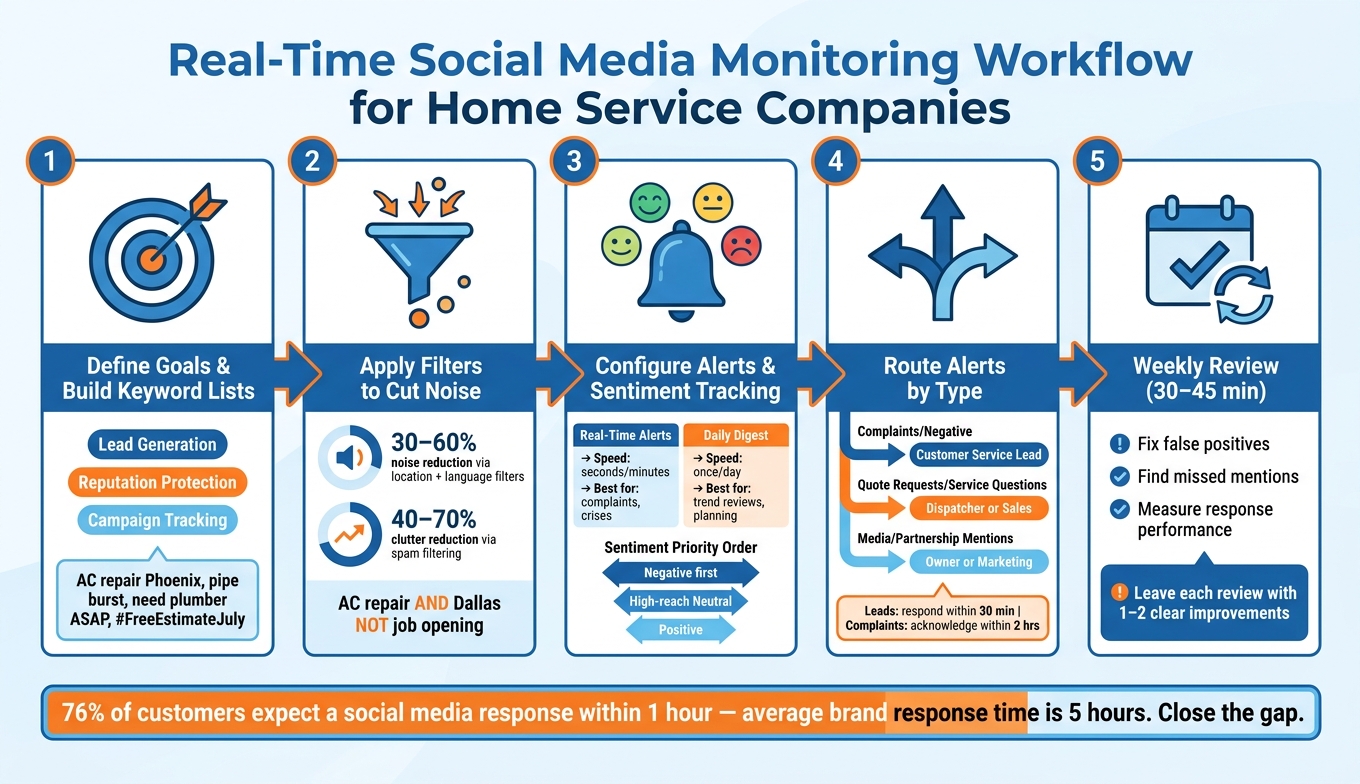
Real-Time Social Media Monitoring Workflow for Home Service Companies
Once alerts and sentiment show you what matters, the next move is simple: decide who owns what and how fast they need to respond.
Choose Goals, Keywords, and Response Rules
Start with one or two clear goals before you touch your tool settings. For most home service companies, those goals are usually lead generation, reputation protection, or campaign tracking. Each one calls for a different keyword set.
For lead generation, build rules around the service-and-city searches people already use, like AC repair Phoenix, water heater replacement Tampa, or emergency plumber Dallas. Then layer in urgent phrases such as pipe burst, no heat, and need a plumber ASAP. Those terms often signal someone who wants to book NOW.
For reputation protection, track your business name, common misspellings, and staff names. Pair those with complaint terms so you can catch problems early. For campaign tracking, include promo hashtags and offer terms like #FreeEstimateJuly to see how far your campaign is actually spreading.
Seasonal terms matter too. Think frozen pipes in winter or AC not cooling during summer heat waves. Add other weather-related issues that hit your service area. And use location filters so you’re seeing mentions from the places you serve, not random chatter from across the U.S.
Once your keywords are in place, write simple response rules. Keep it plain:
- Who replies
- How fast they reply
- What kind of message they send
A one-page playbook works well here. Include scripts for complaints, quote requests, and general comments. Set clear SLAs too: leads contacted within 30 minutes during business hours, and complaints acknowledged within 2 hours.
Route Alerts to the Right Person and Track Follow-Up
Routing falls apart fast when every alert lands in one inbox.
A cleaner setup sends complaints and negative mentions to the customer service lead or office manager. Quote requests and service questions should go to the dispatcher or sales coordinator. Partnership or media mentions belong with the owner or marketing lead.
Each high-value alert should turn into something you can track, not just a pop-up that vanishes. Log it in your CRM with fields for:
- Platform
- Mention type
- Service requested
- City
- Assigned owner
Then connect those alerts to CRM tasks and follow-up reminders so nothing slips through the cracks.
After routing and logging are set, review the system each week to cut noise and catch anything you missed.
Review Results and Refine the Setup Each Week
Set aside 30 to 45 minutes each week to review alerts and clean up the setup. Focus on three things: false positives, missed mentions, and response performance.
If alerts are too noisy, tighten the keyword rules. Add exclusions, narrow the location filters, or increase the sentiment threshold. If the tool is missing mentions, run manual searches on platforms like Facebook, Nextdoor, and Google Business Profile. That’s often the fastest way to spot gaps. Then add the missing terms.
Try to leave each review with one or two clear action items. That could mean adding Spanish-language keywords or extending monitoring until 7:00 PM during heat wave season.
As your business grows, you’ll also need to decide how to split monitoring work. The table below shows the two setups most contractors use:
| Approach | Speed | Accountability | Staffing Needs | Fit for a Growing Contractor |
|---|---|---|---|---|
| Centralized (one person manages all alerts) | Can slow down during peak periods | Very clear - one owner, easy to track | Low complexity; risk of overload in busy seasons | Good starting point; may become a bottleneck as volume grows |
| Shared team (multiple staff handle alerts by type) | Faster - parallel responses across shifts and weekends | Requires well-defined rules to stay consistent | Higher - needs trained staff and clear handoff processes | Better as alert volume and platforms increase |
For most small contractors, the practical move is to start with a centralized setup, then shift to a shared team model as alert volume grows.
Conclusion: What Real-Time Monitoring Helps You Do Better
Once your rules, alerts, and sentiment filters are set up, real-time monitoring starts working like a live triage system. It takes public mentions as they happen and turns them into alerts your team can sort and act on.
For U.S. home service businesses, the payoff is simple: speed. If a homeowner posts about a flooded basement or no heat in the middle of winter, every minute counts. Leave complaints unanswered, and people move on to a competitor. Reply fast, and you have a much better shot at keeping that customer.
Alerts and sentiment tracking help surface negative posts, complaint spikes, and direct service requests fast enough for a response within minutes. At Estatehub, this same real-time visibility also feeds into our Facebook ads service, helping ad spend adjust around what's actually happening on the ground.
Dashboards give you the bigger picture. They show whether a spike is a one-off issue or part of a larger pattern. You can spot volume changes, repeat topics, and demand by location, which helps with staffing, marketing, and seasonal coverage.
A well-set monitoring workflow helps you move faster, protect your reputation, and catch leads before the window closes.
FAQs
How accurate is sentiment tracking?
Sentiment tracking does a strong job of spotting how customers feel, including subtle cues like anger or sarcasm that simple star ratings often miss.
Advanced AI models sort feedback into positive, negative, or neutral and can pull out recurring themes like punctuality or quality. The big win is simple: teams can catch problems early and act faster.
Which alerts should I set first?
Start with high-priority alerts for 1-star reviews on your main platforms and for negative keywords like "unsafe", "scam," or "fraud".
To avoid alert fatigue, bundle less urgent updates into a daily summary instead of sending every single notice in real time. It also helps to set alerts for service-level agreement breaches, like a lead that goes uncontacted for more than 60 minutes.
How often should I refine my monitoring rules?
Use a balanced schedule: weekly reviews for the main metrics and red flags, monthly reviews to fine-tune strategy, and quarterly reviews for longer-term shifts.
For new campaigns, give the data some time to build. Wait at least 30 days before making calls on early performance, and 60 to 90 days before treating patterns as steady enough to change rules or budgets. During peak seasonal periods, check performance daily.
Related Blog Posts

Sign up for the newsletter and be the first to read our articles.