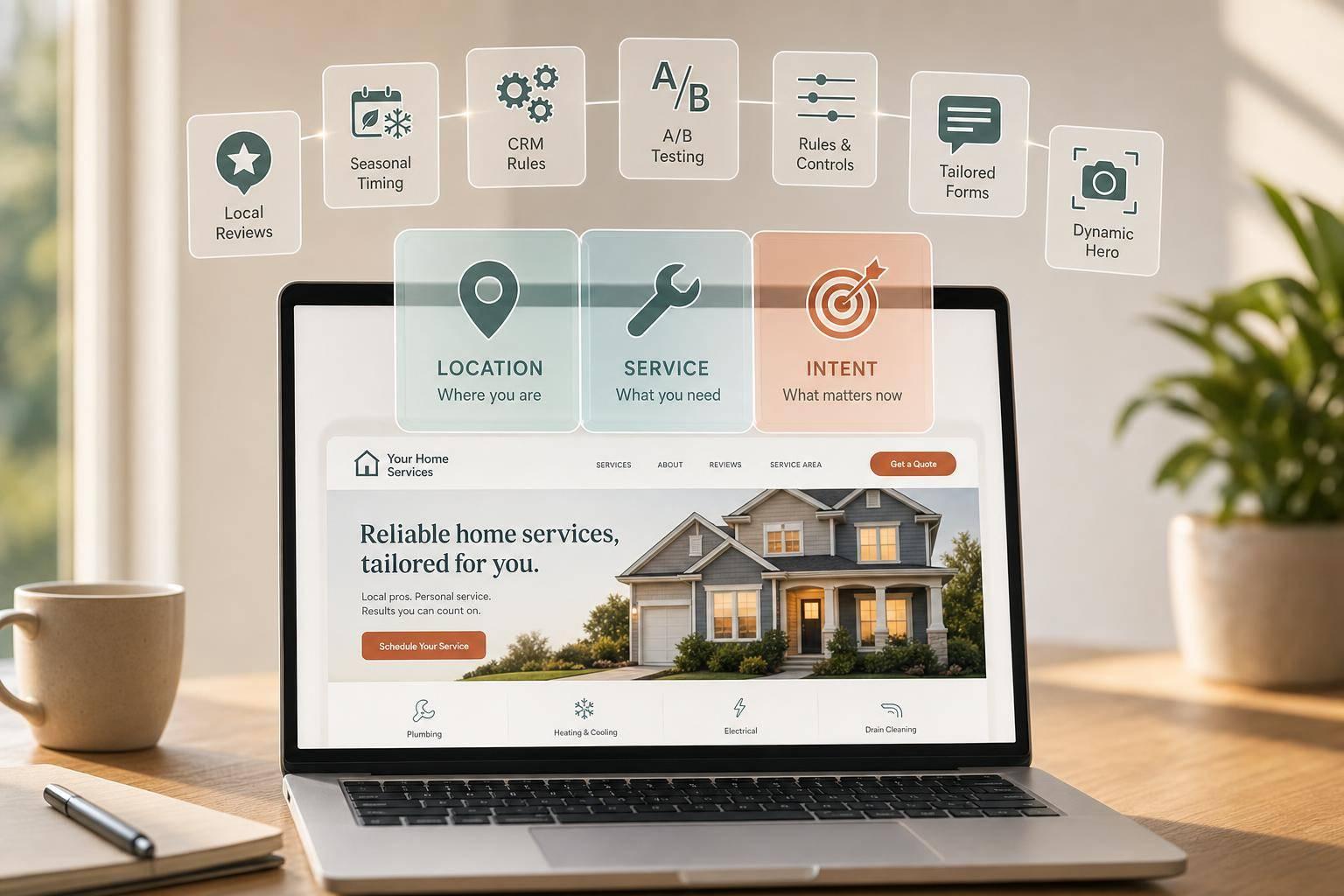
Most home service sites lose leads because they show the same message to every visitor. The fix is simple: match the page to where the visitor lives, what service they need, and how close they are to booking.
You can do that with 10 clear tactics: location-based content, returning visitor prompts, service-specific messaging, dynamic hero copy, tailored forms, local proof, related service suggestions, CRM-based rules, seasonal updates, and testing. The payoff is clear: personalized CTAs can convert 202% better, and replying within 60 seconds can lift conversions by up to 391%.
Here’s the full picture at a glance:
- Location-based personalization shows the right city, phone number, and service area.
- Returning visitor content moves repeat visitors toward booking.
- Service-interest personalization matches the page to the exact job.
- Dynamic hero messaging changes the first message based on source and intent.
- Personalized lead forms cut friction and screen out poor-fit leads.
- Trust signal personalization shows local reviews, badges, and job proof.
- Smart service recommendations suggest the next service that fits the problem.
- CRM-connected personalization changes content for leads, customers, and past customers.
- Seasonal and time-based messaging lines up offers with demand before peak season.
- Testing and refinement shows which changes drive booked jobs, not just clicks.
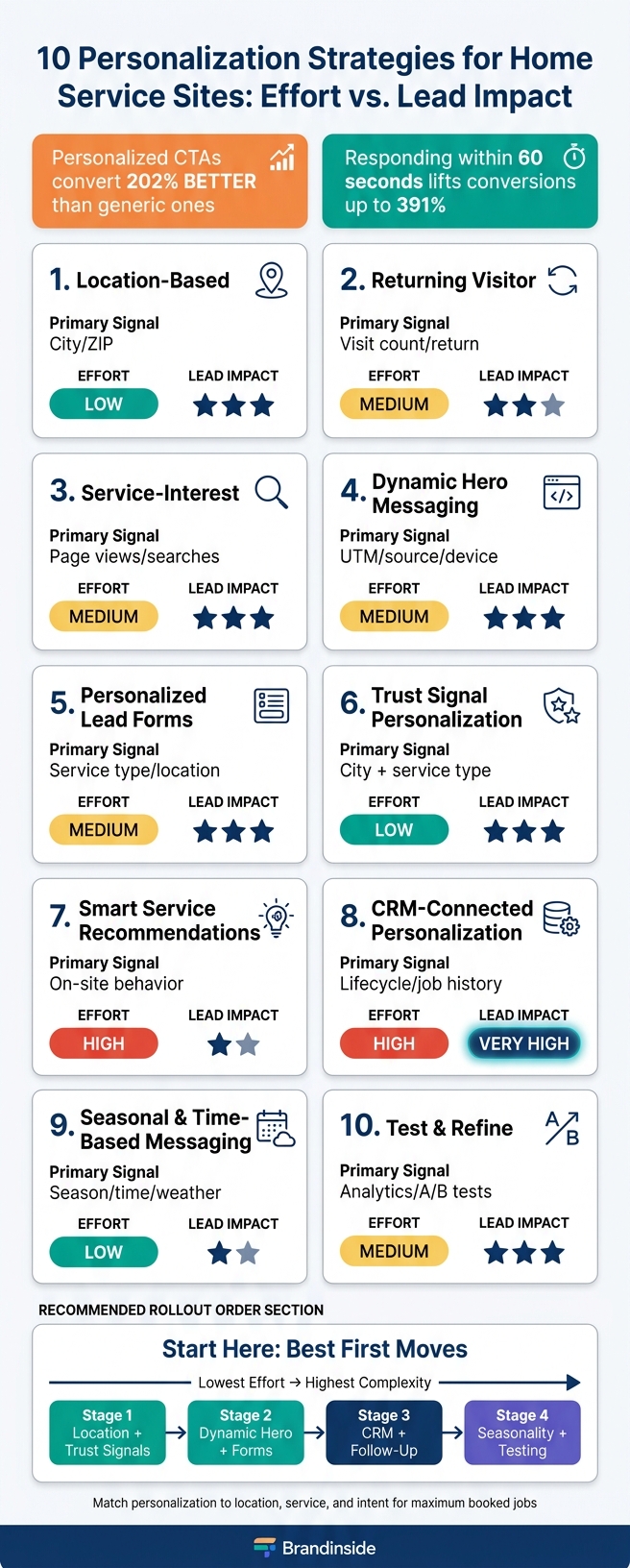
10 Home Service Personalization Strategies: Effort vs. Lead Impact
Website Tips for Home & Field Service Businesses | Convert More Leads
sbb-itb-2aa0348
Quick Comparison
| Strategy | Main Signal | Effort | Lead Impact |
|---|---|---|---|
| Location-based | City, ZIP code, region | Low | High |
| Returning visitor | Visit count, page return | Medium | Medium |
| Service-interest | Page views, searches, clicks | Medium | High |
| Dynamic hero | UTM tags, source, time, device | Medium | High |
| Personalized forms | Service type, location, urgency | Medium | High |
| Trust signals | City + service type | Low to medium | High |
| Service recommendations | On-site behavior | High | Medium |
| CRM-connected | Lifecycle stage, job history | High | Very high |
| Seasonal messaging | Season, time, weather | Low | Medium |
| Testing | Analytics, A/B tests | Medium | High |
If your goal is more booked jobs from the same traffic, start with the low-effort options first: location, trust, and hero messaging. Then move into forms, CRM rules, and follow-up.
1. Location-Based Personalization
Location-based personalization uses a visitor's city, ZIP code, or region to show the right service area, local phone number, and nearby offer. Start with location first. It tells people right away if you serve them and what they should do next.
Primary Personalization Signal
The main signal here is the visitor's location: city, ZIP code, or region matched to your service areas. Use IP geolocation for broad targeting, then confirm it with a ZIP code field or a "Check if we serve your area" widget.
IP geolocation isn't precise enough for street-level targeting. But it does a solid job of separating metro areas and regions. Once you know where the visitor is, you can swap in the page headline, contact number, and service-area message to match that location.
Required First-Party Data
Store city, ZIP code, service area, and office location in your CRM. That way, location and service interest stay tied to each lead from the first visit through follow-up.
Implementation Effort
A simple place to start is with city landing pages like Water Heater Repair – Tampa, FL. After those pages show they convert, add dynamic headlines and local phone numbers.
Why start there? City pages line up with local search intent, and local phone numbers send calls to the right team. Once that setup is in place, you can move into dynamic personalization that blends location, behavior, and service interest in real time.
Lead-Quality Impact
Location personalization also helps screen leads before your team ever picks up the phone. If someone outside your service area checks availability, a clear message that says you don't serve that area can cut down on wasted calls.
For people you can serve, automatic routing to the nearest branch or technician helps shorten response time and improve close rates. That means your team spends less time sorting and more time booking jobs that fit your coverage area.
2. Returning Visitor Content
Once you know a visitor’s location, repeat visits tell you something else: how close they are to taking action. When someone comes back to your site, that usually signals stronger intent. In plain English, returning visitors are often closer to booking, so they tend to respond better to direct next steps.
Primary Personalization Signal
The main signal here is return visit behavior. That includes how many times someone has visited, which service pages they keep coming back to, and how soon they return. A visitor who checks your AC repair pricing page twice within 48 hours is showing much stronger intent than someone who visits once.
That’s your cue to move them forward. On a third visit, you might swap a generic Get a Free Estimate CTA for something more direct, like Pick Your Appointment Time. You can also show a reminder such as Still thinking about AC repair in [City]? Here's what it will cost and how soon we can come out. If someone started a quote form on an earlier visit but didn’t finish, show a resume prompt so they can pick up where they left off instead of starting over. That small shift can turn repeat traffic into a more direct path to booking.
Required First-Party Data
To make this work, store visit count, last visit, and viewed service categories in first-party data. You should also track whether a visitor started a quote or booking flow and didn’t complete it. Then layer in CRM data like lead status, past service history, and location. For known contacts, that lets you show content that fits their stage, such as what to expect during an AC repair instead of a broad intro.
Be clear about tracking. A plain privacy notice and cookie consent, where required, help keep the experience privacy-conscious and build trust.
Implementation Effort
If you already have basic behavior data, this doesn’t need a big build. Many CMS, marketing automation, and CRM platforms already support smart content or personalization rules without heavy custom development. Once CRM data is connected, a returning lead can see content that matches where they are in the decision process.
Lead-Quality Impact
Returning visitor personalization helps people move without friction. It meets them where they are, cuts down on extra back-and-forth, and nudges high-intent visitors toward booking or a quote request. It can also shorten time to booking and improve lead quality.
Track returning-visitor conversion rate as its own metric so you can measure lift. That way, repeat visitors aren’t treated like first-timers when they’re already ready to book.
3. Service-Interest Personalization
Service-interest personalization lines up headlines, CTAs, and forms with the exact service a visitor is looking for. After you know a person’s location and whether they’ve been on your site before, service interest helps you decide what to show next.
Primary Personalization Signal
Use signals like page views, on-site searches, clicked service cards, ad landing pages, and form selections to figure out intent. You can also let visitors sort themselves. A simple homepage prompt that asks what they need help with today can send them into a service-specific path and make the rest of the visit feel more on point.
Required First-Party Data
Track:
- service pages viewed
- time on page
- CTA clicks
- form starts
- CRM data like past service history and lead source
Progressive profiling helps keep friction low. Ask for the service category and ZIP code first. Then bring in details like budget range, timeline, or property type later.
Implementation Effort
Start small with one or two high-value services. Use simple rules to swap the hero headline or CTA based on the service page a visitor viewed. Then A/B test that version against the generic one before you roll it out more broadly.
Personalized CTAs turn more visitors into leads than untargeted ones, so begin with the hero headline or CTA first. After that, you can expand to testimonials, photos, and trust badges. The same intent signal can also drive the next step: dynamic hero messaging.
Lead-Quality Impact
If someone lands on a plumbing page and sees plumbing-specific messaging, pricing cues, and a form that asks about their exact issue, they’re much more likely to send in accurate, useful details. Segment-specific personalization can boost form fill conversions, and adding personalization elements can push conversion rates much higher. That leads to fewer generic inquiries, better routing, and leads that are already pre-qualified by service need.
4. Dynamic Hero Messaging
Once your page matches the visitor’s service interest, the next move is the first message they see. Dynamic hero messaging changes the headline, subheadline, CTA, and sometimes the image based on source, keyword, and context. That matters because not all visitors show up with the same goal.
A late-night emergency plumbing visitor wants help NOW. A roof replacement researcher usually wants pricing, proof, and trust. If both people land on the same hero, you’re leaving money on the table.
Primary Personalization Signal
Start with the traffic clues you already have: campaign source, keyword data, UTM tags, referral source, landing page, and time, device, and location context. These signals tell you a lot. They show whether someone came from a paid emergency search, a social campaign, or organic research traffic.
That context should shape the hero message. A late-night mobile visit right after a storm points to emergency intent. In that case, lead with speed and availability, not pricing or your brand story.
Required First-Party Data
Track campaign and keyword data in the CRM, along with lead source, service type, bounce rate, and scroll depth by hero variant. Don’t stop at clicks. Tie each variant to closed jobs and average ticket size too.
Here’s why that matters: if visitors from roof replacement cost searches who saw a financing-focused hero closed at a higher rate than visitors who saw a generic version, you have a clear next step.
Implementation Effort
This takes a medium level of work. You need:
- Consistent UTM tagging
- A site layer that can swap content through your CMS, personalization tool, or custom JavaScript
- Two or three hero variants
Start with your highest-cost traffic, especially emergency service keywords. Those clicks can be expensive, and the intent is usually easy to read.
In a Telmore Adobe Target case study, personalized hero banners drove 11% more new sales. You don’t need a giant setup to see gains like that. A small set of well-matched variants can go a long way.
Lead-Quality Impact
Dynamic hero messaging can improve lead quality by screening for fit before someone even gets to the form. A hero that says Same-day emergency AC repair in Houston - technicians available tonight pulls in homeowners with urgent, real needs. A hero that highlights Transparent roof replacement pricing and financing options speaks to buyers who are ready for a larger project.
That split helps cut down on mismatched inquiries.
Tie hero variants to CRM data like closed revenue and job value, then put more traffic toward the versions that bring in the best return. Send emergency visitors to click-to-call. Send more complex jobs to quote forms.
Once the hero sets the expectation, the form should collect the details that matter most.
5. Personalized Lead Forms
The hero gets the click. The form decides what happens next.
Once the hero sets the promise, the form should back it up with ONLY the details needed to book. If every visitor sees the same generic form, you add friction. And friction is where conversions go to die.
Primary Personalization Signal
Use the same location and service-interest signals to prefill fields and cut extra steps. Service type and location should shape the form length, required fields, and CTA text.
A homeowner who needs urgent plumbing help shouldn't get the same form as someone weighing roof replacement bids. Those are two very different moments.
- Plumbing forms should put the phone number front and center.
- Roofing forms usually work better as quote requests with a few details about material options.
The point is simple: match the form to intent.
Personalized CTAs that mention a visitor's location and service need convert 202% better than generic ones. A small tweak can do a lot here. For example, swapping “Get a free estimate” for “Get your free Dallas roof inspection estimate” makes the message feel direct and specific.
First-Party Data to Capture
Capture contact details - name, phone, and email - for every visitor who isn't ready to call right away. That gives you the data needed for a clean follow-up loop.
The follow-up should start the moment the form is submitted. Send an automatic text or email right away. Confirm that you got the request, and tell them when they can expect a real response. Speed matters more than most teams think: responding within 60 seconds improves conversions by up to 391%.
Implementation Effort
This takes a medium level of effort.
You need conditional form logic tied to visitor signals, plus an instant automated confirmation after submission. It's not a huge rebuild, but it does take planning.
It also helps to show a price range before the form, such as $11,500 to $25,840 for roof replacement, to filter out low-intent shoppers and set expectations. That's not just about screening leads. It also lines up with what many homeowners want. About 78% of homeowners want pricing information before they call a contractor.
Lead-Quality Impact
Personalized forms don't only lift conversion rates. They also improve lead quality.
When the form fits the visitor's intent, you get fewer mismatched inquiries and more leads that are ready to book. That's the sweet spot. You're not just getting more form fills. You're getting better ones.
Use one primary CTA per page. Pages with a single CTA convert 371% better than pages with multiple competing options.
Use the table below to match form style to urgency and buying intent. Match the form to the job type, urgency, and buying stage - each trade needs a different mix of speed, detail, and price visibility.
| Trade | Visitor Mindset | Best CTA Type | Price Display Strategy |
|---|---|---|---|
| HVAC | Urgent or planning ahead | Phone and form | Range by service type: repair vs. replacement |
| Plumbing | Emergency or minor issue | Phone number front and center | Starting price + "varies by job" |
| Roofing | Comparing 3+ contractors | Detailed quote form | Range with material options |
6. Trust Signal Personalization
Once your form lines up with what the visitor wants, the next hurdle is proof.
That’s where trust signal personalization comes in. It means showing reviews, credentials, and job proof that fit the visitor’s city and the service they need. Done well, it makes your proof feel specific instead of generic.
Primary Personalization Signal
Use the visitor’s city, ZIP code, and service type to show the most relevant proof. That makes your trust section feel local and current, not like the same boilerplate shown to everyone.
This is different from hero copy or form tweaks. Here, you’re personalizing social proof. In plain English, you’re matching proof assets to the visitor’s location and service need, not just changing page copy.
Show reviews, badges, and completed-job proof from that market. For example, "4.9★ from 350+ Phoenix homeowners" lands harder than a plain star rating with no context. Then match that proof to the page itself. AC repair reviews should live on the AC repair page, not buried in a general testimonials section.
If a homeowner in Naperville, IL lands on your roofing page, review snippets that mention nearby neighborhoods can make a big difference. A map of completed jobs close by can do the same. It helps your company feel local, not just regional.
BrightLocal's local review stats show that 73% of consumers say review recency is important for trust, and 68% won't use a business rated below 4 stars. Fresh, location-matched proof helps you clear that line.
Required First-Party Data
You don’t need much to get this working.
The basics are:
- A ZIP code or city, gathered through a lead form or a "check your service area" widget
- A service category, pulled from the page URL or chosen from a dropdown
On the back end, tag your current reviews by city and service type. Even a simple spreadsheet can do the job. If you track city, service type, review text, rating, and source, you have enough to build targeted trust blocks.
Implementation Effort
This is a low-to-medium effort project, depending on how deep you want to go.
A simple starting point is to build reusable trust blocks in your CMS. Each block can include a star rating, two or three short reviews, and a credentials badge. Then assign those blocks to the right city or service pages.
The heavier part is upkeep. Someone needs to tag new reviews by location and service type as they come in. If the reviews get old, the whole thing loses punch fast.
Businesses that respond to reviews are 1.7x more likely to be considered trustworthy by consumers.
Lead-Quality Impact
Matched trust blocks tend to pull in better-fit leads because they show proof from the same area and for the same service.
When your trust elements highlight the jobs and service areas you want more of, the inquiries you get start to line up with that. It’s a simple filtering effect.
A combined trust block - local reviews + relevant credentials + a license or insurance badge - near the CTA is often stronger than any one piece on its own. Keep it short and easy to scan. A star rating, two to four reviews with real names and cities, plus a few relevant badges, is usually enough.
Put that block close to the CTA. That’s usually where hesitation spikes.
7. Smart Service Recommendations
Use on-site behavior to suggest the next logical service. The key is simple: the suggestion should feel like a natural next step, not a pushy add-on. If someone is reading your water heater repair page, they may also be thinking about tankless water heater installation or an annual maintenance plan. Show that option at the right time, and a one-service inquiry can turn into a lead that fits better. Just keep the recommendation tied to the page the visitor is already reading.
Primary Personalization Signal
The strongest signal here is on-site behavior. Pay close attention to which service pages a visitor views, how long they stay, and whether they started a form but left before finishing it. That kind of behavior says a lot.
Someone spending time on roof repair pages is far more likely to care about storm damage repair or gutter replacement than a generic offer from the homepage. That’s why the best service pairings follow a clear path:
- AC repair → AC maintenance
- drain cleaning → sewer inspection
- water heater repair → water heater replacement
- exterior painting → pressure washing
These suggestions work because they address the same root issue.
Required First-Party Data
At a minimum, use page views, clicked pages, form submissions, and CRM history. That gives you enough to make useful recommendations without overcomplicating things.
If your CRM includes service history, you can get more precise. For example, you might suggest an HVAC tune-up to someone who previously asked for furnace repair. Form inputs matter too. If a visitor selects emergency instead of scheduled service, that choice can change which service you show next.
Implementation Effort
Start small with a simple "You may also need" block. Then, once you have data, move to recommendations that shift based on what the visitor clicks. Before adding more rules, watch click-through rate and form-start rate. That gives you a clean read on whether the setup is doing its job.
Lead-Quality Impact
When the recommendation matches the visitor’s actual problem, it does two things at once: it weeds out weak inquiries and guides people toward a more exact service. That matters.
Instead of sending every visitor to the same generic contact form, someone searching for low water pressure can be directed to pipe inspection or fixture repair. That gives your sales team a much cleaner lead.
Track these numbers closely:
- click-through rate on recommended services
- form-start rate
- close rate by service category
If clicks go up but lead quality drops, that’s a sign the placement or the service pairing needs work.
When you connect these rules to known customer data, the recommendations become even more precise.
8. CRM-Connected Personalization
After behavior-based recommendations, CRM data lets you tailor the site for people you already know. That means returning leads and customers don't all see the same page. Instead, what they see lines up with where they are in the buying journey.
Primary Personalization Signal
The strongest signal here is lifecycle stage paired with service history. A lead who asked for an estimate needs one kind of message. A customer who had a furnace installed last year needs another.
For leads, put the focus on financing, guarantees, and proof. For customers, shift to maintenance reminders and loyalty offers. That same segment logic should shape the hero, CTA, and service modules.
Required First-Party Data
Keep the focus on CRM fields that matter most:
- lifecycle stage
- service category
- last job date
- service address
- consent status
Those fields can drive messages like "Time for your annual AC tune-up" for a customer whose system was serviced months ago. They can also trigger a water heater comparison module for a lead who viewed that page but never submitted a form.
Implementation Effort
Data cleanup often takes longer than the build. If your CRM has messy lifecycle tags or missing service categories, the rules won't fire the way you want.
Start small with two or three segments, such as new leads, current customers, and past customers. Then personalize one module first, like the hero. Once the CRM layer is in place, timing-based messages get much easier to target.
Lead-Quality Impact
Known contacts matched to the right segment tend to send more detailed, better-fit inquiries. They also tend to move through the pipeline faster.
Track these segment-level metrics:
- conversion rate
- lead-to-opportunity rate
- opportunity-to-job rate
- average job value
- sales cycle length
- no-show rate
9. Seasonal and Time-Based Messaging
After CRM-connected personalization, seasonality is the next easiest layer to add. It shifts the message before demand peaks, instead of waiting until the season is already here. In plain English: you update your site's hero copy, banners, and CTAs based on what visitors are most likely to need right now.
Primary Personalization Signal
The main signal here is season + service type.
For example, a spring homepage for an HVAC company should lead with cooling tune-ups. Then, by September and October, that same site should switch to heating checkups. The timing matters. You want to launch seasonal messaging 4–8 weeks before peak demand.
That early shift can make a big difference. Homeowners tend to respond better when your message lines up with what they're about to need, not what they're already scrambling to fix.
Required First-Party Data
At a bare minimum, you need timestamped visits and session data.
If you want to get more precise, you can also use:
- ZIP code
- Past service category
- Last service date from your CRM
That gives you a simple way to match the right seasonal offer to the right visitor.
Implementation Effort
This is a low-effort tactic, which is part of the appeal. A basic seasonal calendar with 4–8 message changes per year is enough to get started.
In most cases, that means:
- swapping the homepage banner
- updating the hero headline
- adjusting the main CTA to fit the season
For a first rollout, simple is better. If you want to go a step further later, you can add weather-based triggers, like freeze-prevention plumbing content when temperatures drop.
Lead-Quality Impact
Seasonal relevance can improve lead quality because it lines up your message with active demand. To measure performance, track conversion rate, form-fill completion rate, click-through rate on the seasonal CTA, and lead-to-booking rate.
If you also track calls, compare call volume and qualified-call rate. That will show whether the seasonal message is driving more than just clicks - it's driving the kind of leads your team wants.
10. Test and Refine Your Personalization
Once your personalization rules are live, don't just let them sit there. Test which versions actually lead to calls and bookings.
Start with the rules you already have in place: location, service, hero, form, and follow-up. Compare location- and service-specific headlines with generic ones. That matters because personalized CTAs convert 202% better than generic versions.
Keep the first round simple. Test one primary CTA above the fold before you branch out into secondary options. Pages with a single CTA convert 371% better than pages with multiple competing choices.
After that, move to the pricing cue. Compare realistic price ranges with exact prices to see which one does a better job qualifying leads and improving intent. For example, pages that show exact prices convert 12% lower than pages that show a realistic range.
And don't stop at the page itself. Test the post-submit experience too, especially follow-up speed. Responding within 60 seconds can raise conversions by up to 391%.
How to Choose Which Personalization Tactics to Roll Out First
Not every personalization tactic pays off in the same way. The smart move is to roll out the highest-intent, lowest-effort changes first.
The best rollout order comes down to two things: how clear the visitor’s intent is, and how much work it takes to put the tactic in place. Start with signals your site already has. Then bring in known-user data. After that, add timing-based messages.
Begin with location-based personalization and dynamic hero messaging. These rely on data already available at the page level, so they’re usually the fastest path to better conversion rates. Keep it simple: use one location-specific CTA above the fold.
Then add service-interest messaging. The CTA should match both urgency and buying stage. For urgent trades, use call-first CTAs. For people who are still comparing options, use quote-first forms.
Once your site is matching intent well, move to forms and follow-up for known leads. After on-site personalization is in place, connect your CRM data so you can automate follow-up and tailor messaging for known leads. This step comes later for a reason: CRM personalization depends on data collected after the site has already captured interest.
If you can, automate an immediate response. Responding within 60 seconds can improve conversions by up to 391%.
After those core rules are stable, bring in seasonality. Seasonal messaging should come after your location, intent, and CRM rules are already live.
Comparison Table
Use this table to compare effort, data needs, and impact at a glance.
| Personalization Strategy | Implementation Effort | Data Needed | Expected Lead Impact |
|---|---|---|---|
| 1. Location-Based | Low | IP geolocation / location data | High |
| 2. Returning Visitor | Medium | First-party cookies / visit history | Medium |
| 3. Service-Interest | Medium | UTM Parameters / Behavior | High |
| 4. Dynamic Hero Messaging | Medium | Referral Source / UTM | High |
| 5. Personalized Lead Forms | Medium | User Input / CRM Data | High |
| 6. Trust Signal Personalization | Low | Local Reviews / Licenses | High |
| 7. Smart Service Recommendations | High | Browsing Patterns | Medium |
| 8. CRM-Connected Personalization | High | Customer History / CRM | Very High |
| 9. Seasonal and Time-Based | Low | Date / Time / Weather | Medium |
| 10. Test and Refine | Medium (Ongoing) | Analytics / A/B Testing | High |
If you want a simple starting point, go after the low-effort, high-impact options first. That usually means tactics like Location-Based, Trust Signal Personalization, and then a medium-lift play like Dynamic Hero Messaging or Personalized Lead Forms.
Use this comparison to pick your first two tests before you move to the conclusion.
Conclusion
Personalization works best when it lines up with location, service, and intent. And the numbers are hard to ignore: personalized CTAs convert 202% better than generic ones, while replying to a quote request within 60 seconds can lift conversion rates by up to 391%.
The next move is simple: apply that match to one high-intent page first. At Estatehub, this is where our GoHighLevel CRM service comes in, since automated instant follow-up is what actually catches that 60-second window in practice.
Start with one page change and one KPI. Track booked jobs and cost per lead, not clicks. Test one change, measure the result, and keep refining from there.
FAQs
Which personalization tactic should I start with first?
Start small with one high-impact automated channel, like appointment reminders. That gives your team room to get used to the new workflow without feeling buried on day one.
Next, split your audience into five to 10 main groups based on location or service history. Then swap out generic website buttons for clear calls to action like Schedule My Repair.
What data do I need to personalize my home service site?
To personalize your home service site well, pull data from your CRM, website analytics, and customer interactions.
Focus on three main data groups:
- Demographic details like property type, service location, and service tier
- Behavioral data like website visits, search queries, and email engagement
- Home profiles, including equipment specs, service history, and filter sizes
That mix gives you a clearer picture of who the customer is, what they’ve done on your site, and what’s going on in their home. And that’s what turns a generic website into one that feels a lot more useful.
How do I measure whether personalization is increasing booked jobs?
Track conversion metrics for each marketing channel. Set clear conversion actions, such as appointment bookings, form submissions, and phone calls. Then calculate your conversion rate based on total visitors versus total conversions.
Use UTM parameters and call tracking to find out which personalized campaigns turn into actual bookings. In your CRM, watch metrics like time-to-conversion and completion rates. You can also run A/B tests to pinpoint which personalized headlines or calls to action lead to more appointments.
Related Blog Posts

Sign up for the newsletter and be the first to read our articles.