Your tree service marketing needs two plans: fast storm-call response in summer and advance booking for October. Prepare emergency pages and call routing 6–8 weeks before your local storm season, then run storm ads only when crews can respond safely.
Searches for “tree service marketing” reached 480 in July 2026 - 50% above October 2025’s 320. But these are marketing searches, <u>not proof of homeowner demand or storm activity</u>.
- Summer: State your service area and actual availability, aim for human follow-up within five minutes, and pause ads when crews are booked.
- October: Start outreach in August or early September, follow up on estimates, and schedule work based on local conditions and arborist guidance.
- Both seasons: Set spending by crew capacity and track booked jobs - not just inquiries.
Use that search pattern as a planning cue, then check it against your own calls, bookings, and revenue.
What Storm Calls Actually Reveal
sbb-itb-2aa0348
Monthly Search Volume: July Leads, October Follows
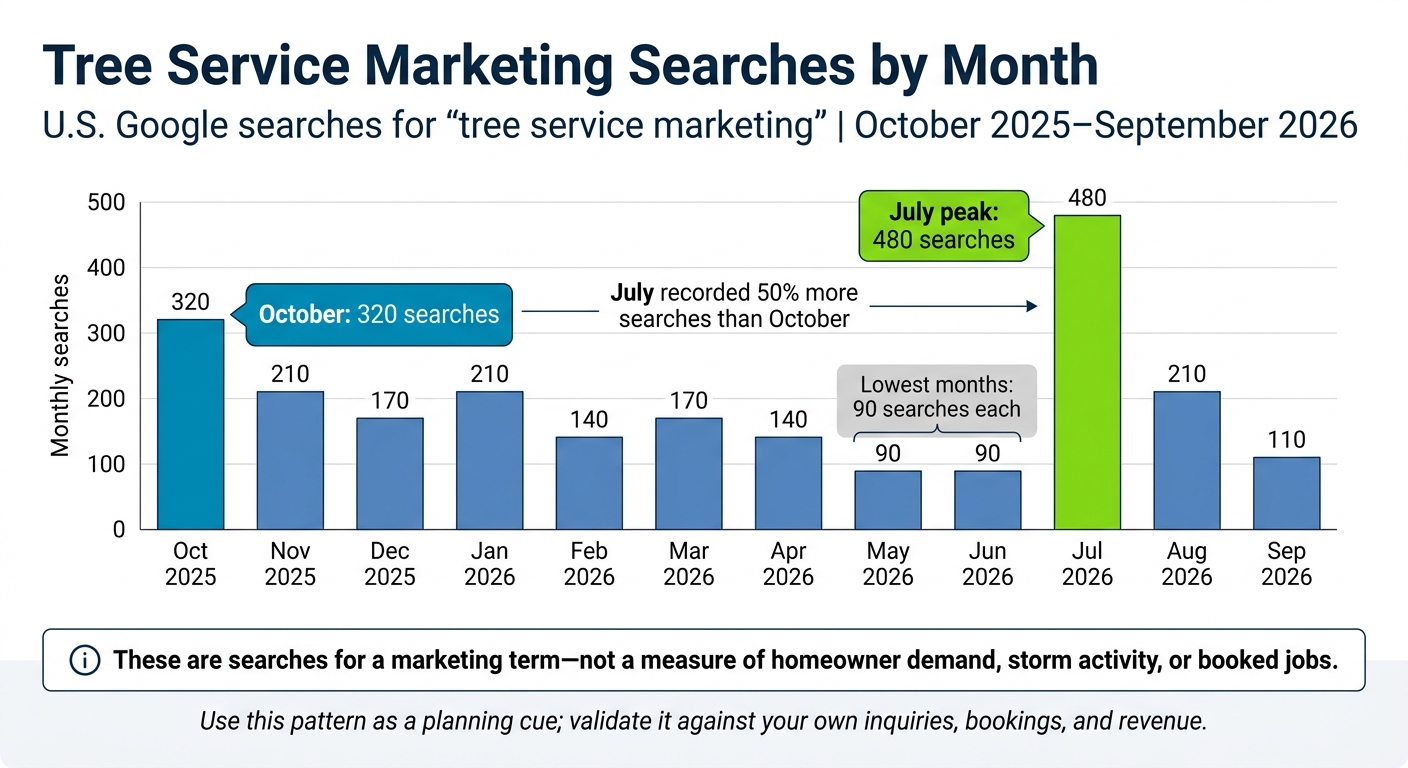
Tree Service Marketing Searches by Month
| Month | U.S. Google searches for “tree service marketing” |
|---|---|
| October 2025 | 320 |
| November 2025 | 210 |
| December 2025 | 170 |
| January 2026 | 210 |
| February 2026 | 140 |
| March 2026 | 170 |
| April 2026 | 140 |
| May 2026 | 90 |
| June 2026 | 90 |
| July 2026 | 480 |
| August 2026 | 210 |
| September 2026 | 110 |
July tops the chart with 480 searches - 50% more than October’s 320. May and June share the low point at 90 searches each.
These numbers track searches for a marketing term. They don’t measure homeowner demand or job volume.
Compare this national pattern with your monthly inquiries, booked jobs, and service mix. A 50% increase in searches doesn’t mean 50% more tree work.
The pattern points to a summer priority: fast response, not broad awareness. Before summer, prepare your emergency intake process and shorten the time it takes to respond to leads.
1. Summer: Prepare for Storm Calls
July’s spike makes summer a time to prepare for emergency calls - not broad awareness campaigns.
Campaign timing
Start 6–8 weeks before your local storm window, not on a fixed July date. Build storm-response Google Ads ahead of time. Run them only where your crews can work and when they have room for more jobs. If you use Local Services Ads, make sure your Google Guaranteed badge is active before increasing spending. With that setup in place, you can switch campaigns on quickly when storms hit.
| Factor | Routine summer work | Storm response |
|---|---|---|
| Customer intent | Maintenance and appearance | Safety and hazard mitigation |
| Services | Pruning, trimming, health checks | Fallen trees, hazardous limbs, emergency removal |
| Response workflow | Standard intake, scheduled estimates | Safety check before dispatch |
| Ad status | Steady campaigns | Turn on only when crews have capacity |
| Main risk | Price shopping, weak conversion | Unsafe work, overcapacity, insurance disputes |
Messaging and lead response
Create separate emergency pages for fallen trees, hazardous limbs, storm damage, and emergency removal. Send storm traffic to those pages - not a trimming page. Clearly state your service area and hours. Include project photos, customer reviews, proof of insurance, and your ISA credential number, with a verification link if applicable. Only promise insurance coverage, immediate dispatch, or 24/7 service if you can back those claims up.
Test calls, forms, texts, and missed-call follow-up. Make sure every inquiry reaches the right person, including after hours. Before dispatch, collect the address, requested service, and whether a tree is on a structure. Set a five-minute response target, and use the speed-to-lead guide to plan follow-up.
A fast reply helps only if your crews can handle the work and your spending stays within capacity.
Budget and crew capacity
Keep storm-response reserves separate from routine campaign spending. Set travel limits, name an after-hours contact, and define when to escalate a call. Run ads only when you have capacity for both assessments and crew work. Reduce or pause campaigns when either fills up. Track spending against booked jobs, not inquiries, using your home-service marketing budget.
2. October: Fill the Fall Schedule
Once storm season eases, shift from emergency calls to scheduled fall work.
Campaign timing
Launch fall promotions in August or early September to book October jobs. Reach out to past customers about annual pruning or tree health assessments. Match your outreach to local weather and seasonal needs, including pre-winter prep where it applies.
Messaging and lead response
Build service pages for assessments, removals, and pre-winter prep. Don't promote October as a pruning month for every tree. Explain that timing depends on species, climate, and arborist guidance. Add local project details to each service page so homeowners can see what the work involved.
On the first call, share an estimate window and available booking dates. Send estimate reminders, then ask for reviews 48 hours to 7 days after the job. Place each review on the matching service page so visitors see feedback about the work they need.
Budget and crew capacity
Set aside crew time for promised fall appointments, but leave room for late-season storm calls. Track pruning and removal separately because each supports a different lead cost. For local tree service marketing, target specific ZIP codes to reduce travel between smaller jobs. Base new spending on how much work your crews can still take on.
October's focus is filling the calendar; summer's is keeping the phones moving.
Fall Scheduling vs. Summer Storm Readiness
Choose your campaign, message, and budget based on the season - and the work your crews can take on.
When to Prepare and Launch Campaigns
July has the highest search demand, followed by October. These are marketing searches, not a storm forecast.
Book October work 6–8 weeks ahead. Build summer campaigns before storm season, but activate them only after storms hit and crews can respond safely.
| Campaign decision | October scheduled-work marketing | Summer storm-readiness marketing |
|---|---|---|
| Preparation window | Start 6–8 weeks before October bookings. | Build pages, ads, and intake procedures before storm season. |
| Launch trigger | October booking opens. | A local storm hits and crews can respond safely. |
| Campaign state | Run while booking space remains. | Activate as needed; pause when capacity is reached. |
| Optimization cadence | Check bookings and remaining slots regularly. | Monitor call coverage and crew availability while ads run. |
What to Say and How to Handle Leads
Seasonal timing changes both your message and how you handle inquiries. Put speed-to-lead tactics in place before spending more on urgent calls.
| Lead-handling decision | October scheduled-work marketing | Summer storm-readiness marketing |
|---|---|---|
| Customer intent | Planning service and weighing project scope. | Seeking emergency help with damage or hazards. |
| Service-page message | Explain project scope and suitable seasonal work. | State safety limits and actual availability. |
| Call to action | Request a scheduled estimate. | Call to check availability - not for a guaranteed arrival time. |
| Response expectation | Respond promptly and follow up while the customer decides. | Aim for human follow-up within 5 minutes. |
| Intake routing | Collect scope, timing, and decision-maker details. | Send location, hazard, and access details for dispatch assessment. |
How to Match Spending to Crew Capacity
Let capacity - not demand alone - set your spending. Base your budget on bookings, margins, and the work your crews can handle.
| Capacity decision | October scheduled-work marketing | Summer storm-readiness marketing |
|---|---|---|
| Budget allocation | Promote open October slots; reduce spending as they fill. | Keep an ad reserve that you can use as storm-response needs change. |
| Staffing | Match estimate appointments to available production time. | Confirm phone coverage and safe dispatch capacity before activating ads. |
| Scaling limit | Protect promised appointments. | Pause ads when calls go unanswered or crews cannot take more jobs. |
| Success measures | Track booked jobs, response time, estimate-to-job conversion, and revenue. | Report storm and routine work separately. |
Conclusion: Schedule for October, Prepare for Summer
Build one annual tree service marketing plan around two workflows: October booking and summer storm response.
Use July and October as planning windows - not proof of storm-driven demand. Time summer campaigns around local weather, safe working conditions, and crew capacity, rather than the calendar alone.
Focus October efforts on filling the schedule and summer efforts on responding fast. Use tree service marketing support to coordinate both workflows, lead handling, and booked-job tracking.
FAQs
How can I verify local demand for tree services?
Generic keyword tools can miss neighborhood, emergency, and problem-specific searches. Build keyword lists around service type, location, and modifiers, then rank them by lead value. Track local search volume for terms that suggest someone is ready to book.
Watch seasonal patterns, weather data, and storm records so you can prepare for emergency requests. Keep your business visible consistently, and track every lead from first contact to closed job to get a clearer picture of local demand.
How do I calculate a profitable cost per booked job?
Track each lead from the first interaction to the signed job. To calculate cost per booked job (CPBJ), divide your total marketing investment by the number of jobs closed from those leads. Then compare your CPBJ with the maximum you can spend on marketing per job, based on your revenue goals.
Track CPBJ separately for high-ticket removals and smaller trims. This shows which channels deliver the best return for each type of work.
How should I prioritize storm calls over scheduled work?
Keep storm calls and scheduled work in separate campaigns. Storm calls need a fast response, while scheduled jobs give customers more time to weigh their options.
Before summer, get service pages and contact protocols ready. Once conditions are safe, turn on storm-response ads only in areas where you’ve confirmed you can respond. Track storm inquiries separately so they don’t skew performance data, and give them priority with instant replies, such as automated text-backs.
Related Blog Posts

Sign up for the newsletter and be the first to read our articles.