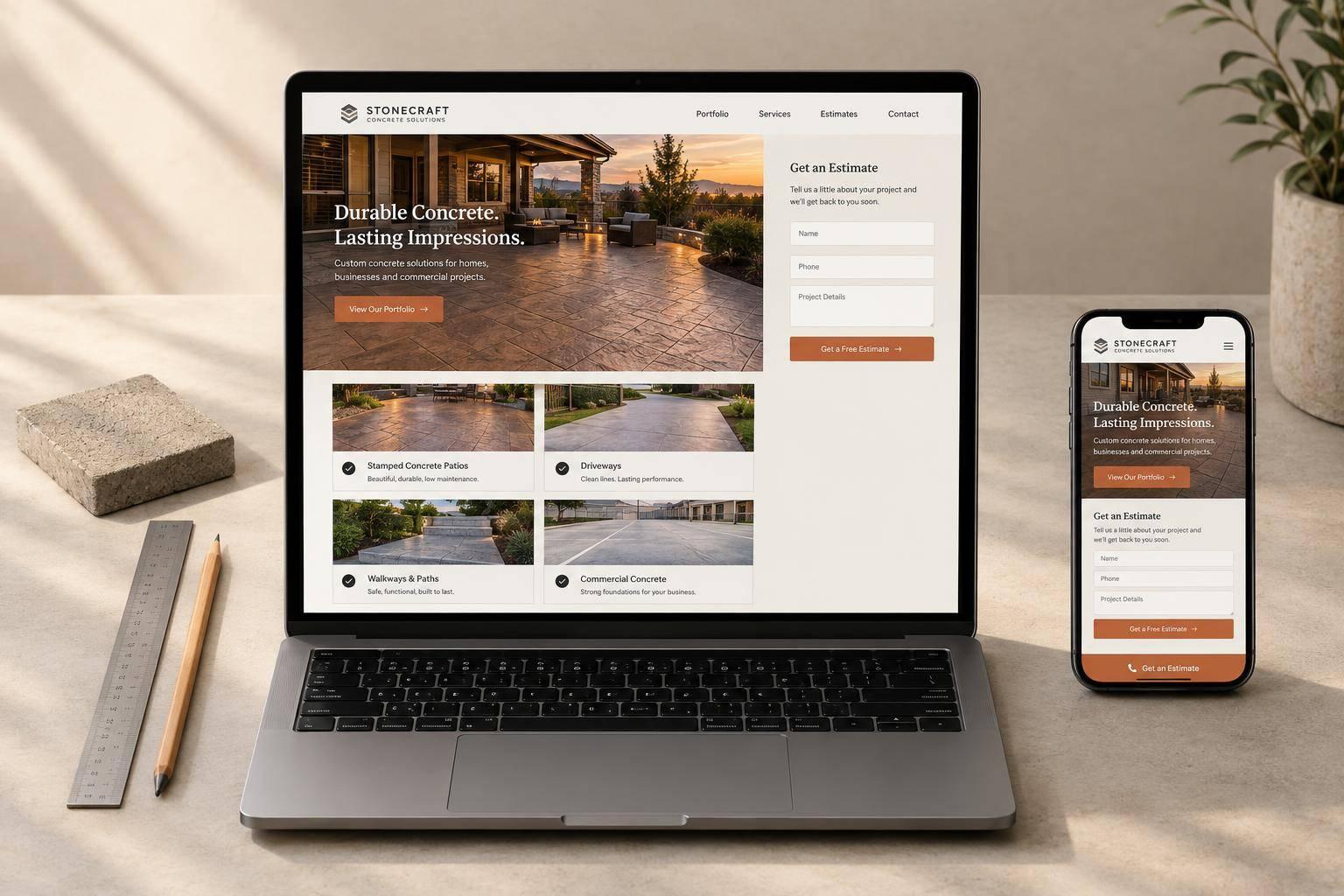
For bid-driven concrete work, lead with project proof and place an estimate button beside it. Show the finish, square footage, and scope so buyers can check whether your work fits their job. Keep the first estimate form to 3–4 fields, with a separate route for commercial plans and bid details.
These four layouts suit different buying needs:
- Gallery-first: Lead with photos for decorative work, such as stamped patios.
- Text-first service: Explain scope first for technical jobs, such as foundations and structural repairs.
- Call-first: Put a tappable phone number first for buyers checking availability or requesting simple estimates.
- Portfolio-first with separate buyer paths: Help homeowners and commercial buyers find matching projects before requesting a quote.
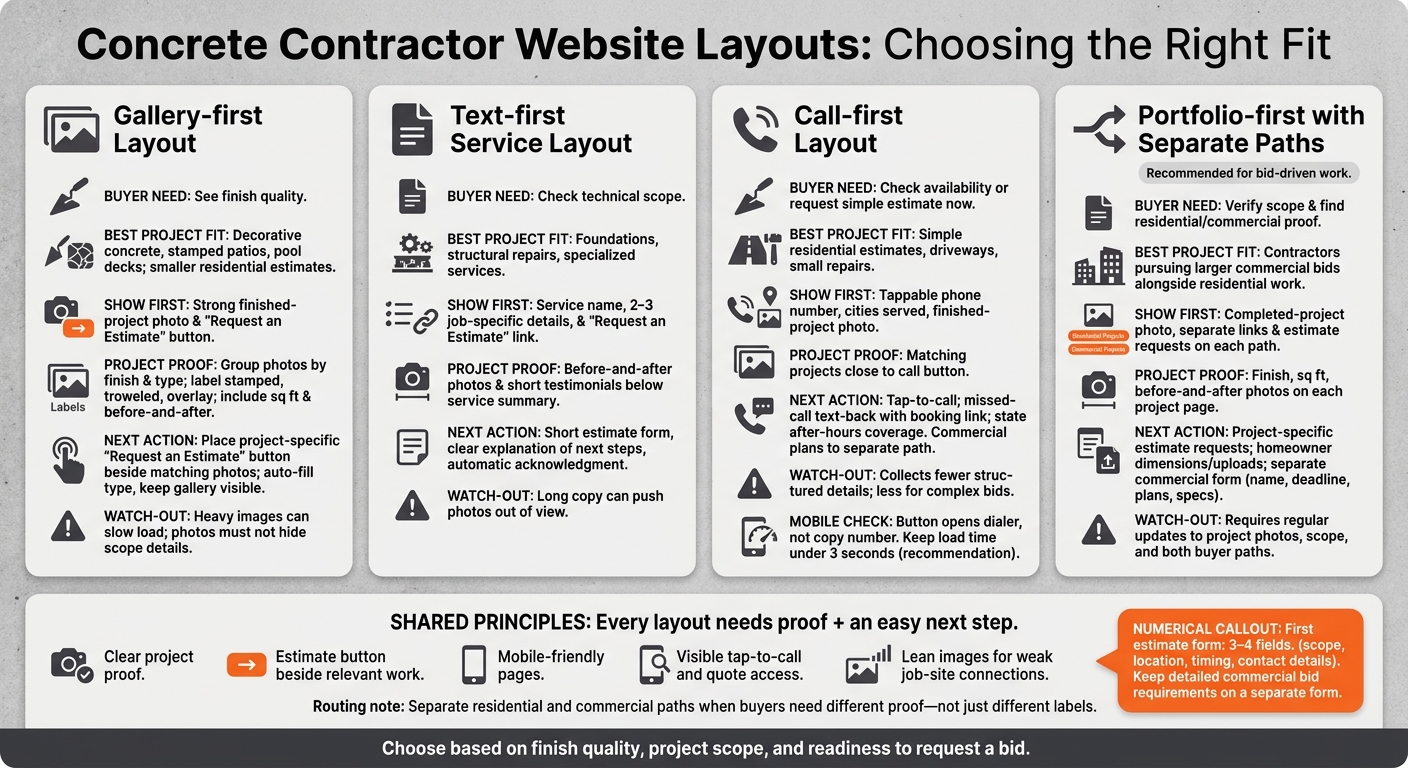
Each layout needs clear project proof, easy quote requests, relevant residential and commercial details, and pages that work well on a phone. The comparison below shows where each approach fits - and what can get in the buyer’s way.
Concrete Contractor Website Layouts: Which Fits Your Buyers?
Building a Contractor Website? Use This Layout
sbb-itb-2aa0348
1. Gallery-First Layout
For decorative concrete, the photo often sells the work before the copy does.
Start above the fold with one strong photo of a finished project and a Request an Estimate button. This layout works best for decorative concrete and stamped patios, where buyers want to see the finish quality. But photos shouldn’t push out the scope details buyers need to decide whether your services fit their project.
Project Proof
Group galleries by finish and project type. Label stamped, troweled, and overlay work, and include square footage and before-and-after photos.
Quote Request Flow
Once a photo earns the click, keep the buyer connected to that project. Place a project-specific Request an Estimate button beside the matching photos. Auto-fill the form with the project type, and keep the gallery visible while the buyer submits the request.
Residential and Commercial Fit
Give residential and commercial buyers separate paths. Send homeowners to patios and driveways, and direct commercial buyers to foundations and slab-on-grade work. Link each path to the matching service details.
Mobile on the Job Site
Project photos and details need to work on a phone, too. Keep gallery image files small so the page loads even with a weak job-site signal. Make captions, quote links, and a tappable phone number easy to reach.
2. Text-First Service Layout
A text-first concrete contractor website works best when buyers know what work they need and want to check the scope before browsing photos. Above the fold, name the service, add 2–3 job-specific details, and include a Request an Estimate link. This helps qualify leads and lets buyers check scope before comparing bids. Put clarity first, then back it up with proof.
Project Proof
Place before-and-after photos and short testimonials below the service summary. They should support the copy without slowing the page, helping buyers feel more confident about pricing and bids.
Quote-Request Friction
Keep the first form short, with 3–4 fields covering scope, timing, budget, and contact details. Explain what happens next and send an automatic acknowledgment so buyers know their request arrived. From there, guide homeowners and GCs to the right work.
Residential and Commercial Fit
Give homeowners a separate path to check whether your services fit their project. Give general contractors a path to bid-ready scope details. Link each group to the matching service page, and make both paths easy to use on a phone at the job site.
Job-Site Mobile Access
Keep the mobile page lean, add tap-to-call, and place the estimate link above the fold so buyers can submit a request right from the job site.
3. Call-First Layout
A call-first layout suits buyers who need availability or a driveway estimate now. Place a tappable phone number first on the screen, alongside the cities or counties served and a finished-project photo.
Project Proof
Place a few matching projects near the call button to back up the phone-first layout.
Show work that matches likely callers: stamped patios for homeowners or slab-on-grade foundations for commercial buyers.
Keep that proof close to the number so buyers can review the work and call right away.
Quote Request Flow
Set up missed-call text-back with a booking link. Clearly state your after-hours coverage so buyers know when to expect a response.
Residential and Commercial Fit
Invite homeowners to call about driveway scope and scheduling. Direct commercial buyers to submit plans and bid requirements. Link straight to foundation or flatwork pages so GCs can check your capabilities before contacting you. Both paths should work well on a phone at the job site.
Job-Site Mobile Access
Test the call button on a real phone. It should open the dialer, not copy the number. Keep load time under 3 seconds, even on weaker job-site connections.
For buyers who need more than a phone number, a portfolio-first layout provides project details to help them decide.
4. Portfolio-First Layout With Separate Buyer Paths
A portfolio-first layout works best when buyers want proof of project scope before choosing a contractor. Start with a completed-project photo, then guide visitors to Residential Projects or Commercial Projects, with an estimate request on each path.
Project Proof
Show the finish, square footage, and before-and-after photos on each project page. Buyers can check the scope before asking for a quote, making the page more useful than a photo gallery alone.
Quote-Request Friction
Keep the first form short: 3–4 fields covering scope, timeline, budget, and contact details. Let homeowners share project dimensions and upload before photos of the area. Give commercial buyers a way to attach plans and specifications.
Residential and Commercial Fit
Focus residential pages on driveways, patios, and walkways. For commercial pages, feature slab-on-grade foundations and flatwork, with fields for company name, bid deadline, and plan uploads.
Job-Site Mobile Access
Many buyers review bids on their phones, so the portfolio needs to work well at the job site. Make project pages, estimate forms, and uploads easy to use on a phone.
Pros and Cons of Each Layout
| Layout | Advantages | Disadvantages | Best project fit |
|---|---|---|---|
| Gallery-first | Gives buyers quick visual proof of finish quality. | Heavy images can slow page loading. | Smaller residential estimates for decorative patios and pool decks. |
| Text-first service | Explains technical work and helps the service appear in search results. | Long copy can push photos out of view. | Foundation work, structural repairs, and buyers researching specialized services. |
| Call-first | Makes contact easy for buyers ready to talk. | Collects fewer structured details before the conversation and works less well for complex bid submissions. | Simple residential estimates and small repair jobs. |
| Portfolio-first with separate buyer paths | Helps homeowners and commercial buyers find project examples that match their needs. | Requires regular updates to project photos, scope details, and both buyer paths. | Contractors pursuing larger commercial bids alongside residential work. |
Choose based on how buyers judge the job: finish quality, project scope, and readiness to request a bid. The right layout gives them the proof and detail they need without slowing them down.
Show more photos for decorative work, use more copy to explain technical work, and make contact easy for urgent calls. Separate residential and commercial portfolios only when those buyers need different proof - not just different labels.
Recommended Layout: Show the Work, Then Guide the Buyer
Lead with the portfolio for bid-driven concrete work. Buyers want to judge finish quality and project fit before asking for a quote. Place Residential Projects and Commercial Projects links above the fold, then show finish details, project sizes, and before-and-after photos. Give buyers the proof they need to see whether your work fits their project.
Once they find a matching project, make the next step easy. Put a project-specific Request an Estimate button beside the work. Keep the first form short: 3–4 fields covering scope, location, timing, and contact details. Give commercial buyers a separate form rather than sending them through the homeowner form.
On mobile, keep tap-to-call and quote access visible without covering the photos. Keep the page lean so it loads quickly, even with spotty cell service.
The work doesn't stop when someone submits a form. Connect the layout to follow-up and tracking. A connected concrete marketing system should record each inquiry, assign follow-up, and track qualified estimates through to won bids.
FAQs
What should I show if my project portfolio is small?
Focus on quality, not quantity. Use clear, high-resolution photos of completed jobs. A well-lit smartphone photo of your own work does more for your business than a generic stock image.
Build trust by sharing your industry certifications, business licenses, and insurance status. As you grow your portfolio, use detailed FAQs to show what you know and address customer concerns.
Should I include pricing on my concrete contractor website?
Yes - include a price range or “starting at” price. Many home service customers expect to see pricing, and sharing it can ease hesitation before they request an estimate. You don’t need to list exact quotes.
Pair pricing with before-and-after photos, details about what’s included, and a clear quote-request button. That makes it easy for customers to go from checking costs to sending their project details.
How can I track which website leads become won bids?
Set up conversion tracking in Google Analytics for form submissions, phone calls, and bookings. Use call tracking software to link inbound calls to the marketing channels or keywords that brought them in.
Connect these tools to your customer relationship management (CRM) system so each inquiry creates a lead record. Then follow each lead from inquiry to estimate to signed job. This lets you measure your lead-to-estimate ratio and see which traffic sources bring in winning bids.
Related Blog Posts

Sign up for the newsletter and be the first to read our articles.