
Your Google review replies can change who calls you next.
If you run a contracting business, your reply should do three things: thank happy customers, own small issues without excuses, and move angry complaints offline. That matters because 97% of people who read reviews also read the business response, and 56% have changed their opinion based on that reply.
Here’s the short answer:
- Reply within 24–48 hours
- Use a different tone for 5-star, mixed, and 1-star reviews
- Keep replies short and public-safe
- Do not argue, blame, or post private job details
- Assign one person to check reviews every day
- Use templates, but edit each reply to fit the job
A simple review process can also support business growth. The article points out that businesses replying to at least 25% of reviews are linked to about 35% more revenue than businesses that reply to none.
Quick Comparison
| Review type | What your reply should do | Tone | Length |
|---|---|---|---|
| 5-star | Thank the customer and reinforce trust | Warm and polite | 2–3 sentences |
| Mixed (3–4 stars) | Acknowledge the good and address the issue | Balanced and direct | 3–4 sentences |
| 1-star | Show calm, limit public back-and-forth, move it offline | Calm and empathetic | 3–5 sentences |
You’ll also see how to manage reviews in Google Business Profile, when to reply versus flag a review, and how to build a simple team workflow that keeps replies on track.
How To Reply To EVERY Google Review (Good or Bad)
sbb-itb-2aa0348
How to Access and Manage Google Reviews in Google Business Profile
Google Business Profile is the place contractors use to manage and reply to reviews. Replies happen right inside the profile, so you don’t need to jump between tools.
To manage reviews, the person writing replies needs to be an owner or manager on the linked Google Business Profile. If a staff member handles review responses, add them to the profile with one of those roles.
How to Reply to Reviews on Desktop and Mobile
You can reply from the Business Profile on desktop or in the Google app on mobile. Once access is set up, it helps to make review checks part of the daily routine instead of something you only get to when there’s time.
Check Reviews Daily
Pick one person to check for new reviews every day and reply within 24 to 48 hours. That keeps things moving and shows customers someone is paying attention. Once review access is easy, the next step is picking the right reply based on the rating.
How to Reply to 5-Star, Mixed, and 1-Star Reviews
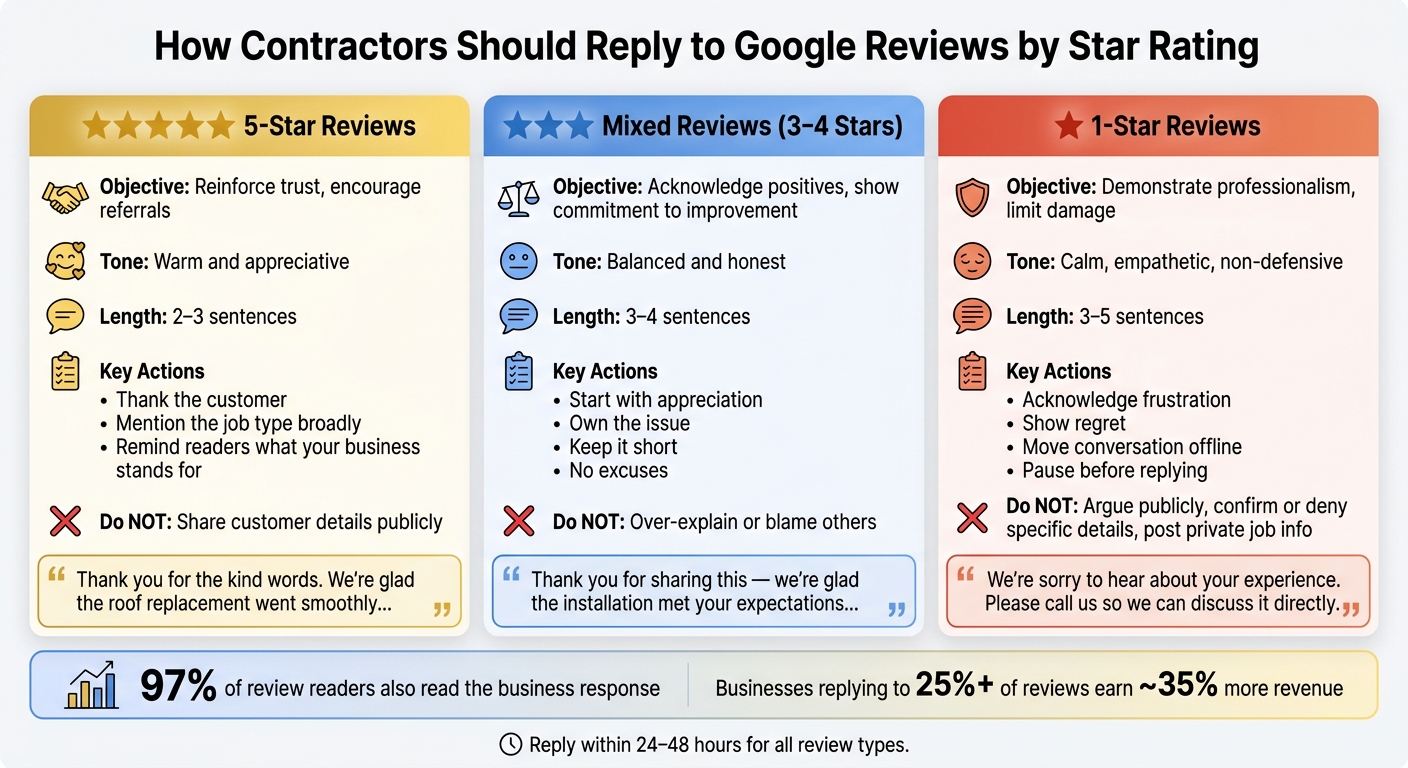
How Contractors Should Reply to Google Reviews by Star Rating
Not every review calls for the same kind of reply. A glowing 5-star post, a review that mixes praise with a complaint, and a 1-star review each need a different tone. Fast, professional responses can help build trust with future homeowners. The type of review should guide how warm, direct, or firm your message sounds.
How to Reply to 5-Star Reviews
A 5-star reply should sound like a real thank-you, not something pasted in from a template. Mention the type of job or the overall experience in broad terms, and remind people what your business is about.
"Thank you for the kind words. We're glad the roof replacement went smoothly and the crew left the yard clean. If you need us again, we're here."
One more thing: don't share customer details in a public reply.
How to Reply to Mixed Reviews
Mixed reviews can be tough. The customer was happy with one part of the job but ran into a problem somewhere else. Start by thanking them, then address the issue head-on without making excuses.
For example, if a customer praised the quality of an HVAC advertising and installation but complained about scheduling delays, a reply might look like this:
"Thank you for sharing this - we're really glad the installation met your expectations. You're right that the scheduling took longer than it should have, and we're sorry for the inconvenience. We'd love the chance to do better for you next time."
The best pattern is simple:
- Start with appreciation
- Own the issue
- Keep the reply short
Don't over-explain, and don't blame someone else.
How to Reply to 1-Star Reviews Without Arguing in Public
When a review is angry, short replies protect trust. A public response that sounds combative usually does more harm than the review itself. Your job is to acknowledge the frustration, show regret, and move the conversation offline.
Keep the reply short, factual, and centered on taking the issue out of public view.
If a customer mentions a delay, a billing issue, or damage they believe your crew caused, don't confirm or deny the details in your reply. Keep it calm and brief:
"We're sorry to hear about your experience. This isn't the standard we hold ourselves to. Please call [your phone number] or email [your email] so we can discuss it directly."
If the review may violate Google policy, move the conversation offline and flag it in Google Business Profile.
Tone, Timing, and Steps That Protect Local Trust in Search Results
Once you know what to say, the next job is deciding how to say it, when to say it, and what should never be discussed in public.
Use a Calm Tone and Protect Customer Privacy
Every reply is public. That means each one shapes how homeowners see your business. This visibility is a core part of digital marketing for home service providers looking to build long-term authority.
Keep your language calm and centered on fixing the issue. Don't blame the customer. Neutral lines like "We could have communicated better" usually land far better. Sarcasm, ALL CAPS, and emotional replies tend to hurt more than the complaint itself.
Don't post private project details in public, either. For electrical, plumbing, and HVAC jobs, billing disputes and scope issues should be moved offline.
Reply Within 24 to 48 Hours, but Pause Before Answering Angry Reviews
A reply within 24 to 48 hours shows that your business is active and paying attention.
That said, not every review needs an instant answer. If you get a harsh 1-star review, give it a few hours. Check the job notes. Then have someone else read the draft before it goes live. A short pause can save you from posting something you'll regret later.
When to Reply, When to Flag, and a Side-by-Side Comparison by Review Type
A calm, brief reply to a tough review tells future customers that you take complaints seriously. If a review clearly breaks Google's content policies, keep your reply short or skip it. This includes harassment, hate speech, impersonation, or off-topic content.
If a review seems fake, post a brief neutral reply. Then flag it in Google Business Profile and save screenshots and dates. The right move also depends on the type of review, which is why the comparison below helps.
Use this quick comparison to match the reply to the review type:
| 5-Star | Mixed (3–4 Stars) | 1-Star | |
|---|---|---|---|
| Objective | Reinforce trust, encourage referrals | Acknowledge positives, show commitment to improvement | Demonstrate professionalism, limit damage |
| Tone | Warm and appreciative | Balanced, honest | Calm, empathetic, non-defensive |
| Length | 2–3 sentences | 3–4 sentences | 3–5 sentences |
Build a Simple Review Reply Process for Your Team
Assign One Owner, Keep Templates, and Personalize Every Reply
Once you know what to say, set up a simple process so replies stay fast and steady.
Review replies often slip when nobody clearly owns them. Pick one person to handle them, ideally your Google Business Profile manager. That person should check for new reviews every day and reply within 24 to 48 hours. One owner means clear responsibility, and it helps cut down on missed reviews.
Templates also help when things get busy. Keep three approved reply templates on hand:
- 5-star reviews
- Mixed reviews
- 1-star reviews
Then edit each one before posting it. Add the job type and mention any issue the customer brought up. Make the reply fit the job. Generic responses can feel automated, and people notice. Personal replies help build public trust, and homeowners reading your responses can usually tell when a business took the time to write back with care.
Connect Reviews to Your Marketing and CRM Workflow
Once replies are covered, tie review requests into your normal job-completion process.
Most homeowners read local reviews before they hire, so replies are part of your marketing, not just customer service. Use the same system you already rely on for leads and finished jobs to trigger review requests. Estatehub's CRM tools can connect review requests, lead follow-up, and completed jobs in one workflow. Send the request as soon as the job is marked complete, while the experience is still fresh.
FAQs
What if a review is fake?
If you think a review is fake or came from someone who never used your services, stay calm and professional. Don't ignore it. Your public reply says a lot about how you treat people, and it can help protect your brand.
Acknowledge the comment in a polite, steady way. Then ask the reviewer to contact you directly so you can handle the issue offline. That signals to potential customers that you take feedback seriously and stand behind the quality of your service.
Who should reply to reviews?
Review replies should come from a person. A thoughtful, personal response helps keep customer relationships human and builds trust over time.
Tech can help track feedback or sort draft replies. But the final response should be written by hand, so the tone stays professional, sincere, and tied to the customer’s actual experience.
Can I use the same reply every time?
No. Automation can help you ask for reviews, but the reply itself should be written by hand. That keeps it personal and helps protect your reputation.
Skip cookie-cutter responses. Instead, use the customer’s name and mention something specific, like the service they received. That small touch shows you paid attention, value their feedback, and gives people one more reason to come back.
Related Blog Posts

Sign up for the newsletter and be the first to read our articles.