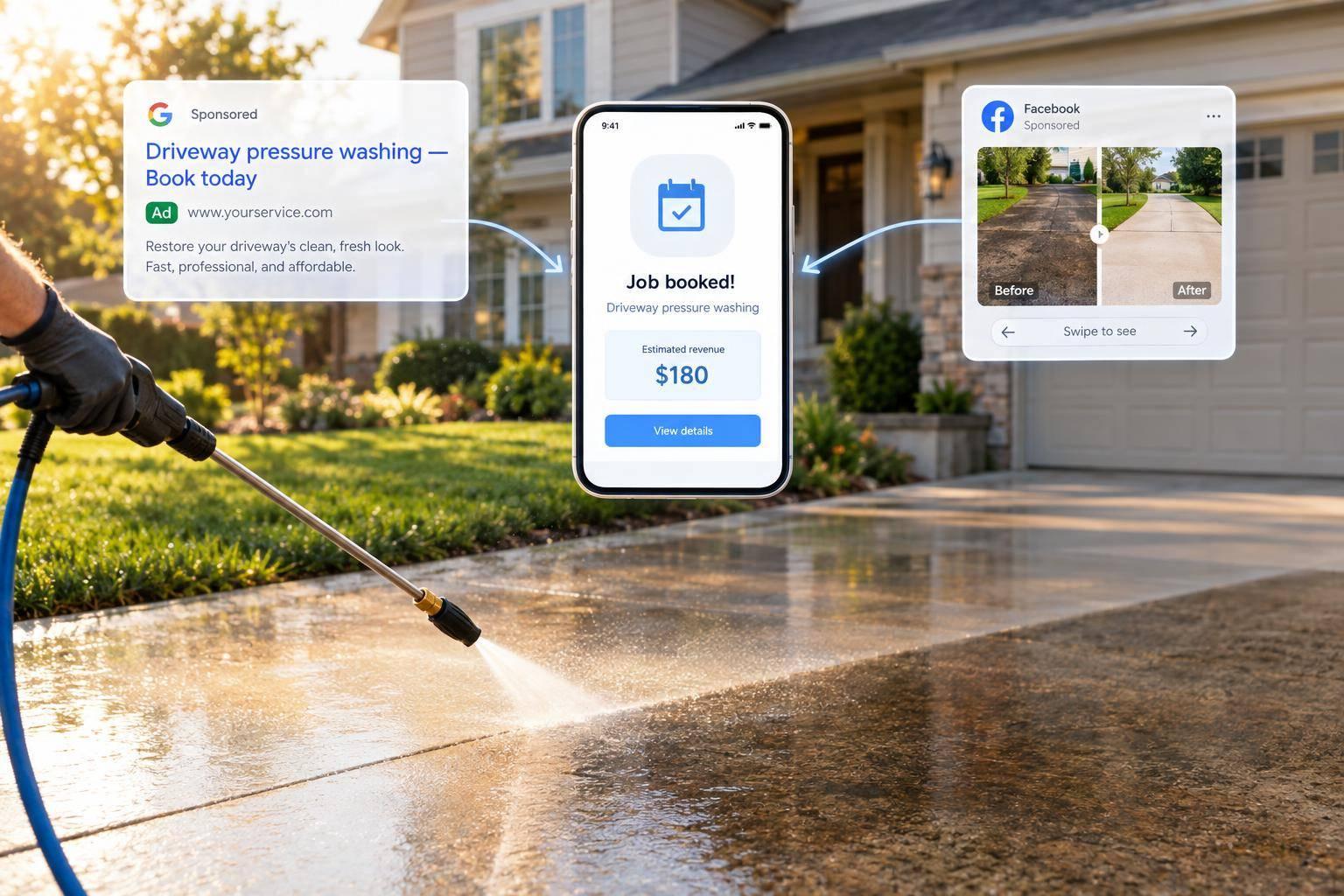
Use Google Search Ads to reach homeowners looking for pressure washing, and Facebook ads, including Instagram placements, to show before-and-after results. Before spending, set a profitable service area, match each ad to its service page or quote form, and have someone ready to reply within five minutes.
Your ads need three things to turn interest into bookings:
- A clear offer: State the service, price terms, and one next step.
- Proof of your work: Use your own photos and a short, phone-friendly quote process.
- Job-level tracking: Connect calls and forms to bookings, completed jobs, and revenue, not just clicks.
More leads aren’t the goal. Profitable jobs are. Track cost per booked job, check margins and crew capacity, and increase spending only after repeated profitable results.
Google Search Ads: Reach People Already Looking
Once your quote process is ready, put budget into Google Search Ads to reach homeowners already searching for pressure washing. Judge results by serious inquiries and booked jobs - not clicks. Connect booking data to Google Ads so it can optimize for customers rather than clicks.
Group Ads by Service and Target Your Service Area
Set up separate ad groups for house washing, driveway cleaning, and roof cleaning. Start with phrase and exact match keywords, and send each group to its matching service page. Someone searching for roof cleaning should land on roof-cleaning details, not your homepage.
Target profitable ZIP codes or a 15–25-mile radius, factoring in drive time. Check Google Ads’ search terms report and add negative keywords for “rental,” “parts,” “how to,” “repair,” and “jobs.” Also exclude services you don’t offer.
Write Search Ads With a Clear Next Step
Include the service, town, a credential such as licensed or insured, and one next step: call for an estimate or submit the quote form. Make sure the landing page matches the ad, with relevant before-and-after photos, service details, and price ranges.
Start with a small daily budget while you work out your cost per booked job. Run call-first ads during staffed hours and use a dedicated tracking number. Track connected calls, form submissions, and call-button clicks separately. A tap isn’t a call.
Search ads reach people who already want the service; visual ads on Facebook and Instagram can spark new interest.
sbb-itb-2aa0348
Facebook and Instagram: Run Before-and-After Ads
Search Ads reach people already looking for pressure washing. Social ads build interest by showing results. Facebook and Instagram put your work in front of homeowners who aren’t searching yet. Lead with the before-and-after, then send viewers to a short local quote form.
Show Real Driveway, Siding, and Patio Results
Photograph each surface from the same position and height, with similar lighting. Include at least one shot of the whole area. Show actual jobs - not stock photos or a cropped clean corner. Use a 15-second vertical split-screen video or a carousel showing multiple jobs.
Put your town in the first line and headline, and target only areas you serve. Send viewers to a matching quote page or a 2–3-question Lead Form asking for their address, service type, and timeframe. Route submissions to staff immediately.
Separate New Audiences From Retargeting
Keep spending on new audiences separate from retargeting. Run one campaign for homeowners in your service area who haven’t interacted with your business. Run another for site visitors, social engagers, and video viewers who haven’t booked.
Show new viewers the transformation. For people who’ve already interacted with you, use messaging that brings them back to request a quote. Keep both audiences within your service area. Follow the Facebook ads setup playbook, then use the testing and scaling guide to plan changes.
Compare Channels by Demand and Job Capacity
| Factor | Google Search Ads | Facebook/Instagram |
|---|---|---|
| Intent | Reaches people actively searching | Reaches homeowners before they search |
| Best-fit jobs | Roof cleaning and full house washing | Driveway, siding, and patio jobs with clear visual results |
| Photo/video needs | Text-led; supporting proof on the landing page | Real before-and-after photos or short videos |
| Lead destination | Service page or phone call | Short lead form or matching quote page |
| Advantage | Meets existing demand | Sparks interest through visible results |
| Limitation | Competitive clicks can be expensive | Needs new photos and videos, plus prompt follow-up |
Set your budget based on local demand, how well your photos and videos show the result, and how much work your crews can handle. Use social ads to fill route gaps, and cut spending when crews are full.
Make Ads Convert With an Offer, Photos, and a Clear Next Step
Keep the offer, photos, and next step focused on one service. A roof-cleaning ad should show roof-cleaning photos and link to a roof-cleaning quote form. Use your own before-and-after photos - not stock images. The same rule applies whether leads come from Google or Facebook: the ad, photo, and form should all match.
State the Offer and Its Terms
Spell out the surface, service area, and included work. If you advertise a starting price, explain the size, condition, access requirements, and exclusions that price covers. For bundles, name every surface included. Use a real starting price or price range to help filter out leads whose budgets don’t fit.
Tie neighborhood discounts to an actual nearby job, and give clear eligibility rules and dates.
Match the Quote Process to the Ad
Choose one primary action: call or request a quote. On forms, ask for the person’s name, phone number, property location, and service. Explain how and when you’ll respond, with a timeframe your team can meet.
| Lead path | Ease of use | Qualification details | Staffing needs | Tracking |
|---|---|---|---|---|
| Call-focused ads | One-tap call | Gather details live | Someone available to answer | Source-specific call tracking |
| Facebook/Instagram lead forms | In-app, with autofill | Service and property questions | Prompt callback or text | Platform data and CRM connection |
| Landing-page forms | Requires a page visit | More room for property details | Automated intake, then staff follow-up | UTM and form tracking |
Test the entire path on your phone. Call the number, submit the form, and check that the inquiry reaches the right person.
Once a lead comes in, track which source led to a booked job.
Track Calls and Booked Jobs Before Spending More
Pressure Washing Ads: Track Leads to Profitable Jobs
Once your ads are live, judge them by booked jobs, not clicks. Source tracking helps you see where your budget should go.
Track Each Inquiry From Ad Source to Booking
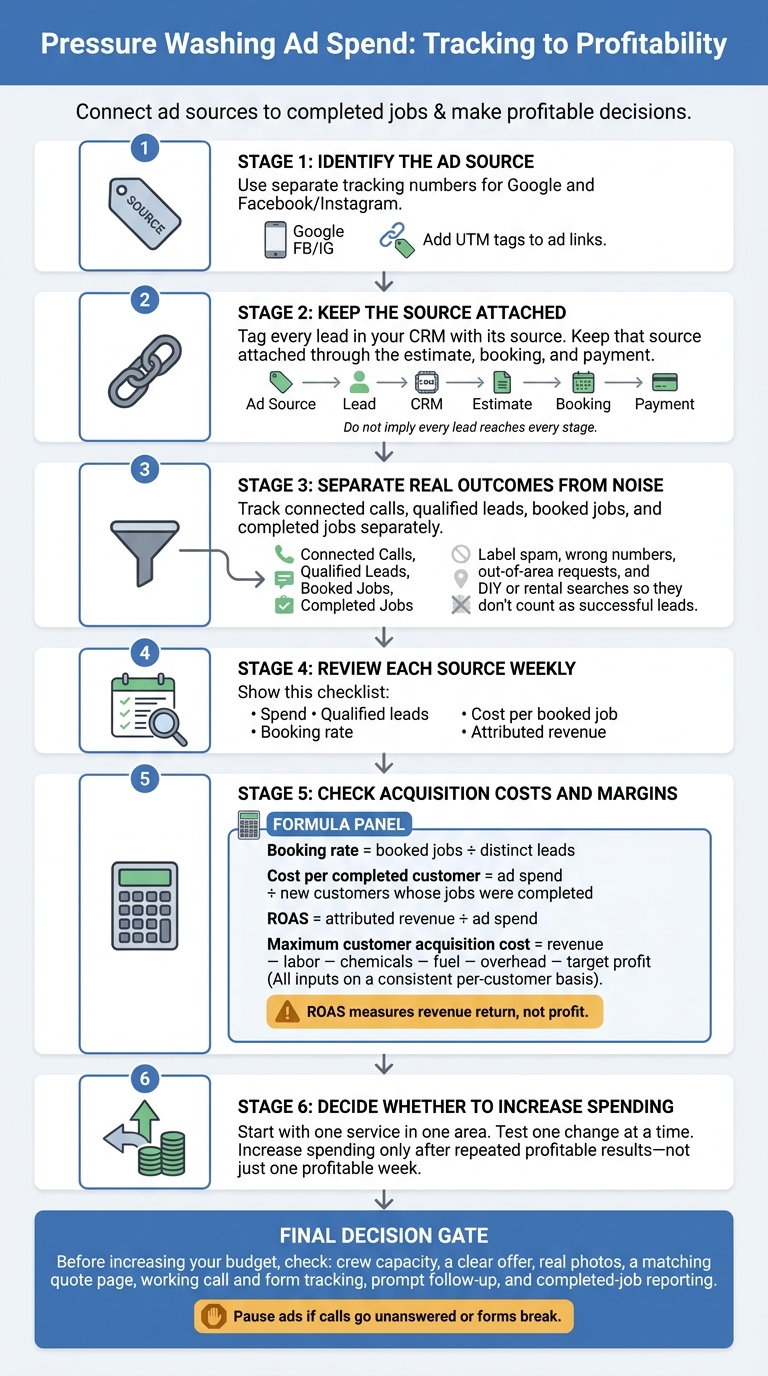
Use separate tracking numbers for Google and Facebook/Instagram, and add UTM tags to ad links. Tag every lead in your CRM with its source, then keep that source attached through the estimate, booking, and payment.
Track connected calls, qualified leads, booked jobs, and completed jobs separately. Label spam, wrong numbers, out-of-area requests, and DIY or rental searches so they don’t count as successful leads.
Use these results to decide whether a campaign is ready for more spending.
Set Ad Budgets Based on Job Margins
Review each source weekly. Check spend, qualified leads, booking rate, cost per booked job, and attributed revenue.
Calculate booking rate as booked jobs ÷ distinct leads. Calculate cost per completed customer as ad spend ÷ new customers whose jobs were completed. ROAS is attributed revenue ÷ ad spend - it measures revenue return, not profit.
To set your maximum customer acquisition cost, subtract labor, chemicals, fuel, overhead, and target profit from revenue. Start with one service in one area, and test one change at a time. Increase spending only after repeated profitable results - not just one profitable week.
Conclusion: Check the Basics Before Spending More
Before increasing your budget, check crew capacity, a clear offer, real photos, a matching quote page, working call and form tracking, prompt follow-up, and completed-job reporting. Pause ads if calls go unanswered or forms break, and use missed-call text-back to catch the calls you miss.
Google Search reaches people actively looking for a service, and Facebook ads for home service contractors let you show finished work on Facebook and Instagram. Put your pressure washing ad budget where booked jobs produce profit.
Estatehub connects these pieces for pressure washing companies, from the first ad to the booked job. Its pressure washing marketing services page shows what that looks like, including one client’s website leads tracked to nearly $300K in closed jobs.
FAQs
How much should I budget for pressure washing advertising?
Your ad budget depends on your market and goals. Start with enough to collect data and see what works: $600–$1,200 per month for Google search ads. Facebook/Instagram budgets often range from $20–$50 per day, with monthly budgets around $1,500–$3,000.
If you’re scaling in a competitive market, plan on $3,000 or more per month for Google to generate enough leads. Adjust your spending based on cost per booked job, not just cost per lead.
How long should I test ads before judging results?
Run social media A/B tests for 7 to 14 days before reviewing results and making changes to improve ROI. Paid search and social campaigns can start bringing in calls within the first few weeks.
Check performance weekly to spot wasted spend. Each month, take a closer look at results and shift your budget toward channels with the lowest cost per booked job.
Why are my ads generating leads but no bookings?
Your ads may reach equipment shoppers, DIYers, or people outside your service area instead of likely customers. Even when the right people click, they may leave without scheduling an estimate. Generic messaging that lacks a specific offer, clear pricing, or proof of quality can hurt bookings, too.
Track cost per booked job, not just clicks or lead volume. Send an instant automated text to help new leads book an estimate before they contact another company.
Related Blog Posts

Sign up for the newsletter and be the first to read our articles.